
Table of Contents
- Week of May 4, 2026
- Week of May 11, 2026
- Week of May 18, 2026
- Week of May 25, 2026
- Week of June 1, 2026
- Week of June 8, 2026
- Week of June 15, 2026
- Week of June 22, 2026
- Week of June 29, 2026
- Week of July 6th, 2026
- Week of July 13th, 2026
- Week of July 20, 2026
- Week of July 27, 2026
- Week of August 3, 2026
- Week of August 10, 2026
- Week of August 17, 2026
- Week of August 24, 2026
Overview
From the week of May 4, 2026, to the week of August 24, 2026, we released weekly feature updates for the new Clarity interface. This article serves as a quick guide to releases, with links to more in-depth documentation.
The released features will be listed above in the Table of Contents with an anchored link to feature sections below. In the feature's section, there will be a simple description with a link to either a new article or an updated existing article. If an updated or new article is still in the works, it will be listed with a Coming soon! message.
We encourage you to check this article regularly for updates, and we will also send emails to system administrators every other Monday. The first bi-weekly email was sent on Monday, May 18, 2026, and the last email will be sent on August 31, 2026.
Week of May 4, 2026
This update was released to training sites on Monday, May 4, 2026, and to production sites on Wednesday, May 6, 2026.
Additional Program Enrollment Information
The following features of a client's program enrollment have been updated.
Household Management
A new Group tab is available within a client’s program enrollment that allows you to view and manage all household members associated with the enrollment, including updating the Relationship to Head of Household field for the enrollment.
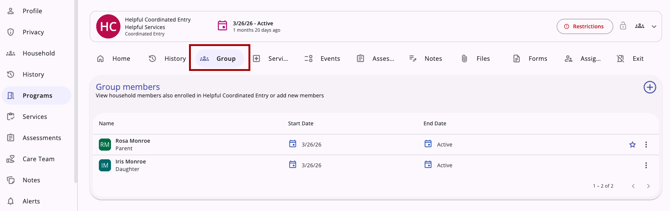
The following article has been updated to reflect this update:
Assigned Staff
A new Assigned Staff tab has been added to program enrollments, allowing you to manage assigned staff for the enrollment.
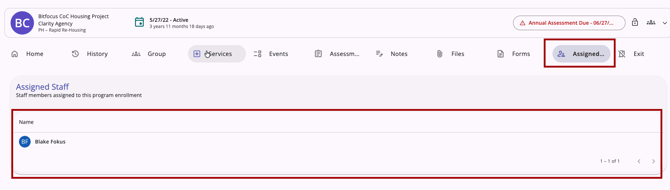
The following article has been created to reflect this update:
Assessment Due Warnings
Assessment Due warnings are now available in the program's information box, with a 10-day pre-due alert, color-coding, and a notifications toggle to turn notifications on/off.

The following articles have been created or updated to reflect this update:
-
How Do I Receive Assessments Due Warnings? (New Clarity Interface) - new article
- Creating and Managing Program Enrollments (New Clarity Interface) - updated article
Additional Program Assessment Information
The following client assessment features have been updated.
Searching for Assessments
Searching for client assessments is easier than ever. Users have updated options when using the Search bar or the column selector to locate assessments in the client record Assessments tab or the program enrollment's Assessments tab.
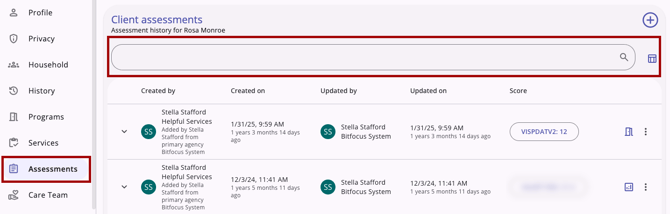
The following article has been updated to reflect this update:
Restoring Deleted Assessments
System Administrators and users with the Restore Deleted Data access right now have the
ability to view and recover deleted assessments.
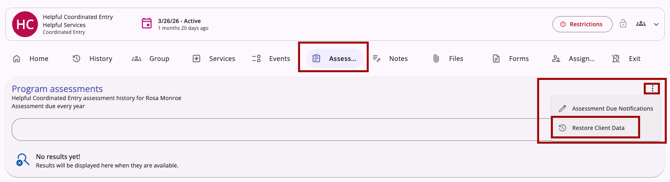
The following article has been updated to reflect this update:
Week of May 11, 2026
This update was released to training sites on Monday, May 11, 2026, and to production sites on Wednesday, May 13, 2026.
Home Agency Displayed when Actions are Completed via Additional Agency Access
Now, when a user uses Additional Agency Access to record data in a client record while switched into an agency that is not their primary (home) agency, the new Clarity interface will display that user's primary agency as a visual indicator next to their name.
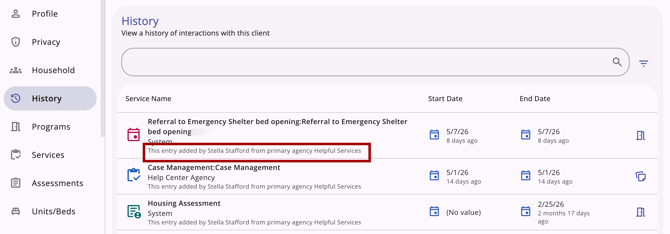
The following article has been updated to reflect this update:
Direct Referrals to Units/Beds
Users can now refer a client and household members directly to a specific unit(s)/bed(s) from within the new Clarity interface without leaving the client record or assessment. This integrates real-time Inventory visibility into the referral workflow.
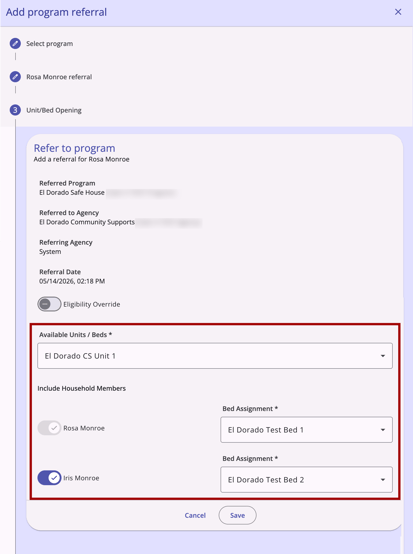
The following articles have been updated to reflect this update:
Tagging Users in Notes
When a user types the @ symbol in a Note field, a real-time, searchable list of available users appears, allowing the author to select the intended recipient(s) easily. A notification with a link to the tagged note and relevant client record will be sent to the user’s email and/or Staff Inbox.
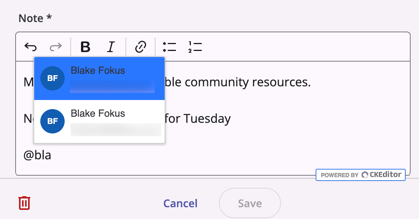
The following article has been updated to reflect this update:
Week of May 18, 2026
This update was released to training sites on Monday, May 18, 2026, and to production sites on Wednesday, May 20, 2026.
Hierarchy-select Fields
Hierarchy-select fields are now available in the new Clarity interface. These fields let users choose from a structured tree of options organized into nested levels that can be expanded and collapsed within the field.
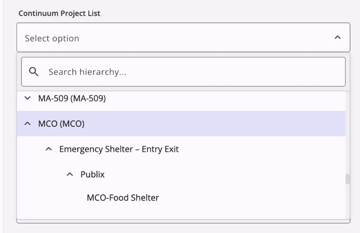
Hierarchy-select fields make it easier to navigate long lists of related items. A built-in search and filter feature allows users to type ahead and quickly narrow the tree to matching options.
The following articles have been updated to reflect this update:
-
Global Referrals Tab: Community Queue (New Clarity Interface)
- Client Referrals Tab: Direct Referrals (New Clarity Interface)
Note: The hierarchy-select field type will be implemented for all Available Units/Beds and Bed Assignment fields in upcoming releases to enable easier navigation when assigning beds to clients and household members.
Coordinated Entry Events
A new Events tab in the client's program enrollment provides a complete view of all Manual and Inferred Coordinated Entry (CE) Events. From this tab, you can add, edit, delete, and restore CE Events, and access an audit log that displays any updates to events (all functions are permission-gated).
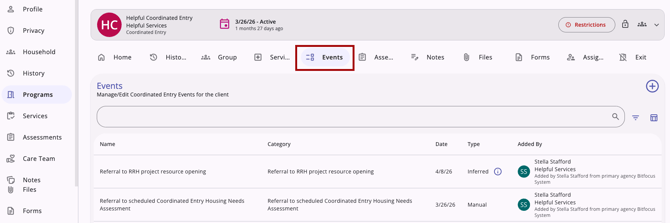
In the new Events tab, you can:
- Search, filter, and customize your view of the client's event history.
- Add CE Events for your client and include their Group Members using a guided three-step workflow. Select a Category, choose an Event, and enter Event Details. Event details match the fields and functionality you're familiar with in the current Clarity interface, including:
- Adding CE Event Notes with @tag mentions available.
- Including Group Members and adding Geolocation, if enabled.
- Edit or Delete existing events, and Restore previously deleted events through the Recover Deleted Data option.
- Access audit logs for any updates made to any of the data in the Events tab.
The following article has been created to reflect this update:
Reassigning Referrals from a Community Queue: Unit/Bed Assignments
The Reassign Referral workflow in the Community Queue now allows clients and their household members to be placed directly into a specific unit/bed. For clients without household members, the form is a simple 1-step process.
The new Available Unit / Beds field replaces the Opening field and is used to select the appropriate placement.
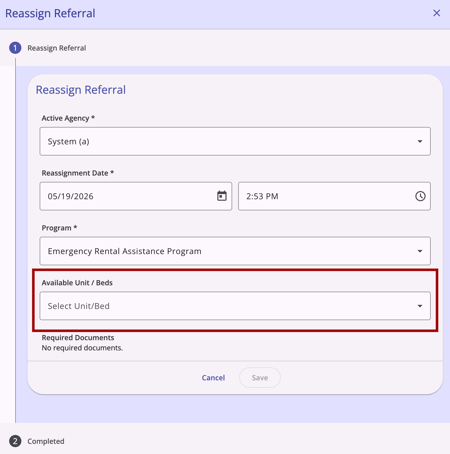
Household Bed Assignments
When household members are included, a guided 3-step form walks you through Unit/Bed placement. A hierarchical mult-select field lets you assign each household member to a specific bed within the selected unit. If there are more beds in the unit than there are household members, the Set Remaining [x] Beds Offline toggle is available to automatically change any unused beds in the unit to the Offline status.
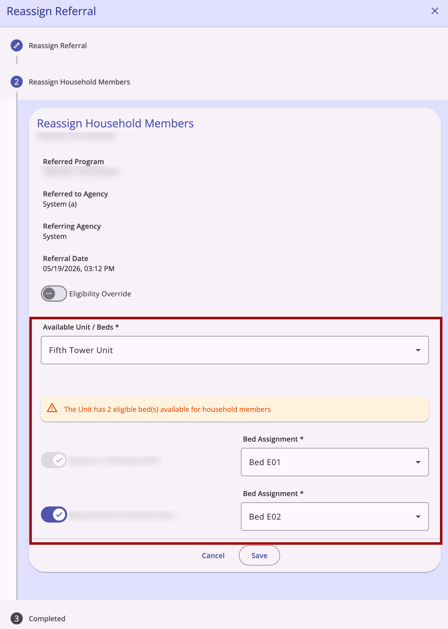
Real-Time Validation & Messaging
The system now provides immediate feedback throughout the workflow to prevent referrals to unavailable inventory, including:
- Program Restriction and Age/Eligibility blockers that stop ineligible placements before they happen.
- Pending Occupancy warnings to alert you when a unit has upcoming occupancies.
- For example:
"This Unit has one or more pending occupancies starting Month DD, YYYY."
- For example:
- Form notifications when no matching inventory exists.
- For example:
"No eligible units / No units available."
- For example:
The following article has been updated to reflect this update:
Week of May 25, 2026
This update was released to training sites on Tuesday, May 26, 2026, and to production sites on Thursday, May 28, 2026, due to the holiday on Monday, May 25, 2026.
Global Referrals Tab: Unit Queue
The Unit Queue is available in the new Clarity interface to show available units, determine client eligibility, and reassign complete referrals for individuals and households to Units/Beds.
Accessing the Unit Queue
To access the Unit Queue, navigate to the Global Referrals tab and select Unit Queue.
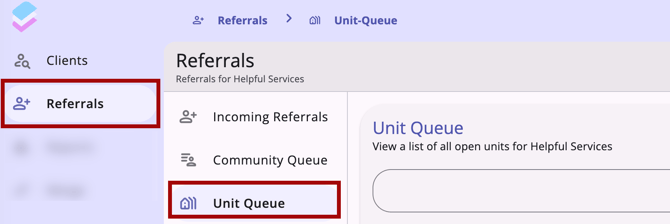
The main content area displays a list of units.
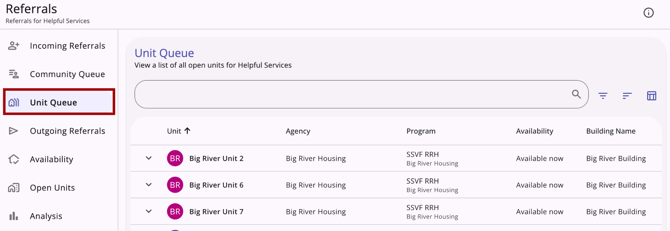
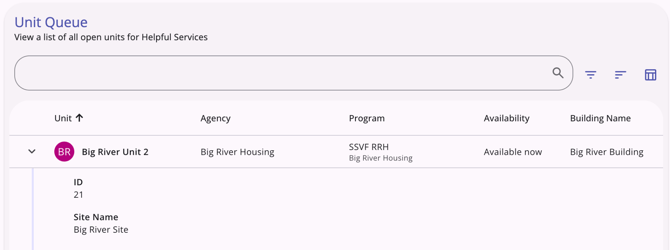
Each row displays the Unit name/Unit number, Agency name, Program name, Availability, Building Name, and Site Name.
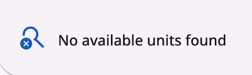
If no units meet your current filter criteria, the system will display the message:
"No available units found."
The following article has been created to reflect this update:
Household Referrals from Unit Queue
When viewing the list of eligible clients for a bed from the Unit Queue, the Refer Household Members toggle is available, allowing users to refer multiple household members to beds within the same unit in a single action.
The following article has been created to reflect this update:
Auto Populate Household Members & Bed Assignments during Program Enrollment
When a user enrolls a client from a household referral, Clarity will automatically select all household members with a Pending Bed/Unit Assignment and carry over their bed assignments during enrollment. This ensures that referral-driven bed assignments stay connected to each member's enrollment record.
- Step 2 of the Add Program Enrollment modal pre-selects all referred household members with a Pending Bed/Unit Assignment. Unchecking a member clears their pending assignment and updates the bed status. Checking a non-referred member triggers a Select Bed dropdown or displays a no available beds notification, when applicable.
- On save, each enrolled member's bed status moves from Pending Occupancy to Occupied, and the assignment appears on their individual Units/Beds tab. Guardrail prompts appear if a user tries to enroll a referred member outside the referral flow or uses the Add Unit Connection feature after enrolling the household separately.
The following article has been updated to reflect this update:
Additional Program Exit Functionality
The Program Exit workflow now allows users to close open services and open Unit/Bed occupancies directly within the Exit modal, with additional steps added when necessary. Coordinated Entry and Encampment programs configured to auto-exit clients and auto-remove client referrals from the Community Queue when a permanent destination is entered now also occur in the new Clarity interface.
- The Open Services step in the Exit modal workflow lists any services ending after the exit date (or open-ended) so users can close them during the exit workflow, with an optional toggle to auto-populate end dates from the exit date. This step is displayed for each household member on the group program exit modal when applicable.
- The Open Occupancies step lists current and future bed or unit occupancies, including Unit/Bed name and dates, so housing statuses are recorded before the exit is finalized. This step is displayed for each household member on the group program exit modal when applicable.
- The Auto Exit from Program setting automatically creates an exit record for configured Coordinated Entry and Encampment programs when a Housing Move-In Date is saved on a permanent-housing enrollment or a "housed" exit destination is recorded.
- The Auto Exit from Queue setting automatically removes a client's Community Queue referral when exiting to a permanent destination (or upon death), with a confirmation prompt that allows the user to cancel, if necessary.
The following article has been updated to reflect this update:
Week of June 1, 2026
This update was released to training sites on Monday, June 1, 2026, and to production sites on Wednesday, June 3, 2026.
Branding Update: Bitfocus Logo Use
As part of our branding consolidation, the new Clarity interface now features the Bitfocus logo in the following locations:
- Every Page: The Bitfocus checkmark logo replaces the cardstack logo in the top-left corner of every page.
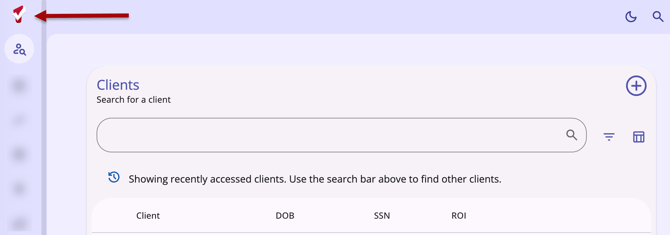
- Browser tab: The favicon, or browser icon, now displays the Bitfocus checkmark logo, supported across Chrome, Firefox, Safari, and Edge browsers.
- Loading animation: The cardstack animation has been repurposed as a loading icon displayed wherever the new Clarity interface is loading.
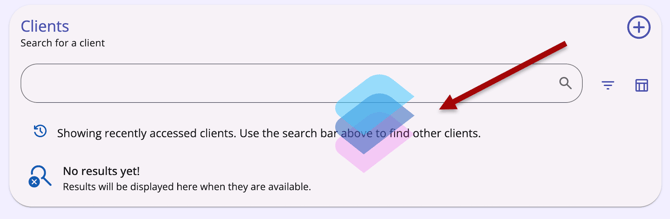
This update is a visual-only change; no functionality is affected, and no system administrator configuration is required. The update will apply automatically at the platform level to all new Clarity interface users upon release.
This update will be reflected throughout all new Clarity interface articles as articles are updated.
Multi-select Filter Standardization
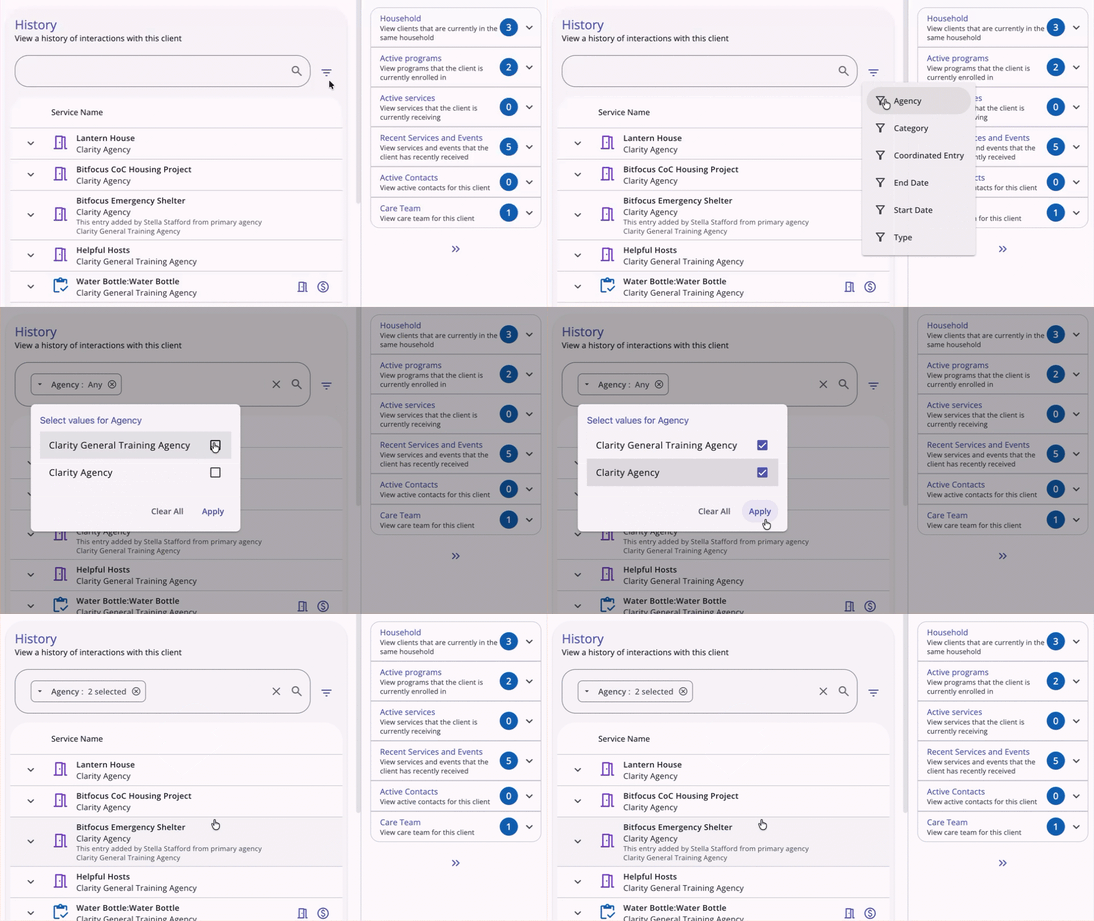
Filtering options in the new Clarity interface now support multi-select filters, allowing users to select one or more values for a single filter in a single step.

When you select a filter that has multiple options, a filter menu pop-up appears with all available values for the field. Click Apply when you have made your selections.
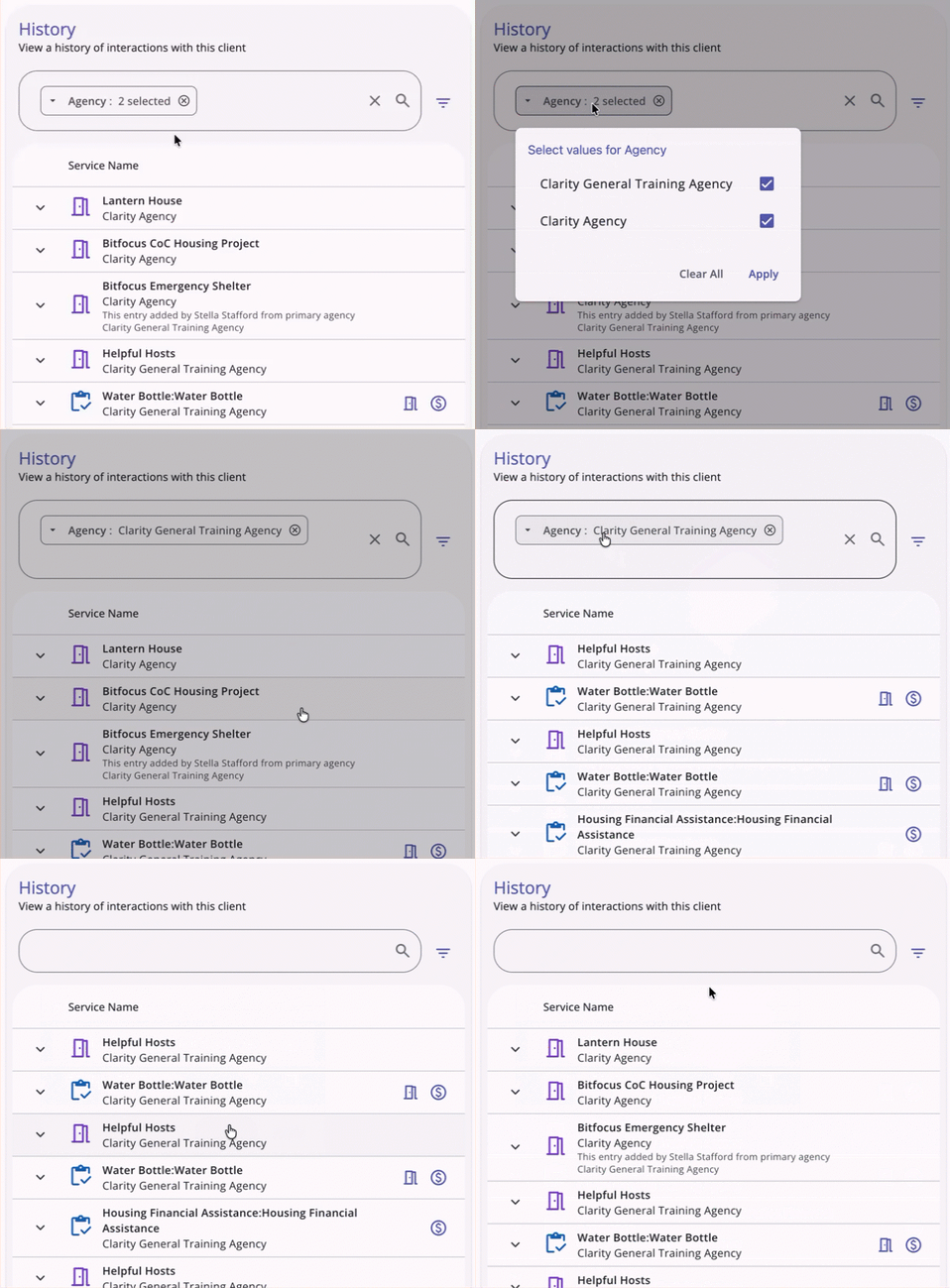
Users can review, edit, or clear previous selections by clicking on the filter within the Search bar.
- Review: Users can click outside the filter menu box (or click Apply) after a review without changes to leave selections as they are.
- Edit: Users can make changes to their original selections in the filter menu and click Apply to make updates to the filter.
- Clear: Users can click Clear All to remove selections and refresh the table.
Once you have selected one filter, you can add more if needed.

When more than one value is selected within the same filter, the chip shows "[Filter title]: #Selected." For example, you will see "Referral Status: 3 selected" if you select 3 of the referral status values for the multi-select Referral Status filter on the client’s Referrals tab.
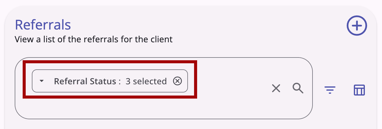
When multiple values are selected in the same field filter, the system uses OR logic to filter results that contain any of those values.
- OR logic only applies to multiple values selected within the same field filter.
- Per current functionality, the system will use AND logic across multiple field filters.
This feature is added to the following pages:
- Referrals > Incoming Referrals
- Referrals > Community Queue
- Referrals > Outgoing Referrals
- Referrals > Availability
- Referrals > Snoozed
- Clients > History
- Clients > Files
- Clients > Forms
- Clients > Location
- Clients > Referrals
- Clients > Restrictions
- Clients > Programs > Files
- Clients > Programs > Forms
The following articles have been updated to reflect this update:
Sensitive Data Protections
Protected labels appear for fields with sensitive data field restrictions.
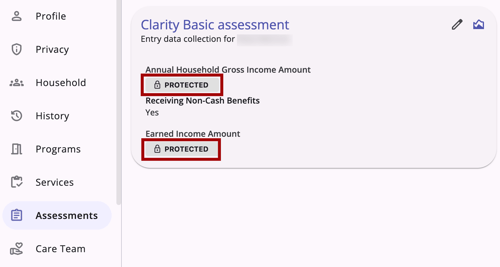
Fields marked as Protected in any of the following configurable screens are hidden for users who don’t have the appropriate permissions for the agency that owns the record:
- Profile screens
- Program Enrollment screens
- Program Status screens
- Program Exit screens
- Assessments screens
- Program Follow-up screens
Users with one of the following two Access Right permissions can see fields with Protected labels:
-
Agency Sensitive Data: Users see the values in the protected fields for the agencies they currently have access to (home agency and switched into agency(ies).
-
Any Agency Sensitive Data: Users see the values in the protected fields for all agencies.
Notes:
- If the user is the creator of the record, regardless of whether the user has any of the permissions noted above enabled in their role, when the user switches to the agency to which the record belongs, the user can see the actual value in the protected field.
- Even when the user is the creator of a record, if the user loses access to the agency, that means that the user can't switch to this agency. Even if the user has the Agency Sensitive Data access right enabled in their access role, they will not see the values for the protected fields.
The following article has been updated to reflect this update:
Check-In Button
An Active Referral(s) card is now available on the right sidebar of a client's Profile page, giving case managers a single-click Check-In button that resets the Last Activity date across all Pending status referrals for the client at once.

The card is visible only when the following three conditions are simultaneously met:
-
The Display Client Profile 'Check-in' button setting is enabled in Referral Settings (this existing toggle defaults to On)
AND - The client has at least one qualifying pending referral
AND - The viewing user has Edit Agency Referral access rights and/or Edit Any Agency Referral access rights enabled for their access role.
The card title is Active Referral when the client has exactly one qualifying pending referral, and Active Referrals when the client has more than one. The card subtitle is always:
"Restart the clock for all active referrals."
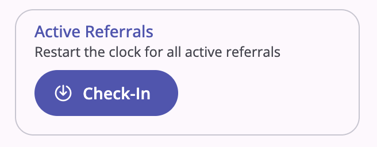
The card contains a single Check-In button. No other actions or information are available on this card.
Notes:
-
When the Active Referral(s) card is visible for a client record, the Active Referral(s) card is pinned to the top of the right sidebar cards.
- When the Active Referral(s) card is visible for a client record, the Active Referral(s) card is visible regardless of which client record tab you are currently working on.
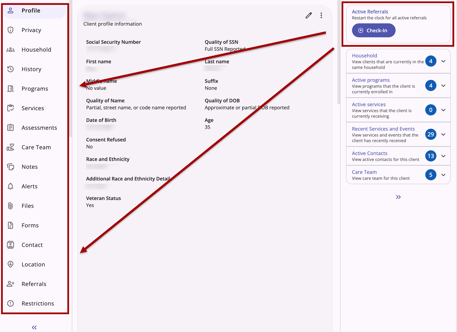
- A user with only the Edit Agency Referral access right enabled sees the card when at least one qualifying pending referral is available for a client for their current agency.
- Visibility and card title are evaluated on page load. If conditions change after page load, the card does not update until the page is refreshed.
Required Action
No system administrator action is required at release, as your existing Referral Settings configuration will remain the same.
The following articles have been updated to reflect this update:
Week of June 8, 2026
This update was released to training sites on Monday, June 8, 2026, and to production sites on Wednesday, June 10, 2026.
'Hide from Customer Portal' Toggle on Applicable Assessments
You can now hide individual assessments from the Client Portal when completing or editing an assessment in the new Clarity interface using the Hide from Client Portal toggle.
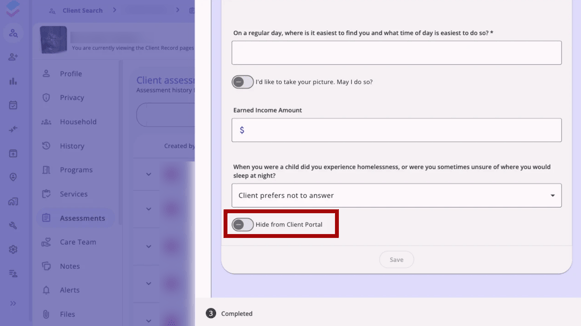
The Hide from Client Portal toggle is available on the assessment when both of the following are true:
- The Customer Portal is enabled for your current agency,
AND
- Your access role includes the Customer Portal Individual Record Management access right.
The toggle is available on assessments accessed from both the client-level Assessments tab and the Assessments tab within a program enrollment.
- By default, the toggle is Off, meaning the assessment will be visible in the Client Portal.
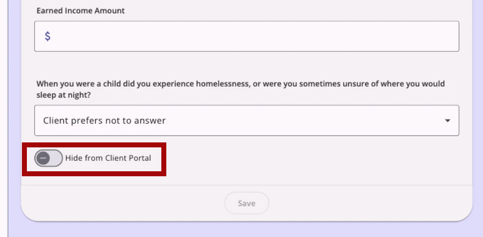
The toggle will not appear in the following situations:
- Your access role does not include the Customer Portal Individual Record Management access right.
- The Customer Portal is not enabled for your current agency.
- The assessment was originally submitted by the client through the Client Portal.
Audit Log
All changes to the Hide from Client Portal toggle are recorded in the assessment's audit log.
The following articles have been updated to reflect this update:
-
Completing an Assessment in the Client Record (New Clarity Interface)
- Customer Portal: Agency-Level and User-Level Settings
Service Details Authorization Lock Field
Users can now lock service records in the new Clarity interface to prevent unauthorized edits using the Authorization Lock field, displayed in a new Additional Information section within Service Details.
Locking a service item prevents edits from being made to that record. The lock date informs users of the date when the information was marked as most current.
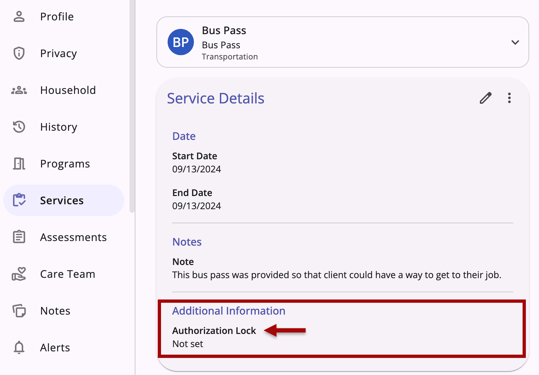
If the record is not locked, the field shows Not set.
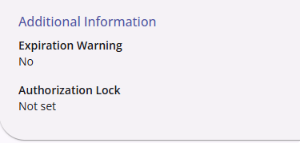
If the record is locked, the field shows Locked on [date].
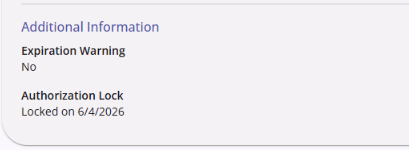
Accessing the Authorization Lock
Users with the Edit Agency Services Authorization Lock access right can set an authorization lock on a service item, preventing edits to that record from users without the relevant permissions. Users with the Edit Agency Services Authorization Lock permission can manage the Authorization Lock status and lock date from the Service Details page.
-
Only users logged into the relevant agency can lock, unlock, or edit locked service records, even if the user’s access includes the Edit Agency Services Authorization Lock permission.
Managing the Authorization Lock
Users can lock, unlock, and edit the authorization lock date by navigating to the client’s Services tab, clicking the appropriate service, and editing the Service Details page.
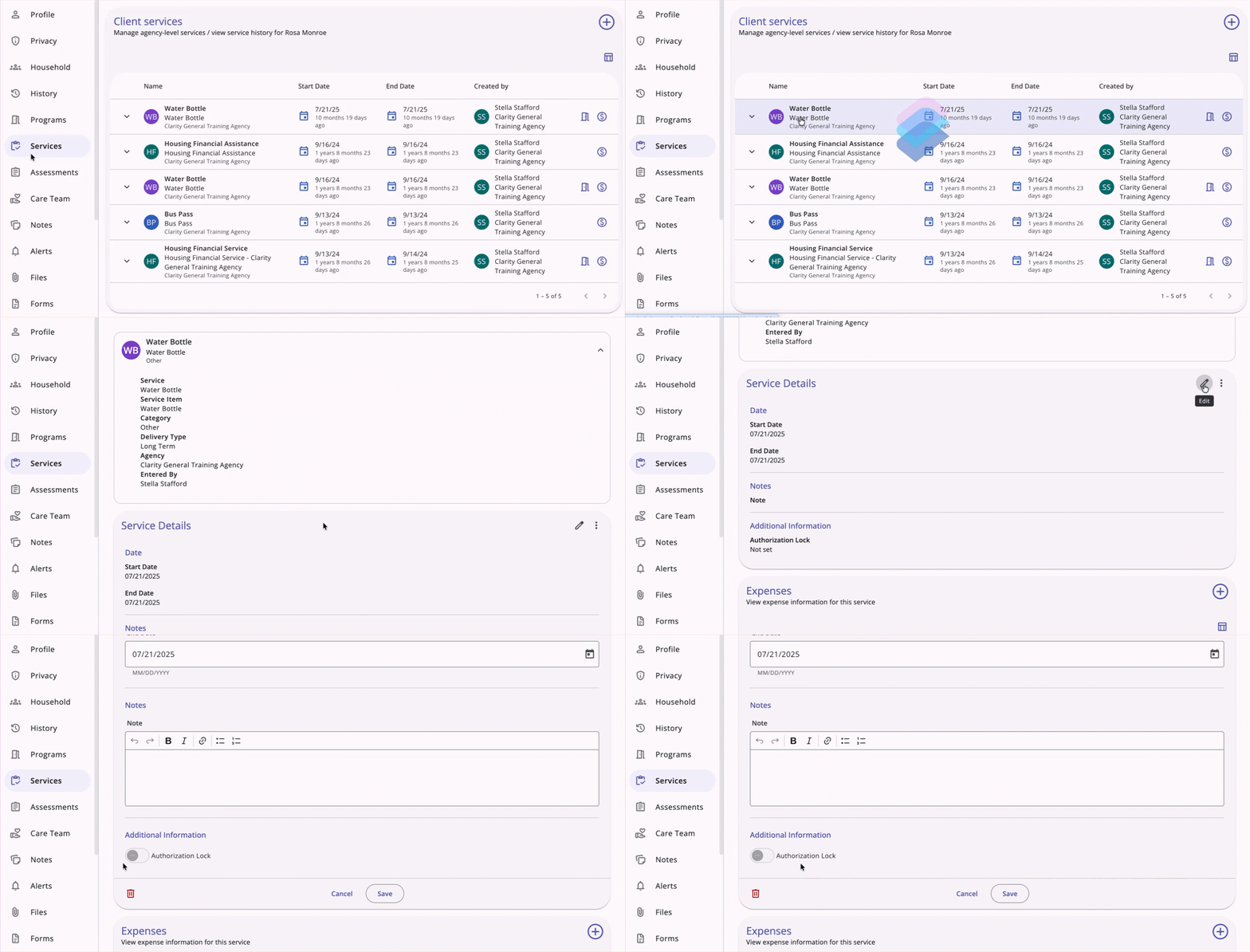
Setting a lock for the first time:
- When you enable the Authorization Lock toggle, an Authorization Lock Date field appears, defaulting to today's date.
- You can also type a date manually. If the format is incorrect, the message "Please enter a valid date." warning message appears in red when you click out of the field.
- If you disable and re-enable the toggle before saving, the date field retains the previously shown date.
- If the toggle is disabled, the date field does not appear.
When a lock is already set:
- Users without the Authorization Lock permission will not be able to edit a locked record.
- Users with the Authorization Lock permission can click the edit icon to view the service item detail page. The page loads with all fields disabled except the Authorization Lock toggle.
- A “This record is locked” warning message appears below the header. Hovering over it displays a tooltip that reads:
"Disable the Authorization Lock toggle below to edit or delete this service."
- The field label reads Authorization Locked on [date], populated with the previously set date.
- Save and all other editable fields (Start Date, End Date, Notes, Add Expense, etc.) are disabled.
Removing a lock:
-
When you disable the Authorization Lock toggle, all fields become editable: Save is re-enabled, the This record is locked warning message disappears, the date field and value are removed, and the field label reverts to "Authorization Lock."
Editing & Viewing Locked Records
If a record is locked and the user does not have the required permission, they will not be able to edit it:
- The Edit (pencil) icon will be grayed out. Hovering over it displays the following message:
"This record is locked. Only authorized users can make edits." - The Add (+) button in the Expenses section will also be grayed out.
Additional Updates to Service Details
The Service Details screen has been reorganized so that information is easier to find and comprehend. The following changes apply to the Service Details page in both view and edit modes:
- Removed the subheading “The main details of the service are displayed below”.
- Organized and formatted fields within the Additional Information section.
- The Expiry Warning field has been renamed to Expiration Warning.
- The Expiration Warning field is now a toggle.
Audit Log
Any changes to the Authorization Lock status are recorded in the service item's audit log.
The following article has been updated to reflect this update:
Week of June 15, 2026
This update was released to training sites on Monday, June 15, 2026, and to production sites on Wednesday, June 17, 2026.
Creating Reservations from Referrals and Services
Users can now reserve a specific bed when creating a direct Referral or a client-level or program-level service record.
Creating a Reservation from a Direct Referral
Users can reserve a specific bed when creating a direct Referral.
Accessing the "Make a Reservation" Step
To access the Make a Reservation step in the Add Program Referral modal, users must have both permission to create Direct Referrals to the destination program and the Create Service Placements access right enabled for their access role.
The reservation step is only available when one of the following conditions are met:
- The service item does not have a unit connection, and the Allow Referred Reservation toggle is enabled in Manage > Services > Service Item setup page within the Reservation Option section.
OR
- The service item has a unit connection, and the Allow Referred Reservation toggle is enabled within the Site/Building/Unit setup. This toggle only appears when the Enable Reservation toggle is ON.
- Additionally, the program must have at least one unit/bed configured as INVENTORY.
Workflow
Step 1: Select Program: Click on a program to highlight it, then click Next.
Step 2: Refer to Program: The user enters a referral date and time, plus a Note, if needed. A toggle appears: Would you like to make a Reservation as well?
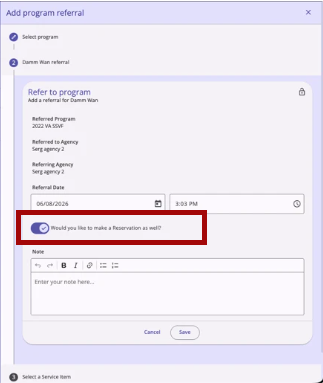
- The toggle is OFF by default.
- If toggled ON, a new Make a Reservation step becomes available after clicking Save.
- Clicking Save advances the user to Step 3: Select a Service Item.
- The Cancel button navigates the user back to the previous step.
- If the toggle is left OFF when Save is clicked, the Select a Service Item and Make a Reservation steps do not appear, and the user is taken directly to the final Completed step.
Notes:
The Direct Unit/Bed Referrals program setting impacts Would you like to make a reservation? toggle visibility.
When the settings are:
- Required: The Would you like to make a reservation? toggle never displays on the Refer to Program step for this program.
- Optional:
- For a client without household members: The Eligibility Override toggle and Available Units/Beds field display at the bottom of Step 2 by default, with the reservation toggle OFF. If the user toggles the reservation option ON, the Eligibility Override toggle and Available Units/Beds field are hidden.
- For a client with household members: The reservation toggle displays as OFF by default. If left OFF, the next step is the Assign Household Members step. If toggled ON, the next step is Step 3: Select a Service Item.
Step 3: Select a Service Item: (only appears if the reservation toggle was turned ON in Step 2)
All available Service Items configured for the selected Service category in Step 2 are displayed as "<Service Name>: <Service Item Name>." Clarity only displays services that meet one of the following requirements:
- There is no unit connection, and Reservation Option is enabled, and Allow Referred Reservation is enabled, and there are sections and slots, and the Referred Program matches the program assigned to the service.
- There is at least one unit connection (past/current/future) with the Enable Reservation and Allow Referred Reservation toggles enabled, and the Referred Program matches the program assigned to the unit connected to the service.
Step 4: Make a Reservation: (only appears if the reservation toggle was turned ON in Step 2 and a Service Item was selected in Step 3)
The reservation form includes the following fields:
- Start Date and Start Time for the reservation.
- Days to Reserve: a single-select dropdown with values from 1 to 180.
- If the reservation service does not have an inventory connection, the default value is the "Default Reservation Term" from the Service Item setup page.
- If the reservation service has an inventory connection, the default value is the "Default Reservation Term" from the Site/Building/Unit. If the Service Item has multiple inventory connections with different Default Reservation Term values, the system uses the smallest value.
Based on the Start Date, Start Time, and Days to Reserve entries, the system displays a separate line for each reserved day. Each line shows:
- The date on the left.
- A Unit/Bed or Slot field.
- A Start Time field, defaulting to the time entered above.
The user can click any previous numbered step to navigate back and make updates. The Cancel button navigates back to the previous step. The Save button advances to Step 5: "Completed."
Step 5: Completed: All changes are saved, and the system displays:
"Nice! You finished this task! Tap the Complete button below to continue."
Additional details can be found in the article linked below.
Creating a Reservation from a Service Record
Users can make a reservation directly from a Service Record.
Accessing Reservations for Services
Only users with the "Create Service Placements" permission can see and use reservation functionality from the client-level Service Record and the program-level Provide Service workflow.
Workflow
Navigate to the Client Services or Client Program Services tab, click the "Add New Service" (+) icon, and select a service configured to support reservations with the Services Option enabled.
The Add a service item modal will include additional reservation options.
Step 1: Select a service: Click on a service to highlight it, then click Next.
Step 2: Select a service item: Click on a service to highlight it, then click Next.
Step 3: Make a Reservation: This step has a header titled "Reservation Details" and prompts the user to enter a Start Date, Start Time, and Days to Reserve.
- An "Include Group Members" section is available with ON/OFF toggles for each available group member.
Click Save on Step 3 to advance to Step 4.
Step 4: Completed: All changes are saved, and the system displays:
"Nice! You finished this task! Tap the Complete button below to continue."
Additional details can be found in the article linked below.
The following article has been created to reflect this update:
Release of Information (ROI) Verification for Reservations
When creating a reservation, the system checks whether the selected service item requires a Release of Information (ROI) and whether the client has an active ROI on file. This verification applies whether the reservation is created via a direct referral or via a service item.
ROI Verification for Direct Referrals
When the user is creating a reservation via a direct referral and the selected service item has the "Require Release of Information" toggle enabled and the client does not have an active ROI on file, the following occurs:
- A red warning message appears with Back and Next buttons below it:
"This client is missing a Release of Information. Please add a Release of Information before adding this Service Item."
- The Next button is grayed out and cannot be clicked while the warning is displayed.
- The Back button remains active and functions normally.
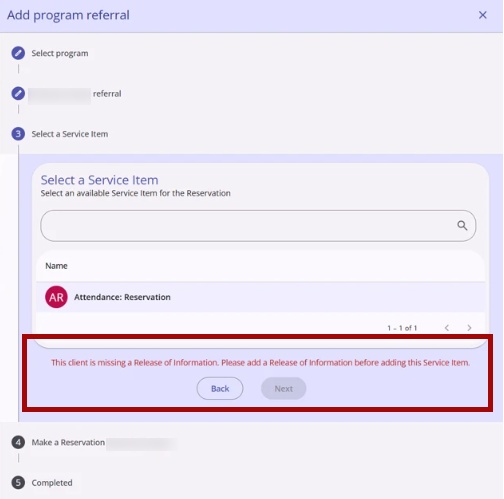
Once an active ROI is added for the client and the user returns to the reservation workflow, the warning message no longer appears, and the Next button becomes active.
No warning message is displayed, and the Next button behaves normally, in the following cases:
- The selected service item does not have the Require Release of Information toggle enabled.
- The client has an active ROI on file.
ROI Verification for Service Items
When the user is creating a reservation via a service item, the selected service item has the Require Release of Information toggle enabled, and the client does not have an active ROI on file, the following occurs:
- A red warning message appears with Back and Next buttons below it:
"This client is missing a Release of Information. Please add a Release of Information before adding this Service Item."
- The Next button is grayed out and cannot be clicked while the warning is displayed.
- The Back button remains active and functions normally.
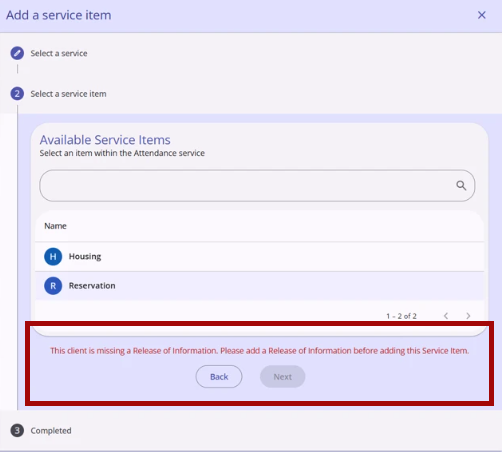
Once an active ROI is added for the client and the user returns to the reservation workflow, the warning message no longer appears, and the Next button becomes active.
No warning message is displayed, and the Next button behaves normally, in the following cases:
- The selected service item does not have the Require Release of Information toggle enabled.
- The client has an active ROI on file.
The following article has been updated to reflect this update:
Linking Services to Program Enrollments
Users can link an existing agency-level service item to an active program enrollment.
Accessing the Link Option
On the Services tab of a client's Program Enrollment, an Action Menu (⋮) icon appears to the right of the Add (+) icon in the Program Services header.
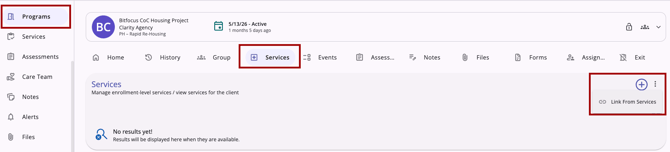
This menu is only available when all of the following conditions are met:
- The Link from History setting is enabled in the program’s settings.
- The user has the required access role permissions (Edit Agency Programs and/or Edit Any Agency Programs).
- There is at least one service available to link to the current program enrollment.
- The program enrollment is Active (does not have an end date).
If any of these conditions are not met, the Action Menu (⋮) icon does not appear.
Linking a Service
- Click the action menu to display the option Link from Services.
- The Link from Services modal opens on the right side of the screen.
The modal displays a table with available services. The modal only displays services administered to the client that have not already been linked to that program's enrollment.
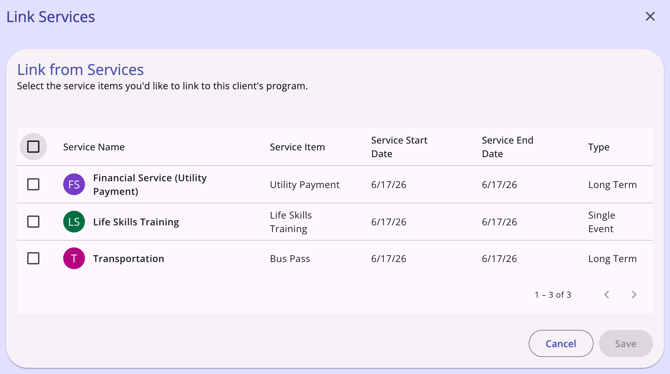
Users can click one or more checkboxes next to the desired Service or select all.
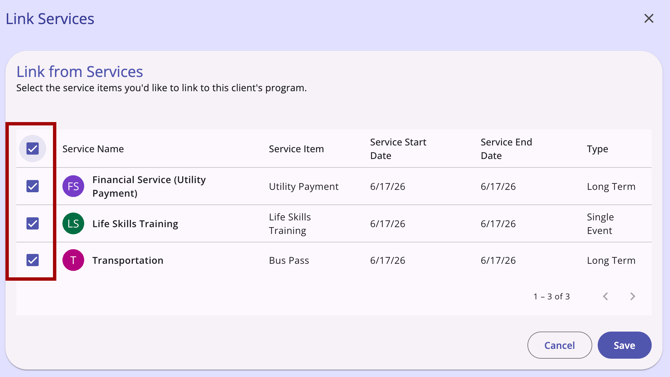
Once you have selected the desired services, click Save. The services will be automatically linked to the program.
The following article has been created to reflect this update:
Week of June 22, 2026
This update was released to training sites on Monday, June 22, 2026, and to production sites on Wednesday, June 24, 2026.
Programs > Units/Beds Tab
The Units/Beds tab in program enrollments allows you to view and manage the unit and bed occupancies a client has been assigned to within a program.
When a program has Manage Units/Beds enabled on the program setup page, a Units/Beds tab appears within the client's program enrollment.
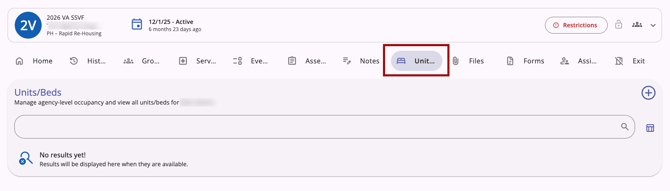
Users can review current and past occupancies, add new ones, edit or delete existing unit/bed assignments, and connect pending referrals to live occupancies.
The following article has been created to reflect this update:
Customer Portal: Send Invite/Request/Message Functionality
A dedicated Client Portal tab is now available for managing portal history and actions for individual clients.
The Client Portal tab and a Client Portal card are available for users who meet all of the following conditions:
- The Customer Portal is enabled at both the instance and agency level.
- The user has the Customer Portal Client Management permission enabled.
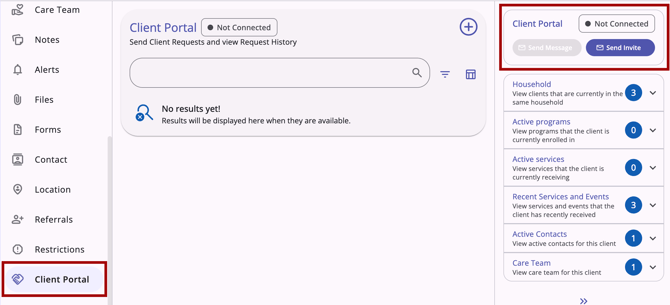
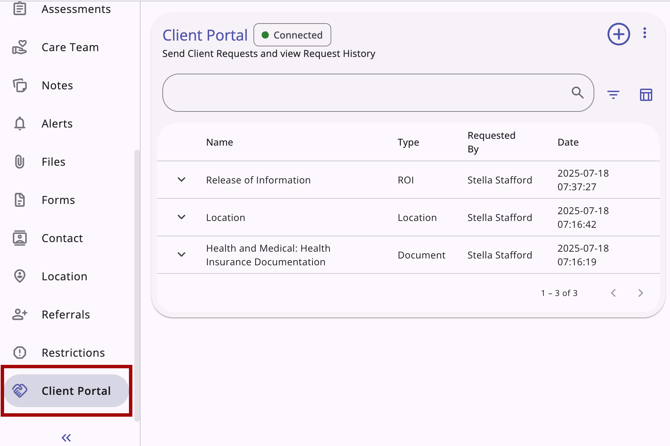
Client Portal Tab
The client's portal status displays in the top-left corner of the page, next to the Client Portal title. The status reflects one of three states:
- Connected: The client has set up their portal, and it is actively connected.
- Invite Pending: An invitation has been sent to the client but has not yet been accepted.
- Not Connected: The portal was never set up, or has since been disconnected.
The Client Portal page displays the full history of all Client Portal requests for the client. The history is searchable by name or type and can be filtered by Type or Requested By. A column selector allows users to customize which columns are shown or hidden.
The following request types are included:
- Assessment requests
- Document requests
- Location requests
- Release of Information (ROI) requests
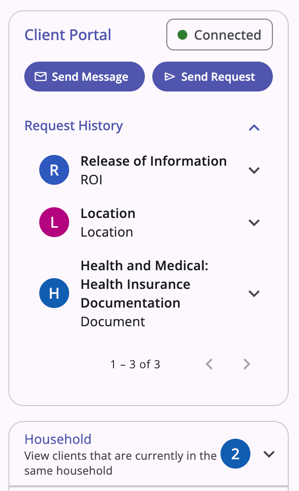
Client Portal Card
A Client Portal card is available on the client profile sidebar, providing quick access to portal history, invite actions, and messaging.
Card status states
The card displays one of three statuses, which update dynamically without requiring a page reload:
- Not Connected: The Send Invite button is available.
- Invite Pending: Displayed after an invite is sent. The button updates to Resend Invite, and Send Message remains disabled. Clicking the Invite Pending status indicator opens a pop-up with the option to cancel the pending invitation or resend it to the original email address provided.
- Connected: Displayed automatically with a green visual indicator once the client accepts their invite and sets up their portal. The Send Invite / Resend Invite button is no longer shown, and the Send Message and Send Request buttons are enabled.
The following article has been created to reflect this update:
Unsaved Changes Warning
When you begin entering data into a form, Clarity Human Services protects your work by warning you before any unsaved changes are lost.
When a form is in a changed state (meaning data has been entered but not yet saved), a warning dialog appears if you attempt to exit the form.
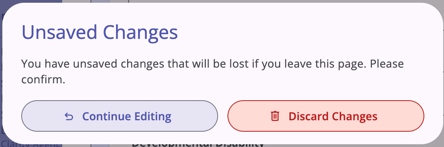
This applies to side sheets, centered dialog forms, and any step within a multi-step workflow.
What Makes a Form "Changed"
A form is in a changed state when its current state differs from the state it was loaded with. A form returns to a clean state when its current state matches exactly the state it was loaded with. The warning fires only when at least one field in the form is in a changed state.
When the Warning Appears
The warning dialog appears when you attempt to exit a changed form by any of the following actions:
- Clicking the X (close) button in the form header
- Clicking the Cancel button in the form footer
- Pressing the Escape key
- Clicking outside the form (on the backdrop or the area behind the form)
- Navigating to a different route in the underlying page (e.g., clicking a left-nav item, breadcrumb, or any link)
- Closing the browser tab or window (triggers the browser's default unsaved changes modal)
The warning does not appear when closing a form that has not been edited.
The Warning Dialog
The warning dialog displays:
- Title: Unsaved Changes
- Body text: "You have unsaved changes that will be lost if you leave this page. Please confirm."
The dialog includes two buttons:
- Continue Editing — Dismisses the warning and returns you to the form with all entered data intact. Focus returns to the last field you were editing.
- Discard Changes — Dismisses both the warning dialog and the underlying form. No data entered in the form is saved. Any files uploaded to the form but not yet saved are deleted from the server.
If you dismiss the warning dialog by pressing Escape or by clicking outside the dialog, the behavior matches Continue Editing — you are returned to the form with your data intact.
The following article has been updated to reflect this update:
Week of June 29, 2026
This update was released to training sites on Monday, June 29, 2026, and to production sites on Wednesday, July 1, 2026.
Standardized Record Deletion
Record deletion has been standardized across all screens. The delete action is now separate from the record-editing experience. On all new Clarity interface screens where the Delete (trash can) icon could previously only be accessed after clicking the Edit (pencil) icon on a record, the Delete (trash can) icon has been removed. Now, all delete actions are available as an option in the Action Menu dropdown.
Accessing the Delete Option
On all new Clarity interface screens with delete functionality, the Delete option is accessed through the Action Menu icon.
- Clicking the Action Menu icon displays a Delete option in the dropdown menu.
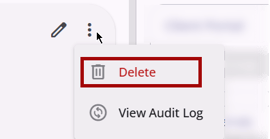
- The Delete option only appears for users who have the Delete access right enabled in their access role for the associated record type. If the user does not have delete access, the option does not appear in the dropdown.
- If the Delete option is the only option in the action menu and the user does not have the Delete access right enabled, the Action Menu icon does not appear at all.
Delete Confirmation Dialog
Before any record is deleted, a confirmation dialog appears with the following standardized messaging:
-
Title: Delete Record
-
Body: "Are you sure you want to delete this record?"
The dialog includes two buttons:
- Delete (bottom right) confirms the deletion. When clicked, the pop-up is dismissed, the record is deleted, and the user is returned to the screen they were on. The table refreshes to reflect the removal.
- This button displays in red with a Delete (trash can) icon.
- Cancel (bottom left) cancels the delete action. When clicked, the pop-up is dismissed, and the record is not deleted. The user is returned to the screen they were on with no changes made.
- This button displays as dark purple with an X icon to the left.
The following article has been updated to reflect this update:
Restoring Deleted Data
Users with the Restore Deleted Data access right can now restore deleted records directly in the new Clarity interface without contacting Bitfocus Support.
Accessing the Restore Deleted Data option
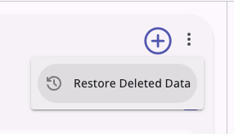
When deleted records are available to restore on applicable client record, program enrollment, and referral pages, an Action Menu (⋮) icon appears to the right of the Add (+) icon on the screen header. When selected, a Restore Deleted Data modal opens from the right side of the screen.
[Record Type] History Section
Records which can be restored are listed under a [Record Type] History section in the Restore Deleted Data modal. Users can selectively choose records listed by clicking the checkbox to the left of the desired records or select/unselect all records with the checkbox in the header row.
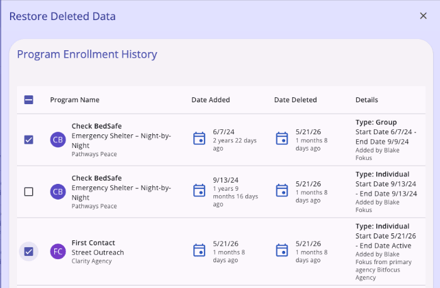
The Restore button is grayed out and cannot be clicked until at least one record is checked.
When ready, click the Restore option. After the restore is complete, the panel closes and the restored records appear on the screen without requiring a page refresh.
[Record Type] - Unavailable for Manual Restoration Section
When applicable, the modal also includes an Unavailable for Manual Restoration section for deleted records that exist in the database but cannot be restored manually, such as Unit Occupancy records.
Automatic Associated Data Restoration
When a deleted client record or program enrollment is restored, Clarity also restores associated records that were deleted at the same time as the parent record, for example Notes records will be restored when its related Program Enrollment record is restored.
If the system detects that one or more associated sub-records were deleted prior to the parent deletion (and therefore will not be restored as part of this parent restore), the system displays a warning before completing the restore.
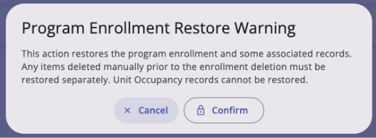
When restoring a client record a similar warning dialog displays:
- Title: Client Restore Warning
- Body text: This action restores the client and some associated records. Any items deleted manually prior to the client deletion must be restored separately.Unit Occupancy records cannot be restored.
Records that were deleted separately before the parent record was deleted must be restored separately, if they are eligible for restoration.
Audit Log
All restore actions are recorded in the audit log.
The following article has been created to reflect this update:
Icon Use Consistency on Client Profile and Referrals
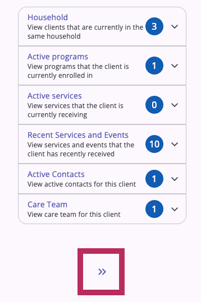
The right sidebar in the Client Profile and Referral pages, which was once expanded/collapsed by clicking an info icon (ⓘ), is now controlled using («) and (») icons similar to align with the rest of Clarity functionality.
Mobile/Tablet View
On a mobile or tablet device, users will see the following icon to expand and collapse the information sidebar:
No Action Needed
This is a visual-only change; no functionality is affected, and no System Administrator configuration is required. The update applies automatically at the platform level to all new Clarity interface users upon release.
This update will be reflected throughout all new Clarity interface articles as articles are updated.
Week of July 6, 2026
This update was released to training sites on Monday, July 6, 2026, and to production sites on Wednesday, July 8, 2026.
The Staff Inbox and Secure Messaging
Clarity’s Secure Messaging functionality is now available in the new interface.
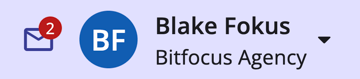
Users can search unread and read messages, create new messages, bulk manage their inbox, and find system notifications all in the staff inbox. Clarity’s messaging function provides a secure alternative to external email or chat tools.
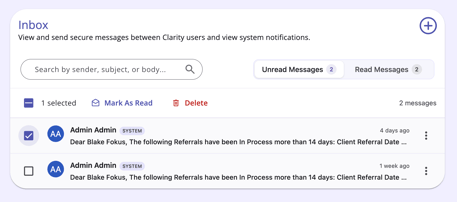
The following article has been created to reflect this update:
Referral Cards - Filter Update
The Community queues and Program referrals cards on the right sidebar of a client's profile were previously filtered to show only those referrals from the user's current agency.
Since referrals are a collaborative day-to-day activity across agencies, the filter for both referral cards has been updated to show referrals for all agencies in a given Continuum of Care (CoC) or Sharing Group, depending on the selected Coordinated Entry (CE) Type.
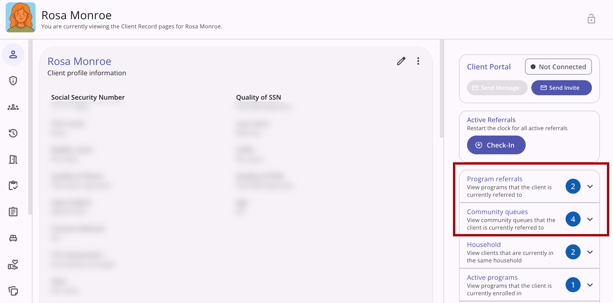
This is a backend filter update only; no visual changes were made.
The following article has been updated to reflect this update:
Week of July 13, 2026
This update was released to training sites on Monday, July 13, 2026, and to production sites on Wednesday, July 15, 2026.
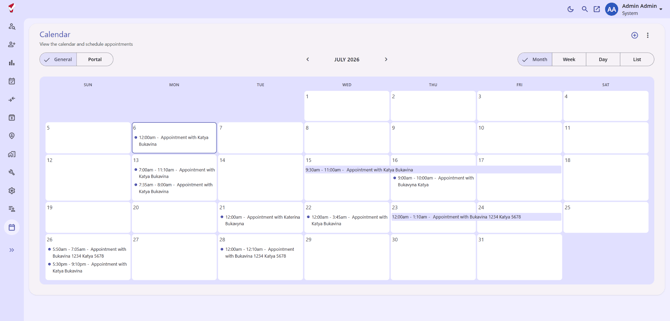
Calendar and Scheduling Appointments
Clarity’s Calendar functionality is now available in the new interface.
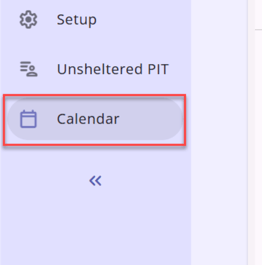
Users can schedule, view, and delete client appointments directly in the Clarity Human Services calendar function.
Clarity’s calendar function provides a convenient and secure alternative to external calendars. Keeping a user’s work in one space. If desired, users can connect this calendar to other external calendar applications.
The following articles have been created to reflect this update:
- Calendar and Scheduling Appointment (New Clarity Interface)
- Client Portal Functionality in the Clarity Calendar (New Clarity Interface)
Assessment Measure Enhancements
This update introduces updates to assessment measures and assessment row indicators on the Client Assessments and Assessment Measure screens in Clarity Human Services.
Score Indicator
The system shows a Score indicator on an assessment row.
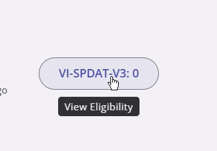
- The score pill-box appears when there is at least one score associated with the assessment.
- When hovering over the pill-box, a tooltip appears that says View Eligibility.
- Clicking the pill-box area brings you to the Eligibility page for that assessment.
Program Indicator
From the client assessment screen, users can see when an assessment is connected to a program by hovering over the program door icon. The Program Door icon appears when the assessment is associated with at least one program enrollment.
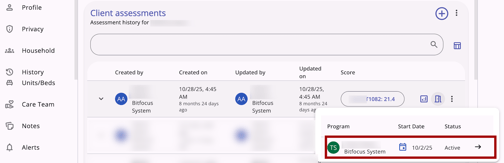
Navigate to the program enrollment by clicking on the program name when highlighted.
Viewing Measures
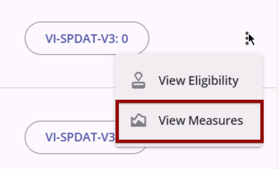
A new View Measures option has been added to the Action Menu (⋮) menu on each assessment row, which can navigate a user to the Measures page, when both of the following are true:
- The assessment type has at least one measure configured at the Setup level.
- The client has at least one answered data point on a configured measure.
Skipped Answers in Measures
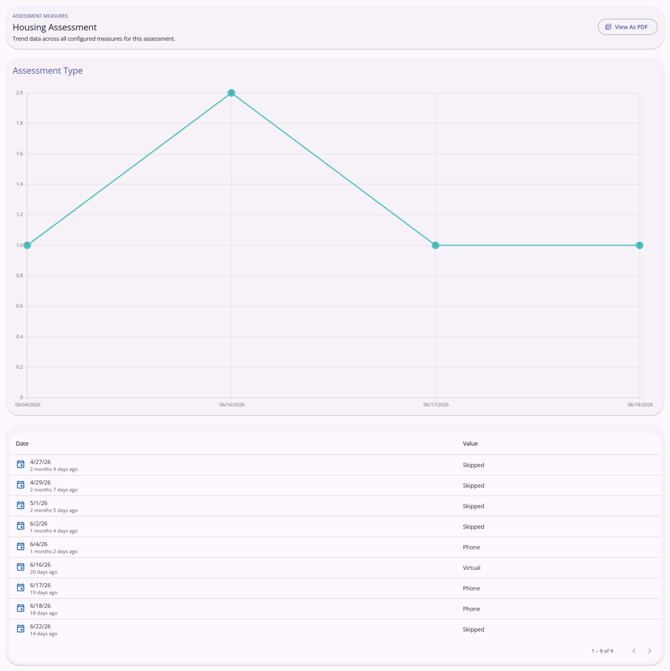
Before this update, skipped responses in measures would appear as a zero value in a Measure. Now assessment measure charts exclude skipped or unanswered responses from the visualization and note skipped questions in the data table.
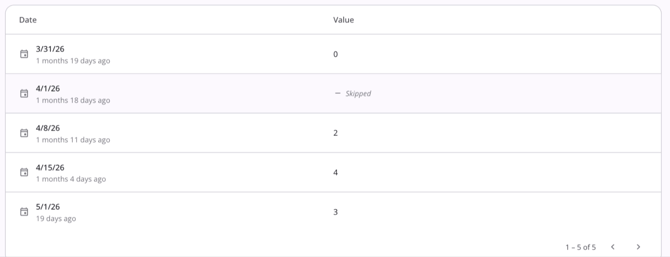
- When generating data for any measure, the visualization excludes any assessment instance where the underlying measure field was left blank or unanswered.
- Excluded data points appear in the data table as Skipped below each chart on the Measures detail page.
- A field with an explicit zero value (e.g., $0 entered intentionally) is considered answered and is plotted on the graph.
Viewing Measures as a PDF
When viewing a measure chart, a View As PDF option appears in the top right corner of the screen header. Clicking this option generates a PDF of the measure(s) listed. Each measure appears on its own page with its graph and data table.
You can save or print measure charts from the Measures detail page.
The following article has been updated to reflect this update:
Week of July 20, 2026
This update was released to training sites on Monday, July 20, 2026, and to production sites on Wednesday, July 22, 2026.
Program Goals
Users can now view, add, and delete program goals, with a companion improvement that makes completion dates more accurate for service-based goals.
View, Add, and Delete Program Goals
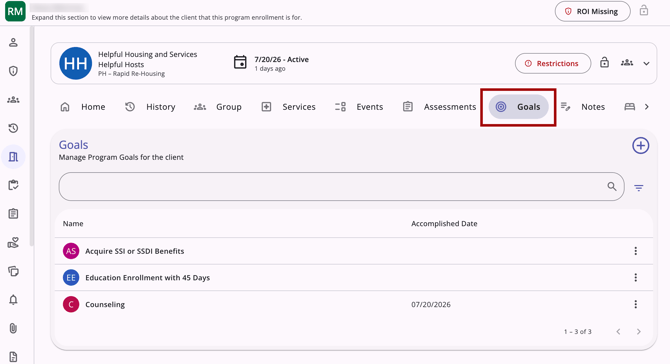
The Goals tab is visible and accessible within a client's program enrollment. All program goals are displayed in a table:
- Active goals (goals without an Accomplished Date) appear at the top of the table.
- Inactive goals (goals with an Accomplished Date) appear at the bottom of the table in descending order by Accomplished Date.
A search bar at the top of the table allows users to type a goal name to filter the goal list.
At the top right of the page, an Add (+) icon is available to add a new goal.
At the far right of each goal row, an Action Menu (kebab) icon displays a Delete option when clicked.
Note: If a program has Default Goals configured, those goals are automatically added to the client's enrollment when the enrollment is created and appear on the Goals list.
The following article has been created to reflect this update:
Staff Member Account Settings
Users can now manage their profile, preferences, password, Multi-factor Authentication (MFA) factors, and Customer Portal settings in the new Clarity interface.
Access via the avatar menu opens a full page with two tabs: Account Settings (profile info, personal preferences, Customer Portal toggles, and profile photo management) and Security Settings (password reset with inline complexity validation and MFA factor enrollment/removal for Authenticator App, Push, SMS, and Email).
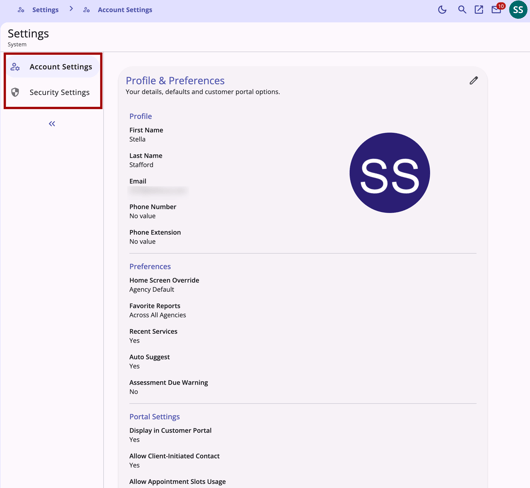
Clarity Shield (SSO) users will see the MFA section in a read-only state, managed by their identity provider.
The following article has been created to reflect this update:
Week of July 27, 2026
This update was released to training sites on Monday, July 27, 2026, and to production sites on Wednesday, July 29, 2026.
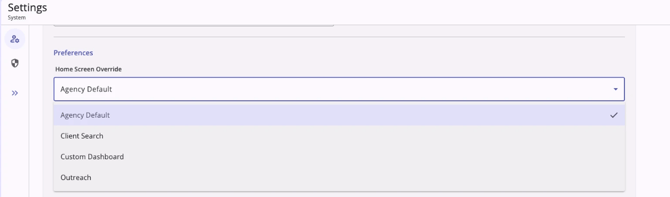
Home Screen Override Options
When a user opens Staff Member Account Settings in the new Clarity interface, the Home Screen Override field displays only the destination options that are available on the instance.
- Agency Default
- Client Search
- If Custom Dashboard is set for the Home Screen Override field, the user lands directly on the configured Looker dashboard upon logging into the new Clarity interface.
- If the agency's Default Profile setting is configured as a Looker dashboard, the user lands on that dashboard upon login.
- If the saved dashboard no longer exists or has been disabled, the user is rerouted to the Default Profile landing page in the new Clarity interface. No error message will be displayed.
- If Outreach is set for the Home Screen Override field, the user lands directly in the Outreach module upon login.
The following article has been updated to reflect this update:
The Merge Module
The Merge module is now available in the new Clarity interface and includes the same four workflows you are familiar with in the current interface:
- Merge Clients: Search, select, and merge duplicate client records.
- Link/Unlink Clients: Manage Personal ID groupings for HUD standardization.
- Merge Client Programs: Consolidate duplicate enrollments.
- Move Client Programs: Relocate an enrollment, with optional household-member handling.
The following updates were made for new Clarity interface functionality:
- A pre-merge warning appears when a secondary client has an active Customer Portal connection or would trigger a Coordinated Entry auto-exit.
- Support for merging duplicate enrollments within the same client; previously, only cross-client merges were supported (A customer Feature Suggestion).
- Group enrollments cannot be selected as the Primary when selecting program enrollments to merge.
- Guidance in the Program Move workflow when Coordinated Entry Events won't carry over.
Access remains gated to those users with the Admin role type and the Merge permission enabled. Every merge, link, unlink, and move action continues to be logged in the client’s audit log.
The following article has been created to reflect this update:
Week of August 3, 2026
This update was released to training sites on Monday, August 3, 2026, and to production sites on Wednesday, August 5, 2026.
Attendance Module
We are excited to announce that the Attendance Module is now available in the new Clarity interface. This update is specifically designed to empower frontline staff with a faster, more intuitive tool for managing high-volume services, client check-ins, and reservations.
The updated Attendance Module prioritizes speed and visibility, ensuring that the most critical information is always at your fingertips. Key features include:
- Enhanced Calendar View: Get a comprehensive look at your facility's capacity with a new view that displays total availability across all slots, units, and beds for an attendance service with reservations enabled.
- Streamlined Reservation Management: Save time with one-click actions to mark clients as "Present" or "No Show" directly from the reservation list.
- Advanced Search & Filtering: Quickly locate clients or specific service groups using more powerful search tools and granular filters.
- Detailed Inventory Insights: Access additional information regarding Inventory Units and Beds configured for reservations to ensure accurate placement and tracking.
This update simplifies the check-in process, allowing staff to focus more on client engagement and less on administrative navigation.
The following article has been created to reflect this update:
Passport Standalone Attendance Tool
We have added the Standalone Attendance tool (Passport) to the new Clarity interface. This kiosk-style surface, used by staff, volunteers, and client self-scan setups, is now more secure and intuitive for recording Daily and Multiple Attendance services.
- Enhanced Privacy: To better protect client data, we have removed Personal Identifying Information (PII), including Date of Birth, Gender, and the last four digits of SSN, from the attendance tables.
- Smarter Defaults: The module now automatically defaults to the last service used, speeding up the check-in process for high-volume setups.
- Improved Usability: We’ve updated labels and error messages to be more intuitive, making it easier for limited-permission operators and clients to navigate the system.
The following article has been created to reflect this update:
Enhanced Current Living Situation Assessment Workflows
We have streamlined how Current Living Situation (CLS) data is captured and managed to improve data quality and user efficiency.
-
Streamlined Enrollment Workflow: Current Living Situation assessments are now captured directly during the enrollment process for all CLS-enabled programs.
- When users navigate to Client > Programs tab >Add program enrollment for a CLS-enabled program, the Record Current Living Situation step will appear after the Head of Household entry screen.
- Flexible Entry Points: In addition to capturing the CLS during the enrollment process, users can now initiate a Current Living Situation assessment from the client-level Active programs card or the Client > Assessments tab.
- Move Assessments: To reduce rework, CLS assessments can now be moved to a different program after they have been saved, eliminating the need to delete and re-enter records created under the wrong program.
- Data Quality Alerts: To support HUD data standards, the system now displays a warning indicator if the date of the first Current Living Situation assessment does not match the program enrollment date, allowing for immediate correction of data quality issues.
The following article has been created to reflect this update:
Week of August 10, 2026
This update was released to training sites on Monday, August 10, 2026, and to production sites on Wednesday, August 12, 2026.
Program Charts
The Charts tab is now available within program enrollments in the New Clarity Interface. Located between the Files and Forms tabs, the Charts tab displays configured field values plotted over time across a client's enrollment.
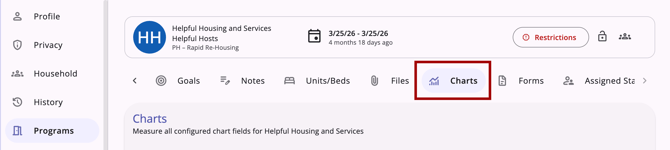
- Numeric and Dollar fields display as line charts, with hover tooltips showing exact values.
- Picklist and Checkbox fields display as a new fixed category strip graph, showing the historical percentage of each response.
- Data points are labeled by Screen Type in chronological order.
- A new Empty State clarifies when no data is available yet, addressing user confusion from the current interface.
- System Admins can now select Assessment Status fields (not just Assessment fields) when configuring Chart fields. When configuring Chart fields for a program, the picker now includes all Assessment Status fields regardless of whether they've been attached to an Assessment screen.
The following articles have been created or updated to reflect this update:
- How Do I Work with Program Charts? (New Clarity Interface) - new article
- Program Setup: Charts - updated article
Client Record Data: Icon Clickability/Search/Filter/Sort/Navigation Updates
This update resolves any non-functional icons and links, standardizes icon/interactive card styling and search/filter/sort behavior across data tables, adds Back button navigation to multi-step forms/workflows, and removes low-value system metadata from expanded table rows in the New Clarity Interface.
These updates are focused on the Client > History workspace but also apply to related tables across Programs, Services, Units/Beds, Referrals, and multi-step forms and workflows.
- Client History workspace is Now Fully Clickable: Clicking on any row in the Client History table now opens that item’s detail page.
- The Service Name column header is now labeled Activity, and a new Details column header has been added above the indicator icons.
- The Action Menu kebab (⋮) with the delete option has been removed from the table; delete is still available on each item’s detail page.
- Standard column sorting is now available on Start Date and End Date.
- Referrals without an end date now display their status (e.g., "Active," "Pending - In Process") instead of a blank value.
- Standardized Cards: Icon interactive cards across Client > History, Client > Services, and Client > Units/Beds now share a consistent hover and interactive card style, including updated designs for the Program, Referral, Characteristics, Expenses, Location, Note, Privacy, and Household cards.
- All referral-type icons now use a single, standardized Person plus icon, with distinguishing details moved into the card content.
- More information is now available at-a-glance on cards, and where applicable, cards include direct links to relevant pages.
- Cards are fully mobile-responsive.
- Consistent Search, Filter, and Sort: Search, filter, sort, and column visibility controls now follow the same pattern across data tables, including Client > History, Programs, Services, Notes, and their program-level equivalents.
- New multi-select filters were added for fields like Program Type and Category.
- Cleaner Expanded Row Content: Expanded table rows across the client record no longer surface raw system metadata (such as internal IDs) by default. Where a row's expanded content had no other value, the expand icon has been removed. Tables affected include Privacy, Program, Services, Assessments, Notes, Files, Location, and several Referrals tables.
- Removed fields remain available through each table's show/hide fields selector, and can be placed as table columns or in the expanded additional details.
- The system will remember the column and additional field display preferences last set on your device.
- Client Search Table Updates: The Client Search table's advanced filter menu now includes the full list of fields from the show/hide column menu, plus Sort functionality.
- Default columns can be adjusted at any time, and like all tables in the new Clarity interface, remember the most recently configured view on your device.
- The Household column has been removed from the default view (household details are now available in the Household icon card)default columns are now Client Name, DOB, SSN, Updated By, Updated On, and Details.
- The Household card now uses a Star icon to clearly indicate the Head of Household.
- Back Button on Multi-Step Forms: Multi-step forms or workflows, including Add Program, Add Forms, and Add Assessment, now include a Back button so users can move between steps to review or edit previously entered data without losing progress.
- Consistent Tooltip Styling: Tooltips throughout the interface now display in a consistent style: black text on a white background in a speech-bubble format.
- Non-Clickable Cursor Fixes: On Referrals > Queue > Program Referral detail pages, the history section and calendar icon no longer display a clickable-style cursor or tooltip on items that are not actually clickable.
The following article has been created to reflect this update:
Location Tab Updates
The Client > Location workspace has been updated with the following:
- Field Interaction side-sheet: View and manage a Field Interaction's Encampment, Address, Location Date, Staff, and other details directly from the Location tab, with options to view the audit log or delete the record.
- Delete safeguard: Deleting a Field Interaction now warns users if the record is tied to an active encampment program enrollment, to help prevent data quality issues.
- Accurate table data: The Status and Encampment columns now display correct values (Active/Inactive and the actual encampment name) instead of placeholder data, and Encampment is now its own filterable column.
- Encampment Search: Searching by encampment name now surfaces results formatted as "Encampment: [Name] (address)."
- Mobile responsiveness: The Location tab is now fully usable on mobile devices.
The following article has been updated to reflect this update:
Referrals > Dashboard Tab
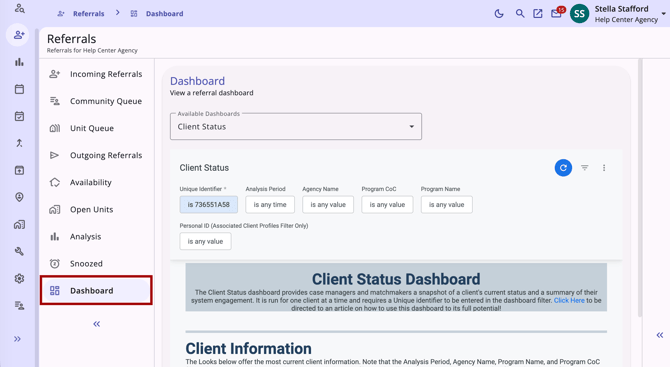
The Dashboard tab is now available to users with the Referrals - Dashboard access right and Data Analysis access.
- View pre-configured Data Analysis reports directly within the Referrals module.
- Switch between multiple configured dashboards using a dropdown selector (if more than one is available).
- Supports the same filter, download, schedule, and send actions available when running the report directly in Data Analysis.
The following article has been created to reflect this update:
Week of August 17, 2026
This update was released to training sites on Monday, August 17, 2026, and to production sites on Wednesday, August 19, 2026.
Client Portal: Mass Send Requests & History
Case Managers can now send the same message or request (File, Assessment, Location, or Release of Information) to multiple Client Portal recipients at once, directly from the new Clarity interface. Previously, this workflow was available only on the Launchpad > Mass Sending page of the current interface.
A new Client Portal tab provides access to Mass Send Request and Mass Request History, visible only to instances with the Customer Portal enabled and their users with the appropriate permissions.
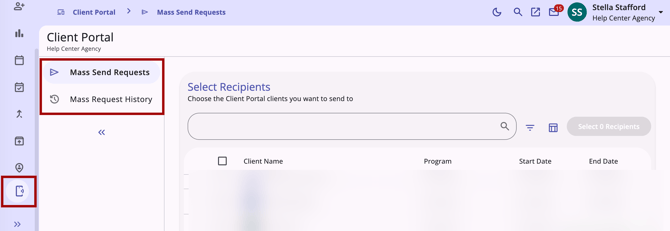
- Users can search, filter, and select multiple Connected Client Portal recipients before choosing what to send.
- Available request types: Message, File, Assessment, Location, and ROI are filtered based on agency configuration and user permissions.
- Assessment and File requests support an optional Connect Requests to Enrollment toggle; Location and ROI requests skip straight to preview.
- Before sending, users can preview all recipients and request details, with any skipped recipients flagged and a reason provided.
- A confirmation email and Clarity Inbox notification summarize results once the batch completes. This is a new feature and only available in the new Clarity interface.
- A new Mass Request History page lets users track the status (Pending, Complete, Failed) of past mass requests. This is a new feature and only available in the new Clarity interface.
- Existing permissions and enablement settings carry over automatically from the current interface; no new setup required.
The following article has been created to reflect this update:
Help & Support Chat Widget
For those communities who use the Help & Support chat widget, it is now available in the new Clarity interface, giving users a direct way to reach Bitfocus support without needing to switch back to the current interface.
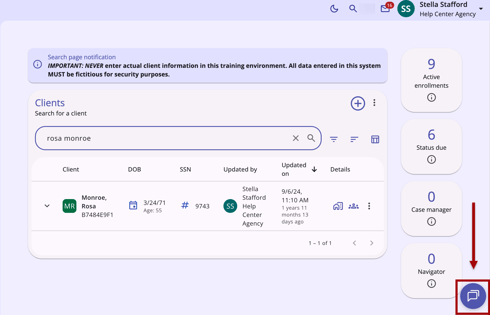
Chat widget visibility continues to be controlled by the same settings used in the current interface; no new settings have been introduced.
The chat widget's placement, icon, and open/close behavior in the new Clarity interface match the current interface, and clicking the chat widget opens the same Help & Support chat/ticket workflow you're already familiar with.
The following article has been created to reflect this update:
Missing and Required Field Alerts
The new Clarity interface now indicates missing required fields more clearly when a form is in progress, automatically flagging all missing required fields at the moment a Save is attempted.
Previously, a required field's only indicator was a trailing asterisk, and the red outline/"This field is invalid" messaging only appeared for fields the user had actively clicked into and out of. Fields the user skipped entirely showed no error signal, even after a failed Save attempt.
Save Button Behavior
If a form has missing or incomplete required fields, the Save/Next button will still appear dimmed — but it's now clickable.
- On desktop: Hovering over the button while required fields are missing displays a red outline, along with a tooltip reading "Required fields are missing" andwith "Click to review" below it.
- On mobile: The Save/Next button remains tappable in its dimmed state. Tapping it does not display a tooltip; instead, a snackbar appears at the bottom of the screen with a warning icon and the message "Required fields are missing."
Missing Required Fields Banner
Clicking the tooltip (or tapping Save on mobile) will:
- Highlight every missing or invalid required field on the form with the familiar red outline and error message.
- Display a yellow warning banner above the Save/Cancel/Back buttons, alongside a list of the missing required fields.
- The banner is expanded by default and displays a bulleted list of the specific missing or invalid field labels, using the exact field name as it appears on the form.
- Click Hide to collapse the list down to just the warning message, or Show to expand it again.
- If the list is longer than the visible area, the expanded section scrolls independently while the Save/Cancel/Back buttons stay pinned.
- The banner does not block or disable the rest of the form — users can continue editing fields while it's visible.
- The list live-updates, removing each missing field as it’s resolved.
- Once all flagged fields are resolved, the banner disappears and the Save button becomes fully enabled.
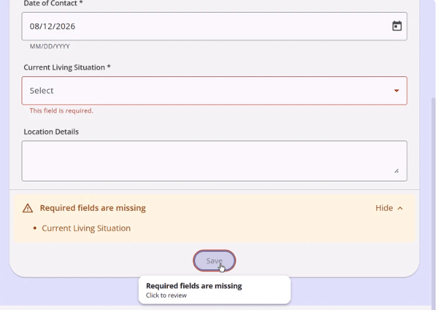 Fig. 1: Desktop Version
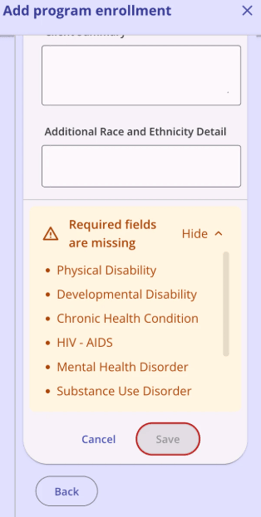 Fig. 2: Mobile Version
The following article has been updated to reflect this update:
Week of August 24, 2026
The final weekly new Clarity interface update was released to training sites on Monday, August 24, 2026, and will be released to production sites on Wednesday, August 26, 2026.
Client Portal Tab: Visibility & Management Enhancements
Case Managers with the Customer Portal Client Management permission enabled now have additional visibility and control options on the Client Portal tab and card.
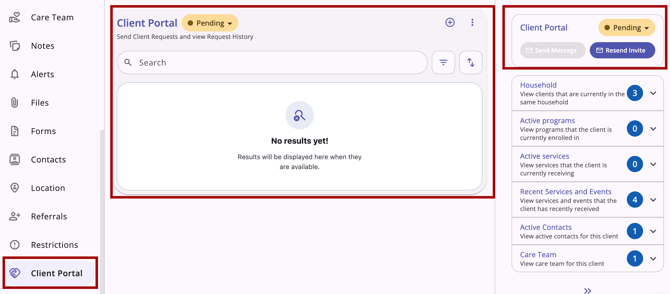
Viewing Invite and Connection Email Addresses
Case Managers can now see which email address a pending Customer Portal invite was sent to, or which email address a client's Portal account is currently connected to.
- On mobile (touch devices):
- Tapping the Invite Pending status badge reveals the invited email address and invitation sent date details.
- Tapping the Connected status badge reveals the connected email address and date connected details.
- The displayed email always reflects the most recently sent invitation.
Updating the Displayed Email
If an invitation is in Invite Pending status and the Case Manager resends the invitation to a different email address, the status detail updates to display the new email address.
- To resend to a new address, the user must cancel the existing invitation and send a new invitation to the updated email address.
Client Portal Card: Action Menu Options
The Client Portal card's Action Menu now displays two options: Disconnect and View Audit Log.
- Disconnect: Allows the Case Manager to disconnect the client from the Customer Portal.
- View Audit Log: Allows the Case Manager to review the history of invite, message, request, and connection actions for the client.
- Any requests sent to the portal using the Mass Request function will be notated in the Audit Log accordingly
- The View Audit Log option is hidden from the Action Menu for users who do not have Audit Log permission.
- In addition to the standard From Values, To Values, Changed By, and Date columns, the audit log now also displays Type and Action columns.
Identifying Client-Submitted Records
Case Managers can now see which files, assessments, or location records were submitted by the client through the Portal.
- On the Files, Assessments, and Location lists, a record submitted by the client through the Customer Portal displays a client-supplied icon, right-aligned in the row.
- Hovering over the icon displays the tooltip: "Client Supplied through the Customer Portal."
Terminology Updates
To improve clarity when sending requests to clients through the Customer Portal:
- The request option previously labeled Documents is now labeled Files.
- When selecting an assessment request to send to an individual client, the subtitle now reads: "Select an Assessment to Request."
- When selecting a file request to send to an individual client, the subtitle now reads: "Select a File to Request."
The following article will be updated to reflect this update:
Mobile Experience Improvements
We've made significant updates to the new Clarity interface on mobile devices, making it easier to navigate, review client information, and manage your caseload on your phone or tablet.
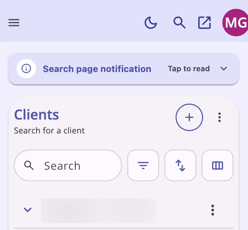
The updates include:
- Navigation: Resized header and icons to eliminate clipping; added breadcrumb-style page indicators for nested navigation.
- Client Search: Responsive table columns (no horizontal scroll), inline row expansion, and a redesigned Caseload Summary card layout.
- Client Header: Collapsed by default to name, photo, and expand chevron, reducing vertical space usage while keeping full detail one tap away.
- Filter, Sort, and Column Controls: Consolidated onto a single line; each control now opens as a bottom sheet with sticky header/footer elements for consistent access to Apply/Clear actions.
- Row Interactions: Standardized tap targets — expand chevrons trigger inline expansion, while row labels/descriptions navigate to the full record.
- Program Details: Compact, non-sticky banner with mobile-optimized tab navigation and support for warning states (e.g., Annual Assessment Due).
- Tables, Forms, and Modals: Full-viewport modals and full-width side-sheet forms; data-heavy tables now pin key columns (e.g., "From Values") while secondary columns scroll horizontally.
The following article will be created to reflect this update:
Program > History Tab Updates
The History tab in a client's program enrollment has been updated to provide users with a more complete and interactive view of all activity records linked to the enrollment.
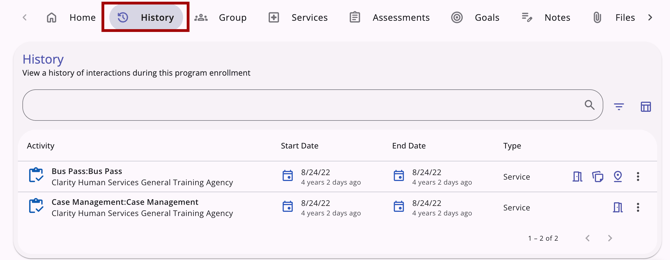
The updates include:
- Assessments, Referrals, Services, Reservations, Coordinated Entry Events, and Pending Bed/Unit Assignments related to the program enrollment are in one combined, searchable, filterable table. A new Type column identifies each row's activity type, and the renamed Activity column shows the activity name, agency, and who added it.
- The legacy interface used the "Service Name" column title instead of "Activity."
- Row-level icons and hover popovers (Link/Connection, Expense, Note, Referral Placement, Tracked Characteristics, Location) give users an at-a-glance context for each record related to the program enrollment without opening it, matching the icon set already used on the client-level History tab.
- Icons are used for an at-a-glance context for each record, instead of the color coding that was used in the legacy interface.
- A row-level action menu includes permission-gated Edit and Delete actions for items related to the program enrollment with the standard confirmation dialog.
- If no actions are available for the activity, then the action menu will not appear.
- The mobile experience follows the new Clarity interface's global table conventions, such as collapsible rows, bottom-sheet menus and popovers, and full-view confirmation dialogs, so the expanded History tab for program enrollments works the same way on mobile devices.
The following article will be updated to reflect this update:
This concludes the weekly release cycle updates.
Updated: 10/02/2026