
Table of Contents
Overview
The Referrals Dashboard workspace allows users to view one or more Data Analysis reports within the Referrals module as an embedded dashboard. System Administrators configure report availability, first in System Setup and then in Referral Settings.
Note: Your instance of Clarity Human Services, as well as your Access Role, must have Data Analysis access to view dashboard reports. For more information about access rights, refer to the Rights Glossary for Access Roles.
The Dashboard menu item on the global Referrals navigation menu is only visible to users who hold both of the following:
- The Referrals - Dashboard access right.
AND
- General Data Analysis access.
Accessing the Dashboard
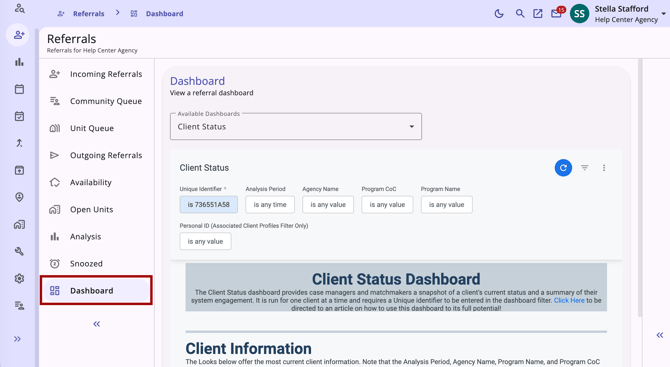
To access the Dashboard workspace, navigate to the global Referrals navigation menu and select Dashboard. The Dashboard menu item appears below the Snoozed menu item.
Switching Between Dashboards
If only one dashboard is configured, it loads automatically when you open the workspace, and no additional options appear.
If more than one dashboard has been configured, an Available Dashboards dropdown appears above the embedded report area, listing each configured dashboard by name in alphabetical order.
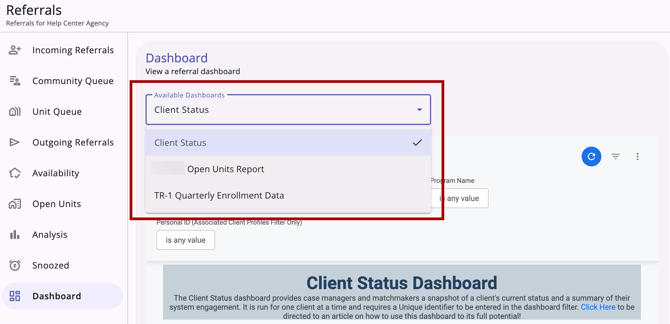
The first dashboard in the list loads by default. Selecting a different dashboard from the dropdown reloads the embedded report area without navigating away from the Dashboard workspace.
Only dashboards marked as active and allowed for your instance will appear as options.
Using the Dashboard Report
The dashboard report displayed in the Dashboard workspace supports the same filter, download, schedule, and send actions available when running the report directly in Data Analysis. For more details, refer to Introduction to The Data Analysis Tool and Looker Resources.
Additional Resources
This article provides an overview of the global Referrals module, which includes links to all possible global Referral workspaces:
The following articles provide general referral information:
- Introduction to Making Referrals
- Referral Connections
- Referral Details Glossary
- Referral History
- Referral Status Updates
Updated: 11/17/2026