
This article is for the new Clarity interface. Screenshots and descriptions will be updated as features are released. For the current interface article, see Switching Agencies.
Table of Contents
Overview
Each agency has its own unique configuration, including specific programs and services. The act of "switching agencies" entails accessing Clarity Human Services based on the settings of a particular agency.
You may need to switch agencies to enter client data on behalf of another agency or to manage agency configuration. In switching agencies, you will access the system based on the agency's configurations and your assigned access role.
Notes:
- Staff members with a System Administrator Access Role have access to view, create, and edit data as well as manage agency and program configuration for all agencies by default.
- All other staff members must be given access by a system administrator to additional agencies in the Additional Agency Access of Account Settings.
Switching Agencies
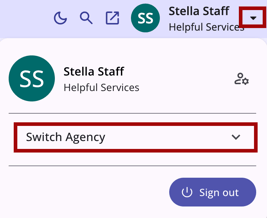
When you need to switch agencies, click the drop-down arrow to the right of your name in the information bar. Click on the Switch Agency drop-down menu on the page to show a list of available agencies to switch into.
Click the desired agency to switch to it immediately.
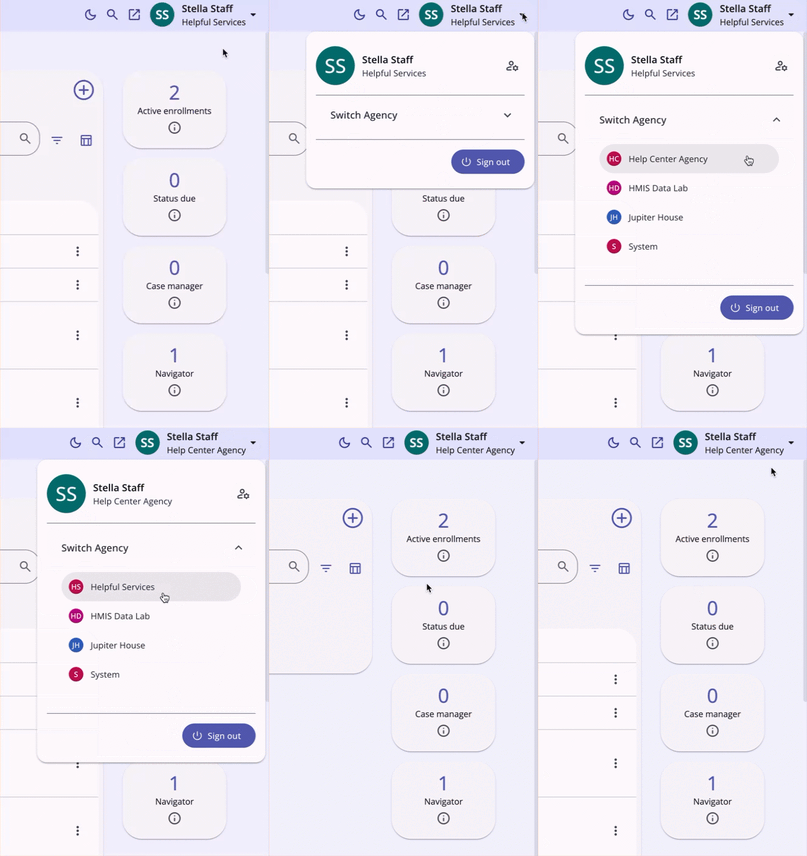
When a new agency is selected, regardless of where you are within Clarity Human Services, you'll be navigated to the Clients tab. The agency you switched to will appear at the top of the page under your name.

Updated: 04/17/2026