
Release Schedule:
- All Training Sites: September 1, 2026
- All Production Sites: October 1, 2026
Feature Focus Recording:
Clarity Human Services Updates
- Featured Update: New Clarity Interface Transition - All Instances
- Client Records > Reports
- Pending Referral Unit Change
- Current Living Situation: Enrollment Workflow
- Overnight Unit/Bed Drop-ins: Occupancy Sharing, Ownership and Access Rights
- Navigation Profiles: Additional Settings
- Navigation to Home Screen
- Occupancy Deletion Logic for Referral Completion
- User Policy Agreement
- Password Change Required Screen
- 404 Error Page
- Attendance Module Client Preview Card
- Referral Details: Future Status Card
- Program Enrollment Workflow - Saved Enrollment Messaging and Follow-Up Prompts
- XML Retirement (DIT and Report Library updates)
Report Library Updates
- New Clarity Interface Transition
- Client Record > Reports
- FY26 LSA Updates
- [HUDX-223-AD] System Performance Measures [FY 2026]
Report Library Release Notes will no longer be published as a standalone monthly article. Beginning with this release cycle, all released and upcoming report updates will be included within the monthly Clarity Human Services Feature Updates articles.
The final standalone release notes article, published under the previous naming convention, is available for reference here: Pentaho Release Notes - July 2026.
Change Log-type entries pertaining to Report Library updates (e.g., logic changes, report format output changes, and field handling standardizations) will now be documented within the Data Analysis Change Log and Known Issues article, alongside existing Data Analysis change log content.
Data Analysis Updates
- New Clarity Interface Transition
- Pending Referral Unit Change
- Assigned Staff Fields
- Tabbed Dashboards
- Federal Report Data Cleanup Assistance Dashboard (LookML)
- FY26 LSA Updates
The 2026 Data Services Change Log and Known Issues article and the Data Analysis Upgrade Note articles are released separately. Change Log-type entries pertaining to Report Library updates (e.g., logic changes, report format output changes, and field handling standardizations) will now be documented within the Data Analysis Changelog and Known Issues article, alongside existing and new Data Analysis change log content.
Notes:
- The updates described in this article will be deployed in the early morning hours on scheduled release days. During release, the Clarity Human Services application, Pentaho Reports, and Data Analysis Tool may experience performance delays. We recommend clearing your cache at your initial login if you are experiencing difficulty.
- From the week of May 4, 2026, to the week of August 24, 2026, we released weekly feature updates for the new Clarity interface. The weekly feature updates cycle has concluded. To learn more about those updates, refer to the Clarity’s New Interface: Weekly Release Notes article.
Clarity Human Services Updates
Featured Update: New Clarity Interface Transition - All Instances
The new Clarity interface will be standardized across all Clarity instances in two phases:
- Training sites on September 1, 2026
- Production (live) sites on October 1, 2026
On each respective date, all active instances and user accounts will be switched to the new Clarity interface. This is a required, system-level change and will be applied automatically; no action is needed to opt in.
Following the production changeover, the legacy interface will remain accessible only for the limited set of screens that do not yet have a new Clarity interface equivalent. All other current interface routes will no longer be reachable.
Here are the details:
- Instance-level default: All active instances will have the new Clarity interface enabled at the instance level. Newly provisioned instances will have this setting enabled by default and will not display the instance-level toggle in SETUP > SETTINGS > System Configuration, as the setting is no longer configurable.
- Setting removal: The Enable New Clarity Interface toggle will be removed from SETUP > SETTINGS > System Configuration.
- User-level default: All staff accounts will have the new Clarity interface enabled at the user level by default and will not display the instance-level toggle in MANAGE > STAFF, as the setting is no longer configurable.
- Setting removal: The Access to New Clarity Interface toggle will be removed from MANAGE > STAFF > [staff name].
- URL routing: Requests to legacy routes will be transparently redirected to the corresponding new Clarity interface route, with no intermediate screen or redirect notice.
- If a legacy route has no mapped new Clarity interface equivalent, the request will resolve to the current interface version of that route instead.
- Post-login routing: On successful login, users will be routed directly to their new Clarity interface home page.
Login Screen
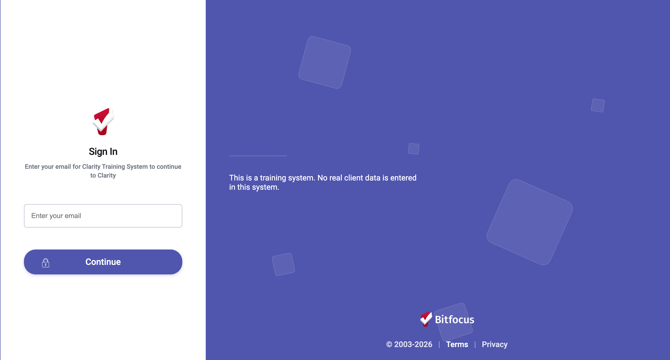
The new login screen appears for training sites now, and will appear for production (live) sites on October 1 for all users.
Required Action: None.
Article Updates: This update is live in all training and production sites.
The following articles have been updated (System Administrator and Agency Manager related):
The following articles have been updated (all users):
- Staff Member Account Settings
- Client Record Overview: Mobile Responsive Screens
- Auth0 for Clarity Human Services: Toolkit
- Clarity Human Services: Passwords and Logins (name change - formerly titled Clarity Human Services Passwords; old links re-direct!)
The following articles have been archived:
-
Step-by-step Instructions to Enable the New Clarity Human Services Interface - settings no longer exist
- Get Excited! New Clarity Interface Updates - originally created for Clarity Connect; all information is available in existing standalone articles
Note: The switchover to the new user interface occurred early on October 1, 2026, before business hours began.
Update: Client Records > Reports
We're excited to announce the Reports workspace within the client record in the new Clarity interface, giving users a way to browse, run, and view client-level reports without leaving the client record or switching back to the current interface.
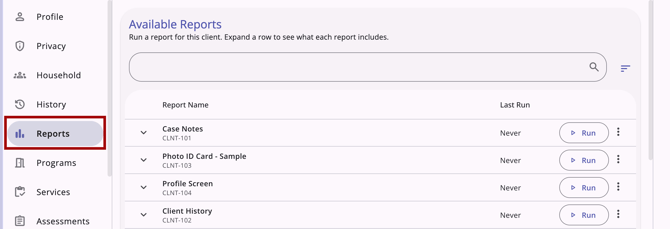
- Reports: Case Managers can now run client reports right from the client record without switching interfaces.
- Report list: See all available reports in one table, with search and sort features available for quick access.
- Report setup: A new report parameter page is available for filling out report details, and you can also schedule a report for a future date.
- Report tracking: A status card shows your reports run for each client in the last 60 days, and whether they're still processing, ready, or failed.
- Global Report Status Icon: The global Report Status icon in the header alerts you when a report finishes, so you don't have to keep checking the Reports workspace.
- Consistent look: Report outputs include the updated logo (Web Page, PDF, Excel). For the web page version, view the results you are familiar with in the new interface.
A new article has been created with all details. See Client Reports (New Clarity Interface).
Required Action: None. The existing Client Reports access right controls visibility for client-level Reports; no new permissions or configuration are needed.
Article Updates: This update is live in all training and production sites. The following article has been updated to reflect this update:
The following articles have been created to reflect this update:
-
[CLNT-127] Homeless Status Timeline Report (New Clarity Interface)
-
[CLNT-128] Client Enrollment Details (New Clarity Interface)
Update: Pending Referral Unit Change
Housing providers can now change the Unit on a referral in Pending status, without denying and recreating the referral, to move a client to a better-fitting unit.
Making a Unit Change
When editing a referral on the Referral Details page, the Referred Unit field now appears below the Referred Program field.
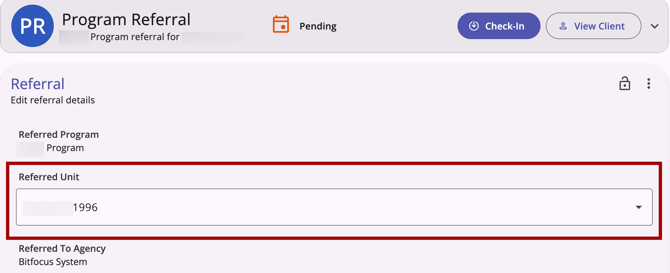
The field is editable when all of the following are true:
- The referral is in the Pending status for a program.
-
The pending program referral is to a Unit (referrals to beds cannot be edited in this interface).
-
The same program has at least one other available unit (with beds disabled) that is in Active status as of the Referred Date, with no occupancy, pending occupancy, or reservation for that date. The Referred Date is Referral Date for direct referrals and Reassign Date for Community Queue referrals
The Referred Unit field remains editable after a change is saved, so a referral can be reassigned to a different unit multiple times if needed.
If the newly selected unit has a future pending occupancy, supporting text displays:
"[Unit Name] is pending occupancy starting on [Pending Occupancy Start Date]."
This is informational only and doesn't stop a user from saving. If multiple future pending occupancies exist, the one with the soonest start date displays.
If a user selects a unit where the current UCT has beds disabled but an upcoming UCT has beds enabled, a warning displays:
"Pending referrals to the unit will become pending to the program only on the '<As Of Date of Upcoming UCT>'."
Users can choose Cancel to pick a different unit or OK to proceed and save.
Once a unit swap is saved, the original unit returns to available status, and the Inventory Dashboard's Unit Occupancy tab no longer shows a pending referral.
Viewing Unit Change History
Each unit change adds a new row to a Referral’s history with the activity type "Unit Swap: [new unit details]." The date column reflects when the swap was saved, showing both the rounded and the exact date/time of the change.
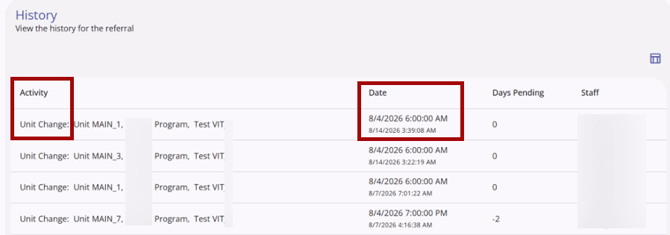
All unit changes are reflected in the audit log for the referral.
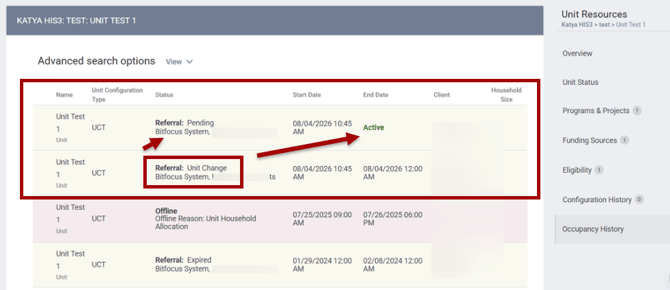
Unit changes also display in Manage > Sites > Buildings & Units > Occupancy History.
-
The original referral's Status column displays "Referral: Unit Change" (agency and program remain the same), and its End Date updates to a date and time immediately prior to the change.
-
The new referral's Status column displays the referral's current status (e.g., "Pending"), its Start Date reflects when the swap was saved, and its End Date displays "Active."
Unit Change Access Rights
A new Referrals - Change Unit access right has been added under Setup > Access Role, below "Referrals - Pending." This access right controls who can change units on a pending referral. Users with this access right see a unit drop-down list on pending referrals when multiple units are available for the relevant program.
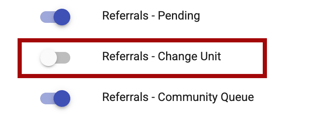
The Referrals - Change Unit access right is dependent on the Referrals - Pending access right. If the Referrals - Pending access right is enabled, this new right is toggleable; if disabled, this right cannot be toggled.
This access right defaults to disabled, except for Admin role types where Referrals - Pending is enabled, in which case it defaults to enabled.
-
Disabling Referrals - Pending triggers a confirmation warning, since doing so also disables the Referrals - Change Unit access right and any other enabled dependent rights.
Required Action: Because access to the required access right is disabled by default, System Administrators must enable the Referrals - Change Unit access right for each user who should be able to change units on referrals.
Article Updates: This update is live in all training and production sites. The following articles have been updated:
- Referral Details Glossary (New Clarity Interface)
- Referral Status Updates (New Clarity Interface)
- Referral History (New Clarity Interface)
- Viewing a Referral’s History
- Unit Occupancy History
- Rights Glossary for Access Roles
- Client Referrals Overview (New Clarity Interface)
- Global Referrals: Incoming Referrals
- Global Referrals: Outgoing Referrals
Update: Current Living Situation (CLS) Enrollment Workflow
CLS assessments are now captured directly during enrollment for all CLS-enabled programs. When a user enrolls a client in a CLS-enabled program, a CLS assessment is automatically added as a step in that client's enrollment workflow, ensuring compliance from the start.
When users navigate to Client > Programs tab >Add program enrollment for a CLS-enabled program, the Record Current Living Situation step will appear after the Head of Household entry screen.
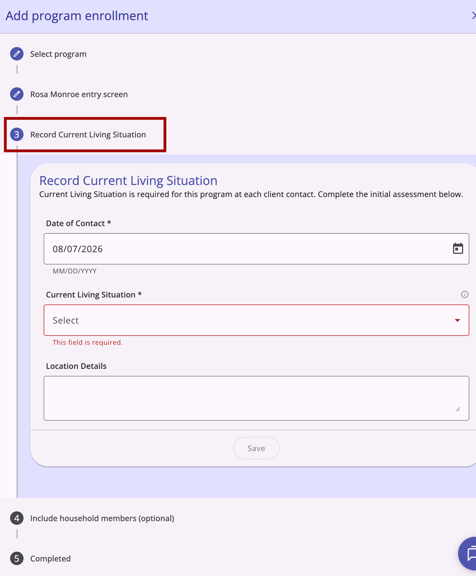
This enhancement was previously announced in Clarity’s New Interface: Weekly Release Notes for the week of August 3, 2026.
Required Action: None.
Article Updates: The following article was created to reflect this update:
Update: On 09/30/2026, an update was added to include messaging and follow-up prompts for enrollments that are closed before all steps are completed. If you close the workflow after saving the entry screen, the enrollment is saved, and prompts on the program page help you add the Current Living Situation (CLS) assessment or enroll household members later. Refer to the Program Enrollment Workflow: Saved Enrollment Messaging and Follow-Up Prompts update in this article for details.
Update: Overnight Unit/Bed Drop-Ins: Occupancy Sharing & Ownership (08/26/2026)
We've identified and corrected an issue related to the new Unit/Bed Occupancy sharing setting introduced with the August 2026 Overnight Unit/Bed Drop-ins release.
Previously, a unit/bed occupancy created from a referral was owned by the referring agency rather than the enrolling agency. Depending on sharing settings, this could cause staff outside the referring agency to lose visibility into occupancies within their own programs, or prevent them from editing or ending those occupancies.
With this update, unit/bed occupancy ownership is now based on the enrolling agency, for both referral-based occupancies and drop-ins recorded without an enrollment. This applies automatically going forward. A data migration will update ownership on existing occupancy records to reflect this change; no action is needed to update historical records.
Required Action:
If your community adjusted sharing settings or access rights as a workaround after the August 2026 release, please review those settings now that ownership has been corrected.
Sharing Setting Configuration:
System Admins should review referring agency and enrolling agency sharing settings for Unit/Bed Occupancy at MANAGE > [Agency] > SHARING to confirm they still reflect intended sharing rather than the temporary workaround.
-
If you set the sharing settings for Unit/Bed Occupancy to Full Share specifically to work around this, you can likely revert it to your original setting.
Access Rights Configuration:
System Admins should review user access rights to confirm they still reflect intended access rather than the temporary workaround.
- If you granted the Edit Any Agency Enrollment-based Unit Records and/or Delete Any Agency Enrollment-based Unit Records access rights to grant editing access, you can likely remove that and rely on the agencies' standard edit/delete rights instead. This avoids leaving broader, system-wide editing permissions in place than you intended.
Article Updates: This update is live in all training and production sites. The following articles have been updated:
Update: Navigation Profiles Settings (09/03/2026)
Navigation Profiles settings now include Forms, Alerts, and Restrictions, giving System Admins the ability to control visibility of the new standalone Forms, Alerts, and Restrictions tabs in the new Clarity interface.
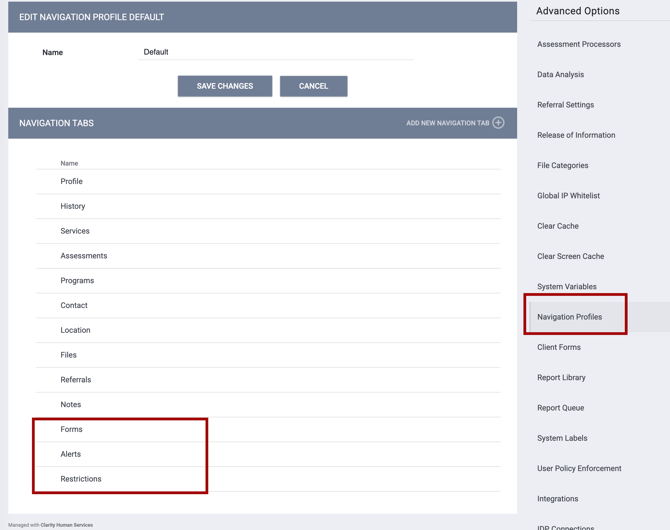
Previously, this functionality lived under other tabs (e.g., forms under Files) in the legacy interface, so there were no separate visibility controls for them. Because the new Clarity interface surfaces Forms, Alerts, and Restrictions as dedicated tabs, System Admins can now manage each tab's visibility independently, just like other navigation elements.
Required Action: System Admins should review the Navigation Profiles settings and update the visibility of the Forms, Alerts, and Restrictions tab for each profile as needed.
Article Updates: This update is live in all training and production sites. The following article has been updated:
Update: Navigation to Home Screen (09/03/2026)
Users can now click the Bitfocus icon in the top-left header of the new Clarity interface to return to their preferred Home Screen from any page in the system. For example, if a user has the Dashboard enabled on their Home Screen, they can tap the Bitfocus icon to easily return to the Dashboard.
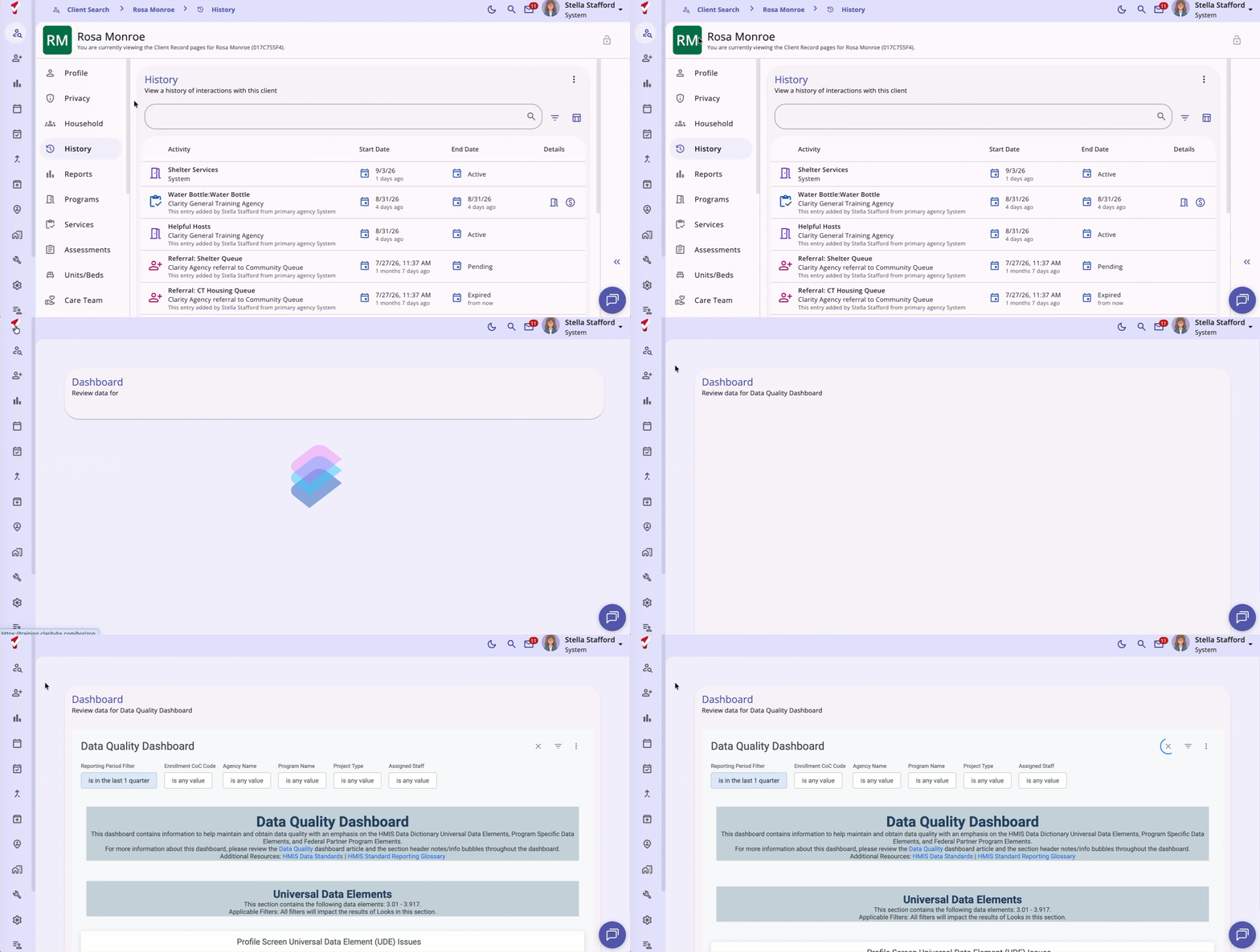
A Default User Home Screen can be set up by an Admin in the Agency settings or by the user in their Account Settings.
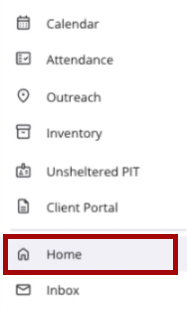
On mobile and tablet, a Home option has been added above the Inbox option in the global menu.
Required Action: None.
Article Updates: This update is live in all training and production sites. The following articles have been updated:
Update: Occupancy Deletion Logic for Referral Completion (09/09/2026)
We've corrected an issue with how the system handles a completed unit referral when the associated unit is deleted.
Previous Behavior: If a client's referral was completed via a unit assignment, and that unit was subsequently deleted, the entire referral reverted to the Pending status.
Current Behavior: This has been updated to align with the behavior introduced with the Initial Occupancy Start Date feature. Now, if the unit connected to a completed referral is deleted:
- The referral stays in the Complete status.
- The occupancy status reverts to Pending Occupancy rather than reopening the referral itself.
Required Action: None.
Article Updates: This update is live in all training and production sites. The following articles have been updated:
Update: User Policy Agreement (09/16/2026)
Users can now complete their required User Policy Agreement directly in the new Clarity interface when the User Policy Enforcement setting is enabled in system settings.
When a user logs in for the first time, or after their enforcement period has lapsed, they'll see the configured policy content along with required checkboxes and signature field(s) before they can continue.
- Reset clears the in-progress signature entry.
- Apply commits the current signature entry without submitting the full agreement, and is disabled until a signature has been entered.
- Save is disabled until all required checkboxes and signature field(s) are complete, and is consistent across desktop and mobile/tablet devices.
- On Save, the system records acceptance, timestamp, and signature, and routes the user to their default landing page.
- Signature capture supports both mouse (desktop) and touch (mobile/tablet) input, with no horizontal scrolling at smaller widths.
This update covers only the user-facing acceptance experience. System Administration configuration (the enablement toggle, enforcement period, and form editor) is unchanged and remains in the legacy interface. See System Advanced Options: User Policy Enforcement for information on the setting.
Required Action: None. If User Policy Enforcement is already configured, users will automatically see the new screen; no reconfiguration is needed.
Article Updates: This update is live in all training and production sites. The following new article has been created:
Update: Password Change Required Screen (09/16/2026)
Users with an expired password or who have had their password reset by an administrator will now see an updated Password Change Required screen.
When a user's password has expired, or an administrator has forced a password reset, they'll be shown a Password Change Required screen before they can continue into the new Clarity interface:
- The Email field is displayed read-only, above the New Password and Confirm Password fields.
- A live checklist above the Save button shows the required password rules, removing each one as it's satisfied.
- Fields display a red border until requirements are met, and each field includes a show/hide password toggle.
- Save remains clickable; selecting it with unmet requirements opens the standard validation message.
- Failed attempts on this screen do not count toward failed login attempts.
- If the account was previously locked, a successful password change automatically unlocks it — matching legacy behavior.
This update covers only the user-facing forced password-change experience. Password policy configuration (Maximum Password Attempts, Force Password Change) is unchanged and remains in legacy System Administration. See System Setup: Settings for more information.
Required Action: None. Users with an expired or forced password reset will automatically see the new screen.
Article Updates: This update is live in all training and production sites. The following articles have been updated:
Update: 404 Error Page (09/23/2026)
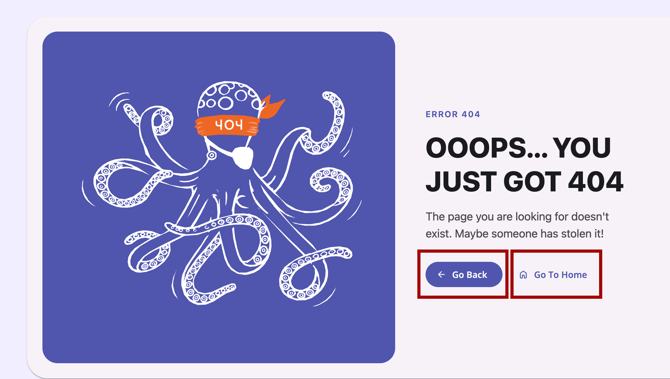
Users in the new Clarity interface will now see a dedicated 404 error page instead of a blank screen when a requested record can't be found.

Previously, in the new Clarity interface, if a record no longer existed or if a URL didn't match any valid route, the page would fail to load, leaving the user with a blank screen and no indication of what went wrong.
Two navigation options are available from the error page: Go Back, which returns the user to the previous page, and Go To Home, which routes the user to their default Home Screen.
Required Action: None. This change is applied automatically and requires no configuration.
Article Updates: This update is live in all training and production sites. The following article has been updated:
Update: Attendance Module Client Pop-Up Card (09/23/2026)
A client preview card is now available in the Attendance Module of the new Clarity interface. A client preview card displays the client's Photo, Name, Age, Unique ID, and Last 4 SSN.
The card can be displayed by hovering over (or, on touch devices, tapping) the client's name.

Required Action: None.
Article Updates: This update is live in all training and production sites. The following article will be updated:
Update: Referral Details: Future Status Card (released 09/23/2026, article updated 09/30/2026)
Referral Details in the new Clarity interface now show a status change scheduled for a future date and let users cancel that change.
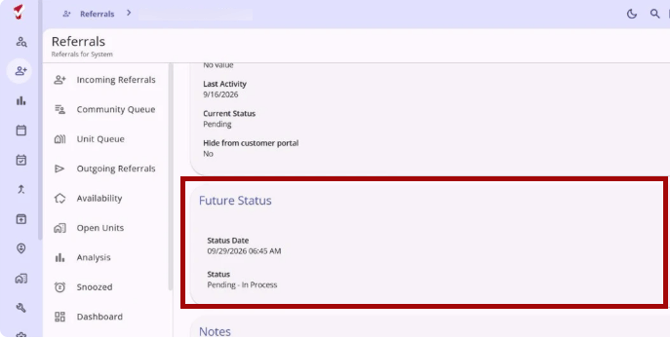
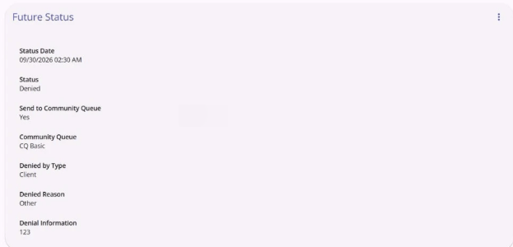
When a referral has a status change scheduled with a future Status Date, a new Future Status card appears on the Referral: Edit referral details workspace, between the Referral card and Notes. The card doesn't appear for referrals without a scheduled change.
The card displays:
- Status Date
- Status
- For a Denied status scheduled to change with a future date, users will also see Send to Community Queue, Community Queue (only when the client is sent back to a queue), Denied By Type, Denied Reason, and Denial Information
Canceling a Future Status
The card has a Action Menu (kebab) icon with one option, Cancel Future Status. Selecting it opens a confirmation message. Choose Keep Future Status to leave the scheduled change in place, or confirm to remove it. Once confirmed, the card disappears. The referral itself isn't canceled and keeps its current status.
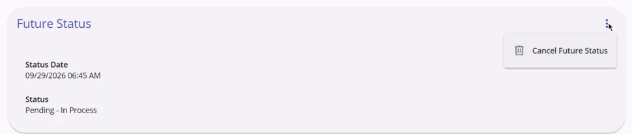
Canceling a future status is recorded in the referral's audit log.
Users without the Edit Agency Referral/Edit Any Agency Referral access right can see the card, but the Action Menu isn't available to them.
Required Action: None.
Article Updates: This update is live in all training and production sites. The following article has been updated:
Update: Program Enrollment Workflow - Saved Enrollment Messaging and Follow-Up Prompts (09/30/2026)
The new Clarity interface now shows more clearly what has been saved during a program enrollment. It also prompts you to finish any steps you skipped.
Your enrollment is saved when you save the entry screen, which is the second step of the Add program enrollment workflow. The Current Living Situation (CLS) assessment and household member enrollments are separate saves that follow. Previously, closing the workflow after the entry screen showed a Discard Changes message, even though the enrollment was already saved. This update fixes that messaging and adds prompts to help you finish the remaining steps.
Completed Step Summary
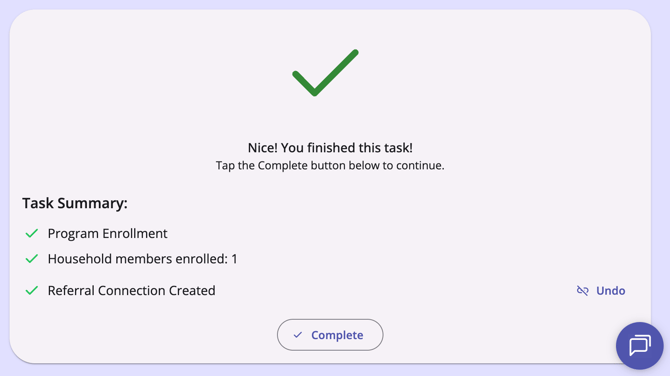
The Completed step now reports what was saved in the Task Summary:
- Program Enrollment is checked when the enrollment is saved.
- Current Living Situation recorded for [#] household members is checked when CLS is recorded. The line appears only for CLS-enabled programs.
- Household members enrolled: [#] is checked when you enroll household members. If you don't select any, the line reads No household members enrolled with an empty gray circle. The line appears only for clients with a household.
- Referral Connection Created with an Undo option still appears when a pending referral was linked.
Closing the Workflow After the Entry Screen Is Saved
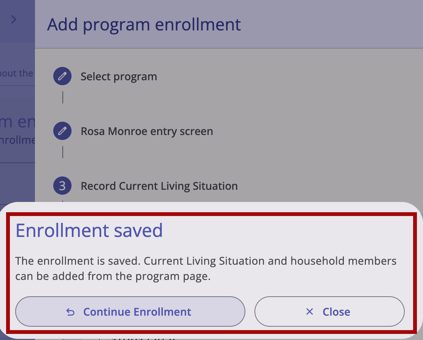
If you select the Close (X) icon after saving the entry screen, an Enrollment saved dialog appears. It reads:
"The enrollment is saved. Current Living Situation and household members can be added from the program page."
The dialog has two buttons:
- Continue enrollment keeps the workflow open on the same step.
- Close closes the workflow and opens the new enrollment.
Closing the workflow before you save the entry screen works as it did before. If you have entered data, the Unsaved Changes dialog appears with Discard Changes. If you have not entered data, the workflow closes without a prompt.
Follow-Up Prompts on the Program Page
If you close the workflow early, the new enrollment's Home tab shows a prompt for each incomplete step. Hover over a prompt to see a tooltip explaining what is missing.
- Current Living Situation Needed appears when a CLS-enabled program has no CLS recorded. Select it to open the Add Current Living Situation modal directly on the CLS form for that enrollment. After you save, the prompt disappears without a page reload, and the CLS appears on the enrollment's Assessments tab.
- Household Members Not Enrolled appears when household members were not enrolled. Select it to open the Group tab with the Add members modal already open. The prompt disappears once every household member is enrolled.

On mobile screens, the prompts appear as pills. Tap a pill to open a bottom sheet, then use the button at the bottom of the sheet to take the same action.
Notes:
- The Household Members Not Enrolled prompt appears only in the browser session where you closed the workflow early. Reloading the page clears it.
- The Current Living Situation Needed prompt appears only for enrollments in the agency you are currently working in. It does not appear for minors who are not the head of household, for exited enrollments, or for programs without CLS enabled.
- If the full workflow is completed, neither prompt will display.
Required Action: None.
Article Updates: This update is live in all training and production sites. The following articles have been updated:
- Creating and Managing Program Enrollments (New Clarity Interface)
- Current Living Situation (CLS) Assessment Guide
- How Do I Add a New Household Member to an Enrollment? (New Clarity Interface)
For more on the CLS step, see the Current Living Situation (CLS) Enrollment Workflow in this article (a full article link is also included in the section above).
Update: XML Retirement (09/30/2026) - DIT and Report Library
As previously announced via email and feature updates (see Clarity Human Services: June 2026 Feature Updates), XML support in the Data Import Tool (DIT) and the HUDX-111 export was retired on September 30, 2026. Help Center documentation has been updated to match. Details are below.
[HUDX-111(-AD)] Report Rename
XML has been removed from the HUDX-111 report name, and the name has been updated across the Help Center.
- Previous name: [HUDX-111] HUD CSV / XML Program Data Export
- New name: [HUDX-111(-AD)] HUD CSV Export [FY 2026]
Article Updates: This update is live in all training and production sites.
Articles Renamed:
- [HUDX-111] HUD CSV / XML Program Data Export → [HUDX-111(-AD)] HUD CSV Export [FY 2026] (new URL: help.bitfocus.com/hudx-111-hud-csv-export)
- HMIS CSV/XML Program Data Export → HMIS CSV Export (new URL: help.bitfocus.com/hmis-csv-export)
- HUD HMIS CSV/XML Program Data Export: FY 2026 Updates → HUD HMIS CSV Export: FY 2026 Updates (new URL: help.bitfocus.com/hud-hmis-csv-export-fy-2026-updates)
- RHY, SSVF, GPD, and YHDP Reporting - [HUDX-111] HUD CSV/XML Program Data Export → RHY, VA, GPD, and YHDP Reporting - [HUDX-111(-AD)] HUD CSV Export [FY 2026] (URL unchanged)
Articles With Updated Report Name References:
- Housing Move-in Date
- Prioritization Status
- Running the HDIS Report
- Importing Data Using the XML API Import Tool
Notes:
- Old links still work. External links to the Help Center's renamed articles redirect to the new URLs.
- References to the retired FY 2024 report, [HUDX-111-AD] HUD CSV / XML Program Data Export [FY 2024], were intentionally left as is.
- Older release notes have not been updated and still use the previous report name (links will redirect).
Data Import Tool (DIT)
Clarity XML is no longer supported in the Data Import Tool. The following have been removed from the DIT's Supported Data Formats:
- Clarity XML 2026
- Clarity XML (Mapping)
The DIT continues to support these formats:
- HUD HMIS CSV 2026
- Clarity CSV, a CSV-based equivalent to Clarity XML with Clarity-specific data extensions. Mapping files and custom fields (managed in Schema Management) are supported for Clarity CSV.
Required Action: Communities that upload Clarity XML or Clarity XML mapping files to the DIT must switch to Clarity CSV or HUD HMIS CSV 2026. See Migrating from Clarity XML to Clarity CSV for guidance.
Article Updates: This update is live in all training and production sites. The following articles have been updated:
Report Library Updates
Update: New Clarity Interface Transition
We updated the URLs in all standard Report Library reports to use the new interface URL formats in alignment with the New Clarity Interface Transition detailed in this article.
Required Action: None.
Update: Client Records > Reports
We updated the [GNRL-118] Batch Scan Card Report and [CLNT-103] Photo ID Card - Sample reports to align with the updated styling associated with the Client Records > Reports functionality detailed in this article.
Required Action: None. If your community does not already use the [GNRL-118] Batch Scan Card Report, you will need to enable it for your Report Library. Refer to System Advanced Options: Report Library for details on enabling reports.
Article Updates: This update is live in all training and production sites. The following articles have been created:
The following article has been updated:
Refer to the Client Records > Reports update in this article for more details on all new client record reports.
Update: FY26 LSA Updates
LSA Reports will be updated with FY26 specifications, including:
- SSN4Digit column
- New SSN validation logic
- DisabilityStatus code column
- DisabilityStatus code logic updates
- DisablingCondition code logic updates
Notes:
-
This update has been released to training sites.
- We will release the update to production sites in October when CoC submissions open. The exact release date is currently TBD, but expected soon.
-
We will update this article and the LSA FAQs and Troubleshooting article with the exact release dates.
Required Action: None.
Update: [HUDX-223-AD] System Performance Measures [FY 2026]
We updated the [HUDX-223-AD] System Performance Measures [FY 2026] parameters to include a new parameter.
The Report Output Mode parameter has the following options:
- Do not generate Prev FY - New option. Does not generate any of the previous year's SPM.
- Do not generate Prev FY for Measure 1a/1b - No change in behavior.
- Full Report - No change in behavior.
Required Action: None.
Article Updates: This update is live in all training and production sites. The following article has been updated:
Data Analysis Updates
Update: New Clarity Interface Transition
All fields with hyperlinks related to existing users' interfaces have been updated to the new Clarity interface in alignment with the New Clarity Interface Transition detailed in this article.
Here are the updates:
| View | Label | Link | LookML Field |
| Release of Information | Documentation | Clarity Release of Information | client_release_of_information.documentation_text |
| Referrals | ID | Edit Referral | referrals.id |
| Client Assessments | Assessment ID | Clarity Assessment | client_assessments.id |
| Clients | ID | Clarity Profile | client.id |
| Enrollment | Enrollment ID | Clarity Program Enrollment | enrollments.id |
| Enrollment | Enrollment ID | Clarity Profile | enrollments.id |
| Client Forms | File Link | Client Form * Intake Check List | client_forms.file_link |
| Clients Files Link | Client Files Link | Client File - Client File | client_files.file_link |
Required Action: None.
Update: Pending Referral Unit Change
We updated the Inventory Model to align with the Pending Referral Unit Change feature detailed in this article.
The Pending Occupation End Reason field in the Unit Occupancy view has been updated to include the value “Referral Unit Swap.”
A new Unit History view has been added to the Inventory model, with the following fields exposed:
| Label | Description | LookML Field |
| ID | "The Unique ID of the unit history record." | unit_history.id |
| Category | "There are two categories of Unit History records: Referrals - records about pending unit occupations, and Occupancy, records about unit occupations." | unit_history.category |
| Added | “The date the unit history record was added." | unit_history.added |
| Last Updated | "The date the unit history record was last updated" | unit_history.last_updated |
| Start | "The date the unit history record started." | unit_history.start |
| End | "The date the unit history record ended." | unit_history.end |
| Unit Deleted | "Has the unit attached to the referral been deleted?" | unit_history.unit_deleted |
| Referral Status | "The status of the referral unit history record. Options include 'Pending', 'Denied', 'Expired', 'Completed', and ‘Unit Changed’." | referral_unit_history.referral_status |
Required Action: None.
Update: Assigned Staff Fields
The following fields have been added to the HMIS Performance and Data Quality models under the Enrollments view, with the group label "Assigned Staff".
| Label | Group Item Label | Description | LookML Field |
| Assigned Staff ID | ID | "ID of staff assigned to the enrollment. An enrollment can have multiple staff members assigned." | members.assigned_staff_id |
| Assigned Staff Status | Status | "Status of staff assigned to the enrollment. An enrollment can have multiple staff members assigned." | members.assigned_staff_status |
| Assigned Staff Username | Username | "Username of staff assigned to the enrollment. An enrollment can have multiple staff members assigned." | members.assigned_staff_username |
The following existing fields have been moved to the "Assigned Staff" group under the Enrollments view, with the group label "Assigned Staff". This will impact the Client, Coordinated Entry, and Services models, as well as the HMIS Performance and Data Quality models.
The existing label for "Assigned Staff" has been updated to "Assigned Staff Name.”
| Label | Group Item Label | Description | LookML Field |
| Assigned Staff Name | Name | "Staff assigned to this enrollment. An enrollment can have multiple staff members assigned." | members.assigned_staff |
| Assigned Staff Home Agency | Home Agency | "The Home Agency of the staff assigned to the enrollment. An enrollment can have multiple staff members assigned." | members.assigned_staff_home_agenc |
Required Action: None.
New: Tabbed Dashboards Article
A new article has been added to the Data Analysis section of the Help Center: Data Analysis Learning Resources.
This article explains how to use and manage Dashboard tabs to enable better content organization, improved storytelling, guided data delivery, enhanced performance, and increased capacity per dashboard.
Complete details can be found in the Tabbed Dashboards article.
Required Action: None.
Article Updates: This update is live in all training and production sites. The following article has been created:
New: Federal Report Data Cleanup Assistance Dashboard
The new Federal Report Data Cleanup Assistance dashboard helps you find and fix data issues before federal reporting, including the LSA season. It focuses on residential and lodging programs.
Existing LSA Data Cleanup Looks were reviewed, and logic updates were made so they better reflect HUD reporting requirements. The dashboard also adds new Looks that flag LSA-related issues. It is the first tabbed LookML dashboard, including 78 Looks across nine tabs and a Dashboard Overview tab.
- Who it's for: System Administrators who are cleaning up data for federal reporting. Agencies and programs can also use it to monitor their own data quality.
- Filters: Use the Reporting Period and Analysis Period filters, along with program filters such as Agency Name, Program CoC, Project Type, and Continuum Project, to narrow your results. The Dashboard Overview tab highlights noteworthy filter exceptions.
- Getting started: The Dashboard Overview tab explains the filters and lists every Look by tab.
- Access: Looks are built in the Project Descriptor, HMIS Performance, Data Quality, and Client models. Review the Embedded Looker Data Security Overview article on how permissions impact visibility within each model.
Complete details are available in the Federal Report Data Cleanup Assistance article.
Required Action: None. Communities can activate this LookML dashboard for use wherever desired within embedded Looker.
Article Updates: This update is live in all training and production sites.
The following article was published on October 8, 2026:
The following article was updated on October 8, 2026:
FY26 LSA Updates - Data Analysis
In preparation for the upcoming LSA reporting season, all 6 LSA Data Cleanup dashboards had their default reporting period updated to 10/01/2025 - 10/01/2026. Both the System Performance Measures (SPM) and the Recidivism - Returns to Homelessness LookML dashboards also had their default reporting periods updated.
A few bugs on the LSA dashboards were also addressed:
-
On the LSA Data Cleanup: Funding Source and Configuration Issues dashboard, Look A. i) had its custom measure counting active grants updated to include grants that ended on the reporting period start date.
-
On the LSA Data Cleanup: Funding Source and Configuration Issues dashboard, both Looks A. iii) and A. iv) had their custom filter updated to add parentheses around an OR statement pertaining to funding source end date logic being null OR after the reporting period start date.
-
On the LSA Data Cleanup: Household and Enrollment Data dashboard, Look A. ii) was updated to replace the funding source name filter with an equivalent funding source code filter due to the syntax of the funding source names missing spaces.
Article Updates: This update is live in all training and production sites. The following articles have been updated:
We Welcome Your Ideas
We encourage you to suggest improvements and new features for our products. You can create feature suggestions or vote, watch, and comment on existing suggestions at ideas.bitfocus.com. Refer to our Feature Suggestions article for additional details.
Update: New and Updated Articles
Typically, we add a table here of new or updated articles related to the releases detailed in the article.
Starting with this release and going forward, new or updated articles related to the releases will be added to each feature's section so that related articles are clearly identified.
New or updated articles will be added by EOD, Thursday, October 1, 2026.
Updated: 10/09/2026