
Release Schedule:
- All Training Sites: Tuesday, June 2, 2026
- All Production Sites: Tuesday, June 16, 2026
Feature Focus Recording
Click here for a recording of the June 11, 2026, Feature Focus!
Clarity Human Services Updates
Interoperability Updates
- Introducing Auth0 Authentication
- Introducing the Clarity CSV Import (DIT)
- Introducing Customer Operational REST APIs
- API Access Control for Customer Operational API
- DIT – Corrected Validation for HMIS Health Insurance Data Elements 4.04.[3-11]A
Client Record Updates
New Clarity Interface Updates:
- All updates for Clarity’s new interface are now added to a separate article. In addition, updates are currently being released weekly. To learn more, refer to the Clarity’s New Interface: Weekly Release Notes article.
Pentaho Reporting Updates
Report Updates:
- [GNRL-411(-AD)] Clarity CSV Export
- [STFF-101] User Activity Report
- [STFF-102-AD] Access Role User List Report
- Additional Pentaho updates can be found here:
Data Analysis Updates
Looker Updates:
- Program Public Listing Setting
- Linking Program Information for Import File Logs
- New LookML Dashboard: Data Import Analysis Dashboard
- New LookML Dashboard: Agency Release of Information Dashboard
- New LookML Dashboard: System Release of Information Dashboard
- The 2026 Data Services Change Log and Known Issues article and the Data Analysis Upgrade Note articles are released separately.
New and Updated Help Center Resources
We update existing Help Center articles and create new ones based on the included feature updates.
Notes:
-
The updates described in this article will be deployed in the early morning hours on scheduled release days. During release, the Clarity Human Services application and Data Analysis Tool may experience performance delays. We recommend clearing your cache at your initial login if you are experiencing difficulty.
-
Data Analysis updates follow the same feature release schedule dates. There may be a slight delay when accessing Looker after the release while system updates are applied.
Interoperability Updates
Introducing Auth0 Authentication
Bitfocus is upgrading Clarity’s login and security infrastructure. We are transitioning our current authentication system to Auth0, replacing Clarity's current authentication functionality.
This upgrade is part of our ongoing commitment to providing a secure, seamless, and highly reliable experience for all Clarity users.
What is Auth0?
Auth0 is a highly secure, SOC 2-compliant identity management platform. By integrating Auth0 into Clarity Human Services, we are streamlining how you access the system while significantly boosting platform security.
Once implemented, the Auth0 infrastructure will handle:
- Secure Logins
- Multi-Factor Authentication (MFA)
- Email verifications and password resets
- Enhanced capabilities for organizations utilizing centralized identity providers
For full details, refer to the Auth0 for Clarity Human Services Toolkit.
Note for System Administrators: Bitfocus will send you a direct email soon with specific details, timelines, and any necessary steps tailored to your unique Clarity instance.
Update Note (07/01/2026):
As part of the Auth0 rollout, auth-related System Labels have been updated. The following updates have been made to the default System Label values.
|
Current Label |
Action |
|
"Such username is not registered" |
Update to: "This email is not registered." |
|
"This account is inactive." |
No change |
|
"Incorrect username or password." |
Update to: "Incorrect credentials." |
|
"This account is locked." |
Removed - no longer used in the system |
|
"You are banned. Please try again later." |
Removed - no longer used in the system |
|
"Invalid Password" |
Removed - no longer used in the system |
No changes were made to functionality. System Administrators will retain the ability to customize system labels.
Required Action: Any required actions will be sent via direct email. See Note for System Administrators above.
Introducing the Clarity CSV Import (DIT)
We’re excited to introduce Clarity CSV as a new import format for the Data Import Tool (DIT), providing a CSV-based equivalent to Clarity XML with Clarity-specific data extensions. The release of the Clarity CSV will help you prepare for the sunset of Clarity XML (planned for FY27 / October 2026), driven by HUD retirement of the HMIS XML Schema for FY26. Clarity XML will continue to be accepted during the transition period.
The Clarity CSV format and FY26 HMIS CSV are fully supported across the DIT User Interface (UI), including an updated RESTful DIT upload and Application Programming Interface (API), and work with the existing Clarity HUD HMIS XML Import Tool.
Read below for update information for:
- Clarity CSV File Set
- DIT User Interface Changes
- Custom Schema Definition
- Clarity and HMIS Bulk Format Import Tool
- Validation
- Client Matching
Clarity CSV File Set
The Clarity CSV is submitted as a separate zip file from the standard FY26 HMIS CSV (the two formats are not combined in a single zip). The standard FY26 HMIS CSV files continue to be submitted as separate zip files. Existing Clarity XML imports are unchanged.
DIT User Interface Changes
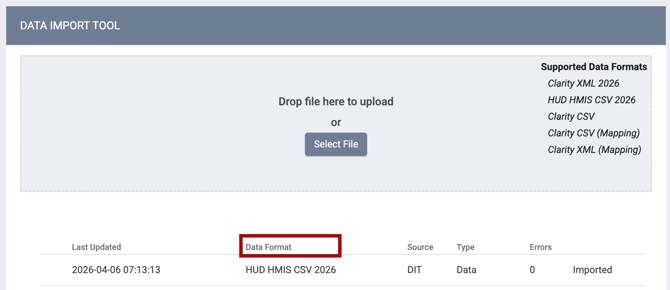
The HUD Standard column header in the import history list has been renamed to Data Format.
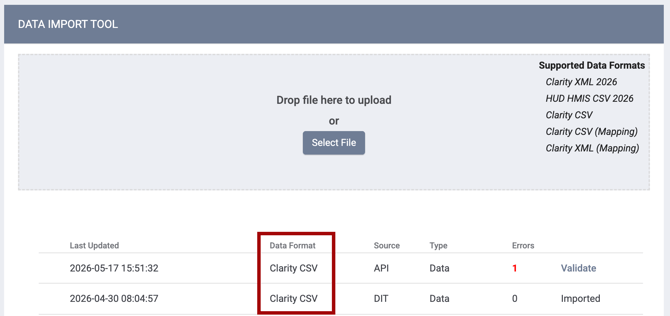
When a Clarity CSV zip file is uploaded, the Data Format column displays Clarity CSV.
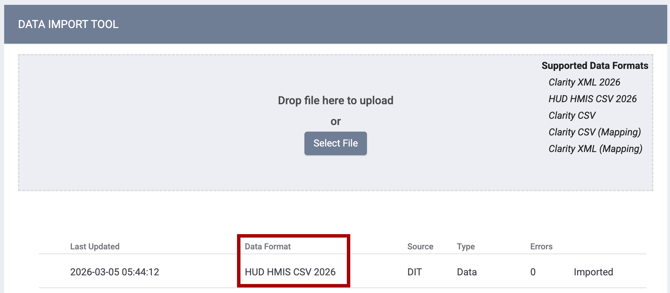
When a standard FY26 HMIS CSV file is uploaded, the column continues to display the HUD HMIS CSV 2026 format.
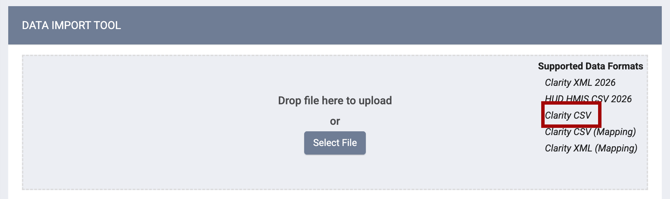
The DIT UI now accepts Clarity CSV uploads, in addition to the existing Clarity XML and FY26 HMIS CSV uploads.
Existing mapping screens work with Clarity CSV and source-to-target mappings, configured via the DIT UI, RESTful DIT API, or Clarity and HMIS Bulk Format Import Tool, apply to Clarity CSV data in the same way they do to Clarity XML data.
Custom Schema Definition
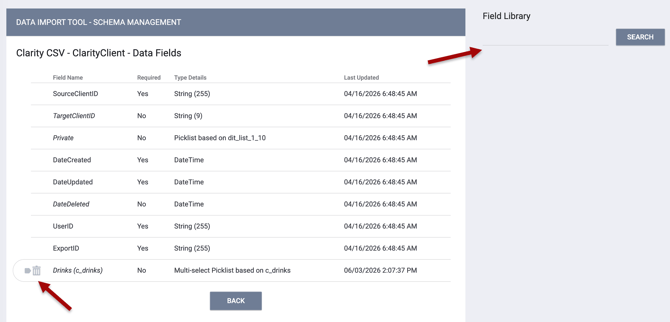
Clarity CSV can be customized via a new Schema Management section.
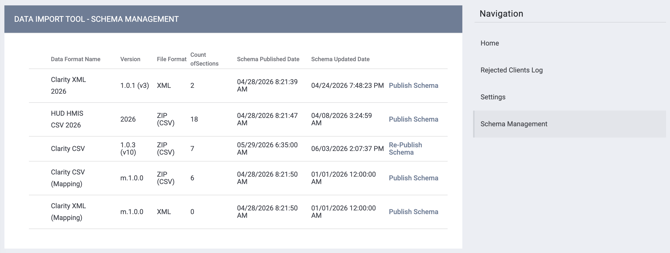
It is a one-stop place to:
-
Manage all your available formats with versioning
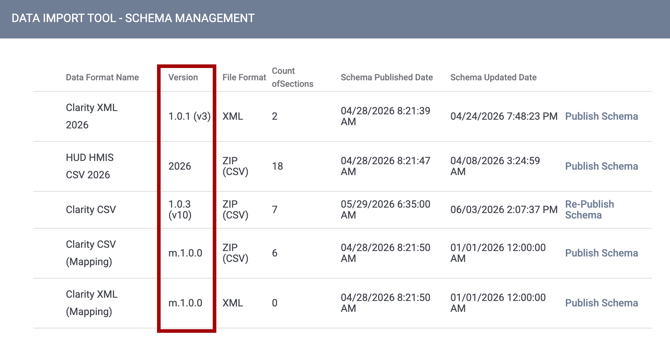
-
View the schema or Edit the data format
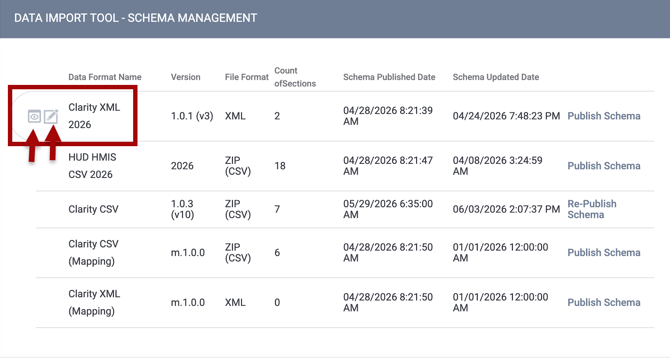
-
Then you can view or edit a data section within each format
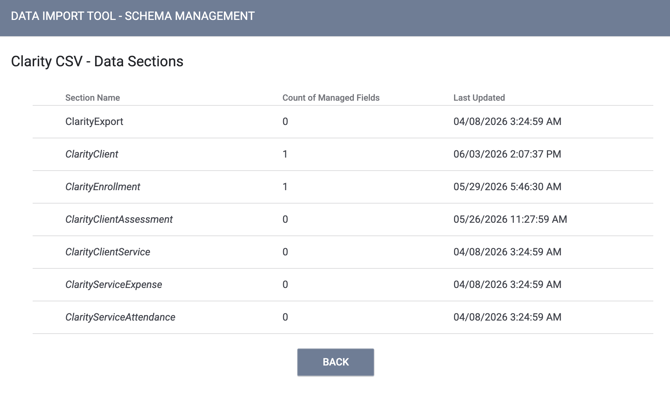
After clicking edit for a data section, you can view, add fields, or delete custom fields
Clarity and HMIS Bulk Format Import Tool
The Clarity and HMIS Bulk Format Import Tool now accepts Clarity CSV and FY26 HMIS CSV zip files in addition to Clarity XML. Mapping files are still supported for Clarity CSV and Clarity XML, as well as with this UI Tool.
Validation
Validation messages are generated for Clarity CSV files according to the rules specified in the machine-readable CSV on the Web definition file. Validation warnings and errors appear in the DIT import log in the same way they do for Clarity XML and HMIS CSV. Refer to the Importing Data using the Data Import Tool (DIT) article for more details.
Client Matching
A new “TargetClientID Match Only” client-matching strategy has been introduced for Clarity CSV. With this match strategy, and with the improved “No Matching” strategy, when a TargetClientID (the 9-character Clarity Unique ID) is present in a Clarity CSV record file, it automatically updates that existing target Client Unique ID if present in the receiving Clarity system.
However, there are differences between the “TargetClientID Match Only” and the “No Matching” strategy.
- With TargetClientID Match Only, no new records are ever created.
- With the “No Matching” strategy, if a TargetClientID isn’t found, the system will create a new record.
Note: A new password-protected Resource article with Clarity CSV tools has been added to the Help Center in the Bulk Import Details section. Data Import Tool (DIT) users with confidential article access will be able to review a Data Import Tool (DIT) Bulk Import Resources article. Reach out to the Support Team if you need additional assistance.
Required Action: As noted in our May 11, 2026, email to customers, Bitfocus will officially end support for Clarity XML on September 30, 2026. After the June 16, 2026, release to production sites, anyone still using XML files should plan to migrate to the Clarity CSV schema.
Introducing Customer Operational REST APIs
We are excited to announce an important enhancement to our Operational API offering: the introduction of REST APIs.
Why REST?
While GraphQL offers powerful querying capabilities, the addition of REST APIs provides increased ease of use and greater flexibility for your development teams. This expansion of our API suite is designed to offer:
- Improved Clarity Coverage: Broader access to the data you need within Clarity Human Services.
- Enhanced Usability: A more mainstream and familiar architectural style for your developers.
- Future-Proof Access: A robust, scalable way to programmatically access and query client records.
Note for System Admins: Direct email communication with additional details will be sent to current GraphQL customers within a week of this article's publication.
Required Action: After your instance receives its Auth0 update, reach out to the support team at support@bitfocus.com to get started with REST API setup.
Update: API Access Control for Customer Operational API
We've added a new per-user API Access control that gives administrators granular oversight of who can access REST Operational API.
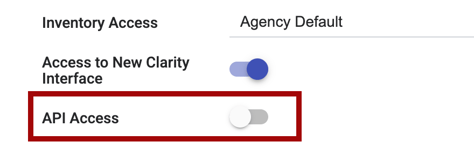
- API Access toggle — A new API Access toggle is now available at Launchpad > MANAGE > STAFF > MODIFY THE STAFF, allowing administrators with Manage Agency - Staff access rights to enable or disable API authentication on a per-user basis.
- Secure by default — When this feature is deployed, API access is turned OFF for all users, including System Administrators. An administrator with Manage Agency - Staff access rights must explicitly grant access.
- New users default to off — Any newly created user will have the API Access setting disabled by default until an administrator with Manage Agency - Staff access rights
enables it. - Full audit trail — Every change to a user's API Access toggle is recorded in the staff member's account audit log, capturing:
-
- From Values
-
- To Values
-
- Changed By: Clarity version and System Administrator’s first and last name
- Date / Time (no Header).
Update Note (06/17/2026):
The API Access setting is intended to be used for the upcoming REST Operational API access. At this time, the API Access setting does not affect existing GraphQL Operational API access.
The original Required Action for this feature has been removed.
Required Action: None.
DIT – Corrected Validation for HMIS Health Insurance Data Elements 4.04.[3-11]A (Hotfix)
Correct validation for HUD HMIS Data Elements 4.04.[3-11]A (Reasons for No Health Insurance) will be reinstated in the June 17, 2026, hotfix following the June 2026 release. In October 2024, validation for these elements was temporarily removed because it was incorrectly requiring responses for non-HOPWA-funded projects, which blocked imports for customers who did not populate these fields. With this hotfix, validation will be restored using the new DIT validation framework with the following improvements:
- HOPWA-aware validation: The DIT will now correctly determine whether an Enrollment Project is HOPWA-funded (Funding Source values 13–19, 48) before validating the 4.04.[3-11]A dependent elements.
- Non-blocking errors: Validation issues for these elements will be logged as non-import-blocking warnings, allowing imports to proceed while flagging data quality concerns for review.
- Non-HOPWA projects unaffected: Projects that are not HOPWA-funded will not trigger validation warnings for null values in these elements.
This update applies to both HMIS CSV and HMIS XML imports.
Client Record Updates
Program Visibility: An update to Public Listing Settings
We’re excited to announce that comprehensive updates have been made to how programs are visible and available during the referral process. The program setup setting formerly known as Public Listing has been redesigned and replaced with more granular Program Visibility settings, giving system administrators more precise control.
This update improves data quality, streamlines the user experience, and more effectively integrates Inventory into the referrals process.
This update will impact:
- Access Rights
- Program Visibility Settings
- Agency/Program Visibility for Program Referrals
- Inventory: Unit/Bed Referrals
- Eligibility Determination
- Tracked Characteristics
Refer to the new article Program Setup: Program Visibility for full details.
Mapping Included:
The following mapping will occur in relation to this update on June 16, 2026, the date updates go live in production sites.
Access Rights:
For users who have the Create Referrals access right enabled:
- The Reassign Community Queue Referrals access right will be enabled for the user.
- The Create Referrals - Eligibility Determination Screen access right will be enabled for the user.
For users who have the Referrals - Community Queue Reassign To Unit access right enabled:
- The Reassign Community Queue Referrals access right will be enabled for the user.
Program Settings:
If a program is set to Public Listing = Public
- Then, each Program Visibility field will be set to Public
If a program is set to Public Listing = Agency
- Then, each Program Visibility field will be set to Agency
If a program is set to Public Listing = None
- Then, each Program Visibility field will be set to None
If a program is set to Allow Restricted Referrals from Other Agencies = ON
- Then, each Program Visibility will be set to Limited.
- Also, each Limit Type will have Agency/User enabled.
- And, any agency selected in Agencies Sending Referrals will be selected for each Limited: Select Agencies/Users field.
- Note: When Allow Restricted Referrals from Other Agencies = ON, but no Agencies Sending Referrals have been selected, update to Program Visibility = Public Listing.
Housing Inventory Settings:
If at least one agency is selected in the Agencies Sending Referrals field on the Building, Unit, or Bed screen :
- Unit/Bed Limit Type will have Agency/User selected.
- The same agencies will be automatically added for the Agencies Sending Referrals field.
Required Action: Automatic mapping ensures the same referral availability and user access for the majority of settings prior to this update. There are additional manual actions required for matchmaker access role permissions and for programs where the Public setting was previously set to None, as detailed below.
Update Note (06/17/2026) - There are additional actions needed for impacted program setup and matchmaker access role permissions:
Matchmakers will no longer be able to reassign Community Queue Referrals to programs where Program Visibility: Community Queue/Unit Queue = None in their program setup.
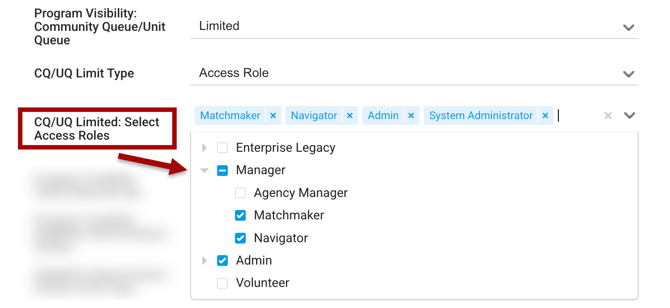
Programs that should continue to receive matchmaker referrals from the Community Queue should have settings with Program Visibility: Community Queue/Unit Queue = None updated to Program Visibility: Community Queue/Unit Queue = Limited, CQ/UQ Limit Type = Access Role, and an Access Role(s) with the Referral Match Maker access right added to the list for the setting CQ/UQ Limited: Select Access Roles.
Matchmakers now also need the Reassign Community Queue Referrals access right enabled in their access role to continue reassigning Referrals from Community Queues to Programs/Units/Beds.
To identify impacted programs that may require updates in connection to their Community Queue visibility settings, the following Looker fields can be utilized on the Project Descriptor Model: "Program Visibility: Community Queue/Unit Queue" and “Programs - Community Queue Name."
Filter for Programs that are connected to one or more Community Queues and where "Program Visibility: Community Queue/Unit Queue" is set to None. These are the programs that will need their Program Visibility: Community Queue/Unit Queue setting updated in program setup to receive referrals from connected Community Queues.
Data Analysis Required Action: Refer to the Data Analysis Public Listing updates section in this article for additional updates. A Data Analysis Required Action is also included in the section.
Deleted Records Update (07/01/2026)
A script is being applied for deleted records to update the last_updated date in the client_program_demographics table to the same date as in the client_programs table to ensure accuracy.
A now-resolved bug was storing more recent dates for the impacted fields, and this will correct the data.
Pentaho Reporting Updates
New: [GNRL-411(-AD)] Clarity CSV Export
The Clarity CSV Export report generates data extracts in the Clarity CSV format. Users will be able to filter the export by date range, files to include, and other prompts to customize output. This report is designed to replace the legacy Clarity XML export, supporting downstream DIT import and other interoperability workflows on the standardized Clarity CSV specification.
A new [GNRL-411(-AD)] Clarity CSV Export article has been published with more details.
Required Action: None, if access will only be needed for System Administrators. For communities that wish to enable the report for additional users or restrict it in some way, a system administrator will need to update the report's configuration. Refer to the System Advanced Options: Report Library article for configuration information.
Update: [STFF-101] User Activity Report
The [STFF-101] User Activity Report has been improved and standardized with other STFF reports. The report name will be updated to [STFF-101] Staff Activity Report, and it includes a new parameter for Staff Status(es) and updated logic to return staff members with Additional Agency Access based on the agency selected by the reporter when the report is run.
Refer to the [STFF-101] Staff Activity Report article for more details.
Required Action: None.
Update: [STFF-102-AD] Access Role User List
The [STFF-102-AD] Access Role User List report has been improved and standardized with other STFF reports. The report name will be updated to [STFF-102-AD] Access Role Staff List, and it includes a new parameter for Staff Status(es) that supports multi-select and clarifies the label for CoC (Agency CoC).
Refer to the [STFF-102-AD] Access Role Staff List article for more details.
Required Action: None.
Data Analysis Updates
Update: Program Visibility - Public Listing Setting Changes (Looker)
Data Analysis updates have been made to align with the program Public Listing setting updates detailed above in this article.
The following fields in the Programs view have been exposed in the Project Descriptor Model.
|
View |
Group Label |
Label |
Description |
LookML Field Name |
|
Programs |
Program Visibility |
Programs Community Queue/Unit Queue |
"Program-level control of CQ/UQ visibility, with possible values of: Public, Limited, Agency, and None." |
|
|
Programs |
Program Visibility |
Programs Client Referral Tab |
“Program-level control of Client Referral visibility, with possible values of: Public, Limited, Agency, and None." |
|
|
Programs |
Program Visibility |
Programs Eligibility Determination Screen |
"Program-level control of Eligibility visibility, with possible values of: Public, Limited, Agency, and None." |
|
The following fields in the Program Visibility view have been exposed in the Project Descriptor Model.
|
View |
Label |
Description |
LookML Field Name |
|
Program Visibility |
Program Visibility Limit Type |
"Program ID's Visibility Limit Type." |
|
|
Program Visibility |
Program Visibility Section |
"Section display for which the Limit Type has been defined for the Program ID." |
|
|
Program Visibility |
Agency/User/Access Role Limit Type |
"The visibility limit type of the Agency/User/Access Role Name dimension." |
|
|
Program Visibility |
Agency/User/Access Role Name |
"The name of the Agency/User/Access Role according to the Limit Type." |
|
The following fields in the Programs view have been added to the Project Descriptor Model.
|
View |
Group Label |
Label |
Description |
LookML Field Name |
|
Programs |
Program Visibility |
CQ/UQ Limited: Select Agencies |
"A list of the agencies allowed to send referrals to the program's community/unit queues when the 'Program Visibility: Community Queue/Unit Queue' setting is set to 'Limited'." |
|
|
Programs |
Program Visibility |
Client Referral Tab Limited: Select Agencies |
"A list of the agencies allowed to send referrals to the program when the 'Program Visibility: Client Referrals tab' setting is set to 'Limited." |
|
|
Programs |
Program Visibility |
Eligibility Screen Limited: Select Agencies |
"A list of the agencies allowed to send referrals to the program's Eligibility Determination Screen when the 'Program Visibility: Eligibility Determination Screen' setting is set to 'Limited." |
|
|
Programs |
Program Visibility |
Limit Program Visibility |
"Is program visibility set to 'Limited' for 'Community Queue/Unit Queue', 'Client Referrals tab', or 'Eligibility Determination Screen'?" |
|
The following fields in the Programs view have been removed from the Project Descriptor Model.
|
View |
Label |
LookML Field Name |
|
Programs |
Agencies Sending Referrals |
|
|
Customer Action Required: The Agencies Sending Referrals field for the Programs view is being removed from Looker and is not directly replaced by another field. Any content currently using this field will need to be updated to use the three new fields associated with program visibility settings: CQ/UQ Limited: Select Agencies, Client Referral Tab Limited: Select Agencies, and Eligibility Screen Limited: Select Agencies. |
||
|
Programs |
Public Listing |
|
|
Programs |
Restricted Agency Referrals |
|
|
Inventory - Buildings |
Restricted Agency Referrals |
|
|
Inventory - Buildings |
Agencies Sending Referrals |
|
|
Inventory - Building Units |
Restricted Agency Referrals |
|
|
Inventory - Building Units |
Agencies Sending Referrals |
|
|
Inventory - Unit Configuration Beds |
Restricted Agency Referrals |
|
|
Inventory - Unit Configuration Beds |
Agencies Sending Referrals |
|
The following fields in Inventory-related views have been exposed in the Inventory Model and Project Descriptor Model.
| View | Label | Description | LookML Field Name |
| Inventory - Unit Configuration Beds | Limit Unit/Bed Visibility | "Is the Visibility of this Unit/Bed settings limited? (Yes/No)." | unit_bed_settings.unit_bed_visibility |
| Inventory - Unit Configuration Beds Visibility | Agency/User/Access Role Name | "The name of the Agency/User/Access Role according to the Limit Type." | unit_bed_settings_visibility_details.object_type |
| Inventory - Unit Configuration Beds Visibility | Agency/User/Access Role Limit Type | "The visibility limit type of the Agency/User/Access Role Name dimension." | unit_bed_settings_visibility_details.object_name |
| Inventory - Unit Configuration Beds Visibility | Limit Type | "Unit ID's Visibility Limit Type." | unit_bed_settings_visibility.limit_type |
| Inventory - Unit Configuration Beds Visibility | Section | "Section display for which the Limit Type has been defined for the Unit ID." | unit_bed_settings_visibility.section |
| Inventory - Building Units | Inventory - Building Units Limit Unit/Bed Visibility | "Is the Visibility of this Unit/Bed limited? (Yes/No)." | units.unit_bed_visibility |
| Inventory - Building Units Visibility | Inventory - Building Units Visibility Agency/User/Access Role Limit Type | "The visibility limit type of the Agency/User/Access Role Name dimension." | unit_visibility_details.object_type |
| Inventory - Building Units Visibility | Inventory - Building Units Visibility Agency/User/Access Role Name | "The name of the Agency/User/Access Role according to the Limit Type.” | unit_visibility_details.object_name |
| Inventory - Buildings | Inventory - Building Units Limit Unit/Bed Visibility | "Is the Visibility of this Unit/Bed limited? (Yes/No)." | buildings.unit_bed_visibility |
| Inventory - Buildings Visibility | Inventory - Building Units Visibility Agency/User/Access Role Limit Type | "The visibility limit type of the Agency/User/Access Role Name dimension." | building_visibility_details.object_type |
| Inventory - Buildings Visibility | Inventory - Building Units Visibility Agency/User/Access Role Name | "The name of the Agency/User/Access Role according to the Limit Type." | building_visibility_details.object_name |
Required Action:
- The Agencies Sending Referrals field, listed above, is being removed from Looker and is not directly replaced by another field. Any content currently using this field will need to be updated to use the three new fields associated with program visibility settings:
- CQ/UQ Limited: Select Agencies
- Client Referral Tab Limited: Select Agencies
- Eligibility Screen Limited: Select Agencies.
- Content that was using the 9 removed fields, listed above, may need to be updated. Please reach out to your BFF/CoAD/Support Team for a list of content impacted for your community.
Update: Linking Program Information for Import File Logs (Looker)
The following updates have been made to the Data Import Analysis Model.
Changes were made to the join structure of the Import Service Map, Import Client Map, Import Enrollment Map, and Import Location PH Housing Map views to make the data more interpretable for users.
The User Uploading dimension underneath the Import view has been updated from a number to a string datatype. Also, the User Uploading dimension description was updated with clarification on field behavior for the Data Import Analysis Model:
|
View |
Label |
Previous Description |
Current Description |
LookML Field Name |
|
Import |
User Uploading |
N/A (no description) |
“The username of the user that uploaded the import file.” |
|
The following fields have been exposed for the Import Logs view in the Data Import Analysis Model.
|
View |
Label |
Description |
LookML Field Name |
|
Import Logs |
Agency ID |
"The ID of the agency that successfully inserted or updated the record." |
|
|
Import Logs |
Agency Name |
"The name of the agency that successfully inserted or updated the record." |
|
|
Import Logs |
Program ID |
“The ID of the program that successfully inserted or updated the record." |
|
|
Import Logs |
Program Name |
"The name of the program that successfully inserted or updated the record." |
|
The following field has been added to the Imports view in the Data Import Analysis Model.
|
View |
Label |
Description |
LookML Field Name |
|
Import |
Agency Name |
"Agency Name of the user who created the Import File." |
|
Required Action: None.
New: Data Import Analysis Dashboard
We have released the new Data Import Analysis LookML dashboard. It includes high-level counts of imports attempted and completed across the system. It also allows for the analysis of individual import results.
Refer to the Data Import Analysis Dashboard article for more information.
Required Action: None.
New: Agency Release of Information Dashboard
We have released the new Agency Release of Information LookML dashboard. The Agency Release of Information Dashboard provides insights into agency Release of Information (ROI) completion and the ROI status of agency clients, including those without an active ROI, those with ROIs that are soon to expire, and those who are set to Private and/or Consent Refused.
Refer to the Agency Release of Information Dashboard article for more information.
Required Action: None.
New: System Release of Information Dashboard
We have released the new System Release of Information LookML dashboard. The System Release of Information Dashboard provides a CoC and an Agency level analysis of client ROI compliance. This dashboard monitors the current ROI status for newly created, enrolled, and served clients, identifies compliance gaps, tracks consent trends, and identifies Private and Consent Refused clients.
Refer to the System Release of Information Dashboard article for more information.
Required Action: None.
We Welcome Your Ideas
We encourage you to suggest improvements and new features for our products. You can create feature suggestions or vote, watch, and comment on existing suggestions at ideas.bitfocus.com. Refer to our Feature Suggestions article for additional details.
New and Updated Help Center Resources
We will either update or create articles in response to this Clarity Human Services update by EOD, Tuesday, June 16, 2026.
Notes:
-
Feature updates will be available in all training sites on Tuesday, June 2, 2026, and in all production sites on Tuesday, June 16, 2026.
-
Articles with links will be added below when articles are published with feature updates information. If an article is updated or created before the Clarity "go live" dates noted above, a note will be added to the top of the article.
Updated: 07/01/2026