
Table of Contents
Purpose
The Agency Release of Information Dashboard provides insights into agency Release of Information (ROI) completion and the ROI status of agency clients, including those without an active ROI, those with ROIs that are soon to expire, and those who are set to Private and/or Consent Refused. It tracks ROI status for both newly created clients and active enrollees, specifically identifying ROIs that expired within the last 30 days or will expire within the next 30 days.
The dashboard is also equipped with enrollment program and agency staff member dashboard filters, allowing for more precise analysis. It identifies records without a Yes permission, though it may not account for ROI policies unique to a community.
For a system-level analysis, see the System Release of Information Dashboard article.
Dashboard Filters
This dashboard has eight filters that allow for more precise analysis by limiting results to Reporting Period, Program CoC, Project Type, Agency Name, Program Name, Assigned Staff, Client Unique ID, and Client Name.
The table below outlines what Looks the filters apply to and the default values.
|
Default Values |
Looks |
|
Agency Name Default: is any value |
Applies to all Looks Filter value required to run the dashboard Selection impacts filter options for Actively Enrolled Program Name and Agency Staff Member Name |
|
Actively Enrolled Program Name Default: is any value |
Applies to the Actively Enrolled Client ROI Status dashboard section only |
|
Agency Staff Member Name Default: is any value |
Applies to all Looks
|
|
Client Unique Identifier Default: is any value |
Applies to all Looks
|
Content
The dashboard content is broken down into two sections:
The following Looks make up the Agency Release of Information Dashboard. For more information on how each Look is configured, what fields are used, and/or custom fields, please review the Look by selecting Explore from Here within the ellipses icon in the upper right corner.
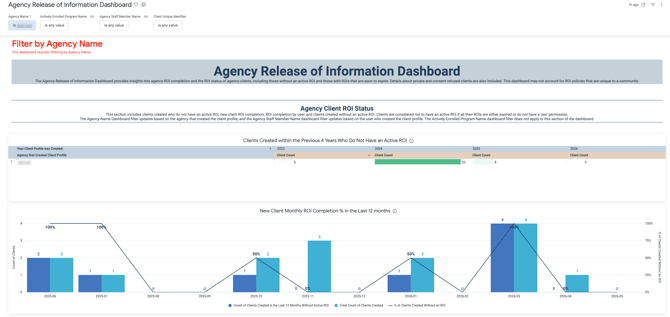
Agency Client ROI Status
This section of the dashboard comprises 8 Looks that identify clients created by the identified agency who do not have an active ROI, track new client ROI completion, and monitor ROI completion by user.
Clients are considered not to have an active ROI if all their ROIs are either expired or lack a Yes permission.
Notes:
-
The Agency Name dashboard filter updates based on the Agency that created the client profile, and the Agency Staff Member Name dashboard filter updates based on the user who created the client profile.
-
The Actively Enrolled Program Name dashboard filter does not apply to this section.

- Clients Created within the Previous 4 Years Who Do Not Have an Active ROI
- This Look counts client profiles created within the last four years that currently lack an active ROI by the agency that created the client profile.
- New Client Monthly ROI Completion % in the Last 12 months
- A monthly trend analysis comparing the total count of clients created to those without an active ROI. The line graph tracks the % of clients created per month without an ROI.
- ROI Completion % by User in the Last 12 months
- This Look calculates the % of clients created in the last 12 months without an active ROI by the user who created the client profile and their specific ROI missing rate.
- Clients Created in The Last 12 Months Without an Active ROI
- A single value headline displaying the total number of client profiles created within the last 12 months that do not have an active ROI.
- Detailed List of Clients Created in the Last 12 Months Without an Active ROI
- A table showing the client’s unique identifier, privacy status, and consent refused status, alongside data about their most recent ROI.
- Clients Created in the Last 30 Days Without an Active ROI
- A single-value headline displaying the count of client profiles created within the last 30 days that do not have an active ROI.
- Detailed List of Clients Created in the Last 30 Days Without an Active ROI
- A detailed table providing specific information for profiles created in the last month, displaying the latest inactive ROI detail due to expiration or No permission.
- Clients Created in the Last 30 Days Without an Active ROI by Profile Creation Date
-
- A column chart focusing on the profile creation date for the last 30 days. It provides daily totals of clients created without an ROI.
Actively Enrolled Client ROI Status
This section of the dashboard comprises 9 Looks that provide details on the ROI status of currently enrolled clients. This includes active enrollees who do not have an active ROI and active enrollees whose ROI expired within the last 30 days or will expire within the next 30 days.
Clients are considered to have no active ROI if all their ROIs are either expired or do not have a Yes permission. The included ROI data is the most recently created ROI per client.

Notes:
-
The Agency Name dashboard filter updates based on the Enrolling Agency, and the Agency Staff Member Name dashboard filter updates based on the active enrollment's assigned staff.
-
All dashboard filters apply to this section.
- Actively Enrolled Clients Without an Active ROI by Program
-
- A program-specific audit listing the enrolling program, the count of missing ROIs, and the % of enrolled clients without an active ROI.
- Clients Currently Enrolled Without an Active ROI- Count
- A comparison showing the total enrolled clients missing an ROI and the count of active enrollments impacted.
- Clients Currently Enrolled Without an Active ROI- List
- A client list showing the actively enrolled clients who are missing an ROI, including their most recent ROI, if they had one.
- Actively Enrolled Clients whose ROI Expired in the Last 30 Days
- A count of current enrolled clients who have an ROI with an end date that is within the previous 30 days.
- Detailed List of Actively Enrolled Clients whose ROI Expired in the last 30 days
- A table featuring a Days Expired table calculation. It lists the actively enrolling programs and assigned staff.
- Actively Enrolled Clients with ROIs That Will Expire Within 30 Days
- A count identifying clients whose ROIs are currently active but are set to expire in the next 30 days.
- Detailed List of Actively Enrolled Clients with ROIs That Will Expire Within 30 Days
- A table capturing those who will soon have an ROI expiration that includes a days until ROI expiration table calculation.
- Actively Enrolled Clients Set to Private
- A table that identifies actively enrolled clients who have a profile that is set to Private.
- Actively Enrolled Clients Set to Consent Refused
-
- A table that identifies actively enrolled clients who have a profile that is set to Consent Refused.
Published: 05/04/2026