
Release Schedule:
- All Training Sites: Monday, July 27, 2026
- All Production Sites: Monday, August 10, 2026
Feature Focus Recording:
Click here for a recording of the August 6, 2026, Feature Focus recording!
Clarity Human Services Updates
Client Record Updates
- Featured Update: Overnight Unit/Bed Drop-ins (Current & New Clarity Interfaces)
- Release of Information (ROI) Verification (Current Interface)
- Clarity Human Services System Emails (Current & New Clarity Interfaces)
New Clarity Interface Updates:
- Weekly updates for Clarity’s new interface are now added to a separate article. To review weekly updates, see the Clarity’s New Interface: Weekly Release Notes article.
Pentaho Reporting Updates
- [STFF-107] Staff Details Report
- Overnight Unit/Bed Drop-ins: Reports
- [HUDX-111] HUD CSV / XML Program Data Export [FY 2026]
- Update Note added 07/27/2026
- [GNRL-411(-AD)] Clarity CSV Export
- [HUDX-223-AD] System Performance Measures Report
- [HUDX-227(-AD)] Annual Performance Report and [HUDX-228(-AD)] ESG CAPER
- [GNRL-212(-AD)] Profile Details Report, [GNRL-210(-AD)] Assessment Details Report, and [GNRL-220(-AD)] Program Details Report
- [STFF-101] Staff Activity Report
- Chronic Homelessness at PIT Calculations
- Additional Pentaho updates can be found here:
Data Analysis Updates
- Data Analysis Folder Structure
- BHSA Chronically Homeless Fields
- Overnight Unit/Bed Drop-ins: New Fields
- Geolocations Table: UserCreated/UserUpdated Fields
- SPM Measure 4
- The 2026 Data Services Change Log and Known Issues article and the Data Analysis Upgrade Note articles are released separately.
New and Updated Help Center Resources
We update existing Help Center articles and create new ones based on the included feature updates.
Notes:
- The updates described in this article will be deployed in the early morning hours on scheduled release days. During release, the Clarity Human Services application and Data Analysis Tool may experience performance delays. We recommend clearing your cache at your initial login if you are experiencing difficulty.
- Data Analysis updates follow the same feature release schedule dates. There may be a slight delay when accessing Looker after the release while system updates are applied.
- The Data Analysis Folder update will roll out to instances throughout August to ensure quality and stability. No Looker downtime is expected during this release.
Client Record Updates
Featured Update: Overnight Unit/Bed Drop-ins (Current & New Interface)
We’re pleased to announce Overnight Drop-in functionality for communities utilizing Inventory to quickly assign a client to a bed overnight.
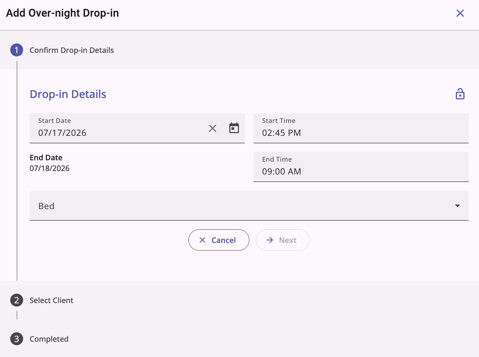
Update Note (August 26, 2026)
We've identified and corrected an issue with the new Unit/Bed Occupancy sharing setting introduced in this release.
Previously, a unit/bed occupancy created from a referral was owned by the referring agency rather than the enrolling agency. Depending on sharing settings, this could cause staff outside the referring agency to lose visibility into occupancies within their own programs, or prevent them from editing or ending those occupancies.
With this update, unit/bed occupancy ownership is now based on the enrolling agency, for both referral-based occupancies and drop-ins recorded without an enrollment. This applies automatically going forward. A data migration will update ownership on existing occupancy records to reflect this change; no action is needed to update historical records.
The following articles have been updated:
Required Action:
If your community adjusted sharing settings or access rights as a workaround after the August 2026 release, please review those settings now that ownership has been corrected.
Sharing Setting Configuration:
System Admins should review referring agency and enrolling agency sharing settings for Unit/Bed Occupancy at MANAGE > [Agency] > SHARING to confirm they still reflect intended sharing rather than the temporary workaround.
- If you set the sharing settings for Unit/Bed Occupancy to Full Share specifically to work around this, you can likely revert it to your original setting.
Access Rights Configuration:
System Admins should review user access rights to confirm they still reflect intended access rather than the temporary workaround.
- If you granted the Edit Any Agency Enrollment-based Unit Records and/or Delete Any Agency Enrollment-based Unit Records access rights to grant editing access, you can likely remove that and rely on the agencies' standard edit/delete rights instead. This avoids leaving broader, system-wide editing permissions in place than you intended.
Key highlights:
- System Admins can enable and configure Overnight Drop-in settings at the Site, Building, or Unit level, including whether program enrollment is required and when occupancy automatically ends.
- Nine new access rights give administrators granular control over who can create, edit, and delete drop-in and enrollment-based occupancy records.
- Drop-ins can be added to any available, occupied, or pending bed from the Inventory Dashboard, with eligibility checking and optional enrollment steps built into the workflow.
- Auto-exit logic, from the unit/bed and from the enrollment, handles program enrollment cleanup when a drop-in ends, with rules for multiple drop-ins and existing activities.
- Sharing rules, privacy settings, and Public Alerts are all extended to cover occupancy records.
- Occupancy records are also visible in the client History tab and Program Units/Beds tab, and behave correctly through client merge, program merge, and program move actions.
The following standalone articles contain full details:
See the Overnight Unit/Bed Drop-Ins: Reports section in this article for reporting impacts.
See the Overnight Unit/Bed Drop-Ins: New Fields section in this article for reporting impacts.
Required Action: Inventory settings, User access roles, and Sharing settings may need to be reviewed/updated if your community uses Inventory.
Update: Release of Information (ROI) Verification (Current Interface)
Release of Information (ROI) verification has been updated for the following workflows:
- Service workflow for adding an Attendance Service
- Service workflow for adding a Reservation
- Referral + Reservation workflow for adding Reservations
When the Require Release of Information setting is enabled for the service item and the client does not have an active ROI, the text "Client missing release of information" now displays in place of the Save/Preview Reservation option.
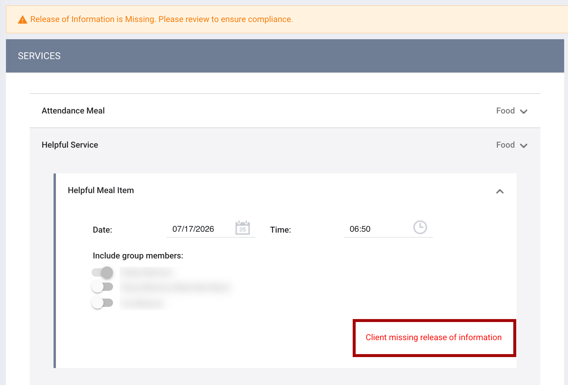
Required Action: None.
Update: Clarity Human Services System Emails (Current & New Interface)
Clarity Human Services system emails have been updated. All automated system emails sent from Clarity now display the new Clarity interface branding, for password resets, new user verification, alert notifications, and more.
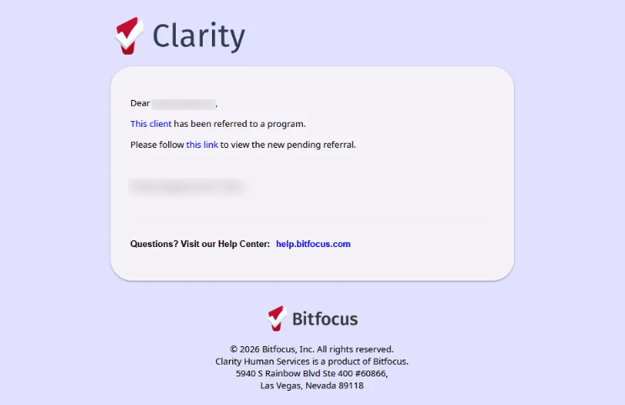
The company address, website, and any other relevant contact details in all system email footers have been updated to the current Bitfocus information.
A centralized link-generation component now evaluates the user's access, page readiness, and authorization to route each email link to the correct Clarity interface, with full audit log records of the routing decision.
This update applies to all emails used for automated system notifications (e.g., password resets, new user verification, alert notifications). A complete list of system notifications can be found in the System Notifications article.
Required Action: None.
Pentaho Reporting Updates
New: [STFF-107] Staff Details Report
The Staff Details report provides a comprehensive list of staff members with agency access, including key information such as username, access role, email, phone number, and status. The report allows you to review active, inactive, locked, and deleted staff records, making it useful for staff administration, audits, and access reviews.
The [STFF-107] Staff Details Report article contains all details.
Required Action: Once the article is live in your instance, review the report settings and update as appropriate. Refer to the System Advanced Options: Report Library article for assistance.
Update: Overnight Unit/Bed Drop-ins: Reports
Overnight Drop-in functionality has been added in Clarity Human Services. More information about the functionality can be found in the Overnight Unit/Bed Drop-ins section of this article.
The following reports are being updated to align with the updated sharing logic and drop in records based on this feature:
Required Action: None.
Update Note (July 27, 2026) - [HUDX-111(-AD)] CSV/XML Export
We have updated the [HUDX-111] HUD CSV/XML Program Data Export to include three new parameters purpose-built to support monthly VA By-Name List (BNL) reporting. These additions allow communities to seamlessly isolate veteran-only data and scope it to specific VA Medical Center (VAMC) Station Number(s) in a single export action.
The following parameters have been added:
- Veterans Only?
This parameter limits the export universe exclusively to clients with Veteran Status = Yes. This eliminates the need to export your entire client dataset, preventing the oversharing of non-veteran Personally Identifiable Information (PII) and eliminating the need to manually strip records after export. - VAMC Filter?
This parameter enables filtering by Veterans Affairs Medical Center (VAMC). - VAMC Station Number(s)
When the VAMC Filter? parameter is enabled, the VAMC Station Number(s) parameter lets you select one or more active VAMC codes configured in your instance.
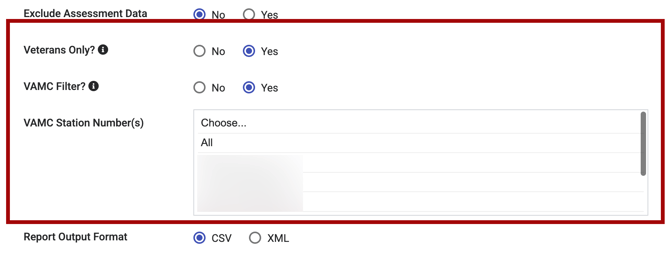
This update was released to training sites on July 27, 2026, and to production (live) sites on August 10, 2026.
Update: [GNRL-411(-AD)] Clarity CSV Export
The [GNRL-411(-AD)] Clarity CSV Export was updated to add ClientServiceEndDate and to relabel DateProvided as ClientServiceStartDate, ensuring alignment with the Clarity CSV schema and DIT functionality.
This update was released to training sites on 06/29/2026 and to all production sites on 07/01/2026.
Required Action: None.
Update: [HUDX-223-AD] System Performance Measures Report
For the [HUDX-223-AD] System Performance Measures Report, Measure 4 was updated in Pentaho and Looker to ensure that null income is handled appropriately for comparisons and that Annual Assessments fall within the anticipated +/- 30-day window to qualify for income comparisons.
This update was released to training sites on 07/13/2026 and to all production sites on 07/15/2026.
Required Action: None.
Update: [HUDX-227(-AD)] Annual Performance Report and [HUDX-228(-AD)] ESG CAPER
For [HUDX-227(-AD)] Annual Performance Report and [HUDX-228(-AD)] ESG CAPER, updates were made to ensure alignment with clarified guidance from HUD. Q22e. Length of Time Prior to Housing was updated to ensure that minor clients with the same Project Start Date as the Head of Household are counted as anticipated. This update also impacts table Q27l, which provides the Length of Time Prior to Housing table with Youth filtering applied.
This update was released to training sites on 07/13/2026 and to all production sites on 07/15/2026.
Required Action: None.
Update: [GNRL-212(-AD)] Profile Details Report, [GNRL-210(-AD)] Assessment Details Report, and [GNRL-220(-AD)] Program Details Report
The [GNRL-212(-AD)] Profile Details Report, [GNRL-210(-AD)] Assessment Details Report, and [GNRL-220(-AD)] Program Details Report were updated to standardize field type handling across all three reports. Field Type: Hierarchy Select - Continuum Project List now returns the program name instead of the ID, and Field Type: Location was updated to align with the Clarity Human Services interface.
This update was released to training sites on 07/13/2026 and to all production sites on 07/15/2026.
Required Action: None.
Update: [STFF-101] Staff Activity Report
The [STFF-101] Staff Activity Report was updated to ensure successful report delivery when the report output format is set to Excel, and there is more than one tab with the same Staff Name, by using Staff ID along with Staff Name to create unique tab titles.
This update was released to training sites on 07/13/2026 and to all production sites on 07/15/2026.
Required Action: None.
Update: Chronic Homelessness at PIT calculations
Chronic Homelessness at Point-in-Time Logic Discrepancies in the HMIS Reporting Glossary were identified, allowing clients entering a program on the first of the month to experience a double-counted month toward Chronic Homelessness status at a Point-in-Time for certain project types (Emergency Shelter – Entry Exit and Safe Haven). We have informed HUD of this ambiguity in the documentation, received guidance on anticipated calculations, and updated the Chronic Homelessness at PIT calculations to ensure accurate logic is applied.
This update was released to training sites on 07/13/2026 and to all production sites on 07/15/2026.
Required Action: None.
Data Analysis Updates
Update: Data Analysis Folder Structure
To enhance data security, customer folders will move to an updated folder structure. Customer folders will now be nested under a new folder called clarity_[CUSTOMER_NAME]. The customer-level folder is the same one retrieved today, with the same IDs and downstream locations.
Existing embedded content and scheduled deliveries will continue to work without any changes — no URL updates or re-embedding required.
All existing content will be migrated into the new structure while preserving original ownership and permissions. Embedded Looks and Dashboards continue to function without re-embedding, and scheduled Looks and Dashboards continue to run and deliver without interruption.
Note:
- 08/26/2026: The Data Analysis Folder update will roll out to instances in mid-September to ensure quality and stability. No Looker downtime is expected during this release.
Required Action: None.
Update: BHSA Chronically Homeless Fields
This release adds a parallel California BHSA chronic homelessness calculation alongside the existing HUD calculation across the chronic_homeless derived table views. Nothing HUD-related was changed logically; the HUD fields were only relabeled for clarity now that a second standard exists.
In Looker, users will see two side-by-side groups instead of one.
| Before | After |
| One field group: Chronically Homeless | Two field groups: Chronically Homeless (HUD) and Chronically Homeless (BHSA) |
Existing fields had their label changed to add "(HUD)." They contain the same underlying SQL/logic. This change is purely a relabel so users can tell the two standards apart in the field picker.
New BHSA fields, visible to all users (no access-grant restriction), appear right alongside them:
- Chronically Homeless at Project Start – Individual (BHSA) — Yes/No/DK-PNTA/Missing dimension, parallel to the HUD one.
- Chronically Homeless Project Start – Household (BHSA) — same, at the household level.
-
Chronically Homeless at PIT/Current Date – Household (BHSA) — parallel to the existing HUD point-in-time household field.
-
Count Chronically Homeless Households (BHSA) — a new measure, parallel to the existing HUD count measure.
How the BHSA definition actually differs from HUD
- Length of time homeless: HUD requires either ≥365 days in the current episode, or ≥4 qualifying occurrences totaling >12 months over 3 years. BHSA drops the "4 occurrences" requirement — it only needs the 12-month total, regardless of how many episodes it took
-
Institutional stay condition (3.917): HUD only counts a stay in an institution if it was ≤90 days. BHSA removes that 90-day cap entirely — a longer institutional stay will not disqualify a client from meeting chronic homeless status when other criteria are met.
-
Both standards otherwise share the same household/PIT aggregation shape (data-quality-check fallback codes 8/9/99/"Missing"/"DK/PNTA" for incomplete data), so the two are comparable fields rather than one replacing the other.
Net effect for a Looker user: they can now report chronic homelessness under either standard from the same explore, filter/pivot by whichever definition their program needs, and the BHSA numbers will generally be equal to or higher than HUD's for the same household, since BHSA relaxes both the occurrence-count and institutional-stay restrictions.
New Fields
The following new fields were added to the Client, Coordinated Entry, Data Quality, HMIS Performance, and Population Over Time models.
| View | Group Label | Label | Description | Look ML Field Name |
| Entry Screen | Chronically Homeless (BHSA) | Chronically Homeless at Project Start - Individual (BHSA) | "Using current CA BHSA logic, was client chronically homeless at project start." | chronically_homeless_at_entry.is_chronic_homeless_BHSA |
| Entry Screen | Chronically Homeless (BHSA) | Chronically Homeless at PIT/Current Date - Household (BHSA) |
"Using HUD Point-In-Time logic and the BHSA Chronically Homeless rules, Is the client's household chronically homeless as of the current date? Project types different than ES, SO, & Safe Haven show a null value. If no member of the household is chronically homeless and the individual's information to determine chronic homelessness is missing or unknown this field will return 'Missing' or 'DK/PNTA.' " |
chronically_homeless_at_pit_household.chronically_homeless_at_pit_household_bhsa |
| Entry Screen | Chronically Homeless (BHSA) | Chronically Homeless Project Start - Household (BHSA) | "Using current BHSA logic, is a Client's Household considered Chronically Homeless." | chronically_homeless_households.is_chronic_homeless_household_bhsa |
Updated Group Labels
The following updates were added to the Client, Coordinated Entry, Data Quality, HMIS Performance, and Population Over Time models.
| View | Group Label | Group Item Label | LookML Field Name |
| Entry Screen |
Previous Group Label: Chronically Homeless New Group Label: Chronically Homeless (HUD) |
Previous Group Item Label: Project Start - Individual New Group Item Label: Project Start - Individual (HUD) |
chronically_homeless_at_entry.is_chronic_homeless |
| Entry Screen |
Previous Group Label: Chronically Homeless New Group Label: Chronically Homeless (HUD) |
Previous Group Item Label: PIT/Current Date - Household New Group Item Label: PIT/Current Date - Household (HUD) |
chronically_homeless_at_pit_household.chronically_homeless_at_pit_household |
| Entry Screen |
Previous Group Label: Chronically Homeless New Group Label: Chronically Homeless (HUD) |
Previous Group Item Label: Project Start - Household New Group Item Label: Project Start - Household (HUD) |
chronically_homeless_households.is_chronic_homeless_household |
Required Action: None.
Update: Overnight Unit/Bed Drop-ins: New Fields
Overnight Drop-in functionality for the Inventory module has been added in Clarity Human Services. More information about the functionality can be found in the Overnight Unit/Bed Drop-ins section of this article.
To assist in reporting on this new functionality, new fields have been added to the Project Descriptor and Inventory models.
New Fields for Project Descriptor and Inventory Models
The following new fields have been added to the Project Descriptor and Inventory models.
| View | Label | Description | LookML Field Name | Dimension Group Exposed |
|
Inventory - Building Units |
Overnight Drop-in End Time Date |
"Date the overnight drop-in record ended." |
units.drop_in_time_date |
Time, Time of Day, Week, Month, Quarter, and Year |
|
Inventory - Building Units |
Allow Overnight Drop-ins |
"Is the 'Allow Overnight Drop-in' toggle enabled for the unit?" | units.enable_drop_in |
|
|
Inventory - Building Units |
Require Program Enrollment for Drop-ins |
"Is 'Require Program Enrollment for Drop-ins' toggled on?" |
units.require_enrollment_for_drop_in |
|
|
Inventory - Buildings |
Overnight Drop-in End Time Date |
"Date the overnight drop-in record ended." |
|
Time, Time of Day, Week, Month, Quarter, and Year |
|
Inventory - Buildings |
Allow Overnight Drop-ins |
"Is the 'Allow Overnight Drop-in' toggle enabled for the building?" |
|
|
|
Inventory - Buildings |
Require Program Enrollment for Drop-ins |
"Is 'Require Program Enrollment for Drop-ins' toggled on?" |
|
The following new fields have been added to the Project Descriptor model.
| View | Label | Description | LookML Field Name | Dimension Group Exposed |
|
Agency Sites |
Overnight Drop-in End Time Date |
"Date the overnight drop-in record ended." |
|
Time, Time of Day, Week, Month, Quarter, and Year |
|
Agency Sites |
Allow Overnight Drop-ins |
"Is the 'Allow Overnight Drop-in' toggle enabled for the site?" |
|
|
|
Agency Sites |
Require Program Enrollment for Drop-ins |
"Is 'Require Program Enrollment for Drop-ins' toggled on?" |
|
|
|
Program Sites |
Overnight Drop-in End Time Date |
"Date the overnight drop-in record ended." |
|
Time, Time of Day, Week, Month, Quarter, and Year |
|
Program Sites |
Allow Overnight Drop-ins |
"Is the 'Allow Overnight Drop-in' toggle enabled for the site?" |
|
|
|
Program Sites |
Require Program Enrollment for Drop-ins |
"Is 'Require Program Enrollment for Drop-ins' toggled on?" |
|
The following new fields have been added to the Inventory model.
| View | Label | Description | LookML Field Name | Dimension Group Exposed |
| Bed Occupancy | Private | "Is the occupancy record private ?" | bed_occupancy.private |
|
| Bed Occupancy | Type | "Type of Occupancy Record - Occupancy or Drop-In." | bed_occupancy.type |
|
| Sites | Overnight Drop-in End Time Date | "Date the overnight drop-in record ended." | inventory.drop_in_time_date |
Time, Time of Day, Week, Month, Quarter, and Year |
| Sites | Allow Overnight Drop-ins | "Is the 'Allow Overnight Drop-in' toggle enabled for the site?" | inventory.enable_drop_in |
|
| Sites | Require Program Enrollment for Drop-ins | "Is 'Require Program Enrollment for Drop-ins' toggled on?" | inventory.require_enrollment_for_drop_in |
|
| Unit Occupancy | Private | "Is the occupancy record private ?" | unit_occupancy.private |
|
| Unit Occupancy | Type | "Type of Occupancy Record - Occupancy or Drop-In ." | unit_occupancy.type |
Required Action: None.
Update: Geolocations Table: UserCreated/UserUpdated Fields
The Clarity database now stores the user who created or updated a geolocation on the
geolocations table, so that information is available for use in data analysis reporting. The following new fields were added to the Outreach Model.
|
View |
Group Label |
Group Item Label |
LookML Field Name |
|
Geolocations |
User Creating |
"Name of the user that created the geolocation." |
|
|
Geolocations |
User Updating |
"Name of the user that last updated the geolocation." |
|
Required Action: None.
Update: SPM Measure 4
In the group of dimensions and measures in the HMIS Performance model related to System Performance Measure 4: Employment and Income Growth for Homeless Persons in CoC Program-funded Projects, clients with no valid annual assessment in the prior year's date range are no longer considered in the universe of stayers. This change was made following guidance from HUD.
Required Action: None.
We Welcome Your Ideas
We encourage you to suggest improvements and new features for our products. You can create feature suggestions or vote, watch, and comment on existing suggestions at ideas.bitfocus.com. Refer to our Feature Suggestions article for additional details.
New and Updated Help Center Resources
We will either update or create the following articles in response to this Clarity Human Services update by EOD, Monday, August 10, 2026.
Notes:
- Feature updates will be available in all training sites on Monday, July 27, 2026, and in all production sites on Monday, August 10, 2026.
- Links will be added below when articles are published with feature updates information. However, the information detailed on updated or new content may not be "live" in Clarity. If an article is updated or created prior to Clarity "go live" dates noted above, a note will be added to the top of the article.
Updated: 08/26/2026