
Table of Contents
-
Settings that impact Program and Unit/Bed Referrals from the Client Referrals Tab
-
Settings that impact Program Referrals from the Eligibility Determination Screen
-
Settings that impact Reassigning Referrals from the Community Queue/Unit Queue
Overview
Comprehensive updates have been made to how programs are visible and available during the referral process with the June 2026 Feature Updates. The program setup setting formerly known as Public Listing has been redesigned and replaced with more granular Program Visibility settings, giving administrators more precise control. This update improves data quality, streamlines the user experience, and more effectively integrates Inventory into the referrals process.
Update Note (06/17/2026) - There are additional actions needed for impacted program setup and matchmaker access role permissions:
Matchmakers will no longer be able to reassign Community Queue Referrals to programs where Program Visibility: Community Queue/Unit Queue = None in their program setup.
Programs that should continue to receive matchmaker referrals from the Community Queue should have settings with Program Visibility: Community Queue/Unit Queue = None updated to Program Visibility: Community Queue/Unit Queue = Limited, CQ/UQ Limit Type = Access Role, and an Access Role(s) with the Referral Match Maker access right added to the list for the setting CQ/UQ Limited: Select Access Roles.
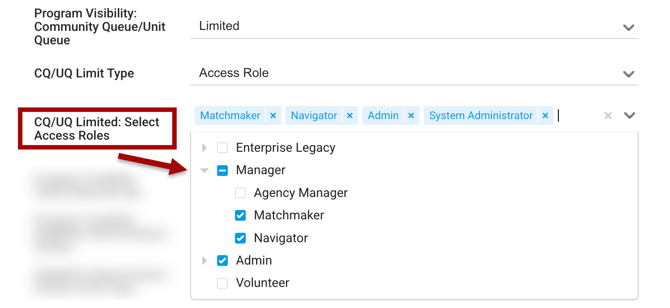
Matchmakers now also need the Reassign Community Queue Referrals access right enabled in their access role to continue reassigning Referrals from Community Queues to Programs/Units/Beds.
To identify impacted programs that may require updates in connection to their Community Queue visibility settings, the following Looker fields can be utilized on the Project Descriptor Model: "Program Visibility: Community Queue/Unit Queue" and “Programs - Community Queue Name."
Filter for Programs that are connected to one or more Community Queues and where "Program Visibility: Community Queue/Unit Queue" is set to None. These are the programs that will need their Program Visibility: Community Queue/Unit Queue setting updated in program setup to receive referrals from connected Community Queues.
This note has also been added to the June 2026 Feature Updates article.
Access Rights
Access rights were updated to control which users can make referrals from each referral area.
The following access rights were updated:
- The Create Referrals access right label was changed to Create Program Referrals - Client Record.
- The update removed the ability to reassign Community Queue (CQ) referrals to programs. This ability is assigned to a new access right (See the Create Community Queue Referrals access right below).
- The update removed the ability to send referrals from the Eligibility Determination screen to programs. This ability is assigned to a new access right (See the Create Program Referrals - Eligibility Determination Screen access right below).
- The update removed the ability to reassign Community Queue (CQ) referrals to programs. This ability is assigned to a new access right (See the Create Community Queue Referrals access right below).
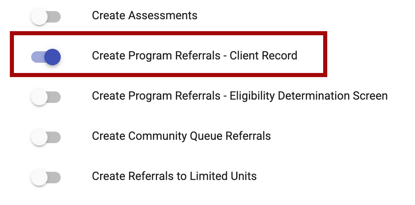
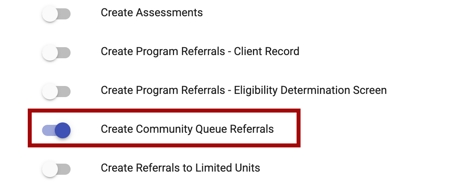
- The Refer Directly to Community Queue access right label was changed to ‘Create Community Queue Referrals.
- The update removed the requirement for the Create Referrals access right to be enabled.
- The update removed the requirement for the Create Referrals access right to be enabled.
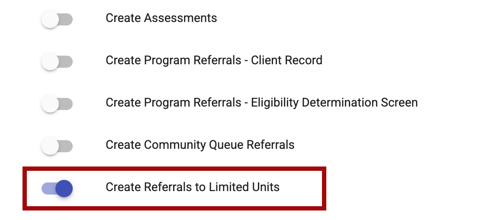
- The Referrals - Send Restricted Referrals access right label was changed to Create Referrals to Limited Units.
- We updated functionality to remove the logic below. Users with Create Referrals to Limited Units are still able to refer to other programs when visibility allows:
- The previous functioning of the Referrals - Send Restricted Referrals access right limited the ability of a user to refer to other programs, even if they are publicly listed.
- The previous functioning of the Referrals - Send Restricted Referrals access right limited the ability of a user to refer to other programs, even if they are publicly listed.
- We updated functionality to remove the logic below. Users with Create Referrals to Limited Units are still able to refer to other programs when visibility allows:
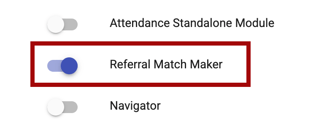
- The Referral Match Maker access right was updated.
- When enabled, users can reassign CQ referrals to units/beds.
- When enabled, users can refer to programs from any referral area unless Program Visibility = None
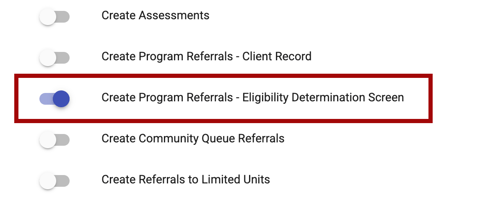
- The new Create Program Referrals - Eligibility Determination Screen access right was added.
- This access right is available for all Access Role Types.
- It is enabled by default for access roles with the Role Type = Admin by default.
- It is enabled by default for access roles with the Role Type = Admin by default.
- The user must have the Referrals access right enabled to enable this access right.
- This access right allows the user to make a referral to an available program from the Eligibility Determination screen.
- This access right is available for all Access Role Types.
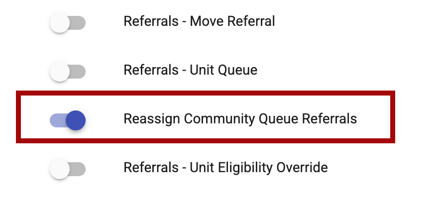
- The new Reassign Community Queue Referrals access right was added.
- This access right is available for all Access Role Types.
- It is enabled for access roles with the Role Type = Admin by default.
- It is enabled for access roles with the Role Type = Admin by default.
- The user must have the Referrals access right enabled to enable this access right.
- This access right allows the user to reassign a referral to a program and to a unit, when applicable.
- For users with access to a Unit Queue: the user sees the Refer button on the Unit Queue if the Reassign Community Queue Referrals access right is enabled for the user.
- For users with access to a Unit Queue: the user sees the Refer button on the Unit Queue if the Reassign Community Queue Referrals access right is enabled for the user.
- This access right is available for all Access Role Types.
The following access right has been removed:
-
The Referrals - Community Queue Reassign To Unit access right and associated logic has been removed.
Refer to the Rights Glossary for Access Roles article for more information on access rights.
Program Visibility Settings
The Public Listing field on program setup was split into different settings for each referral area and renamed Program Visibility. A new option was added to select Limited for program visibility, allowing users to determine where programs are available for referral and which agencies, users, and access roles can make referrals, thereby improving referral accuracy.
Three new independent fields replace the single Public Listing picklist on a program’s setup:
- Program Visibility: Community Queue/Unit Queue
- This setting affects program visibility on Community Queue / Unit Queue referral reassignments.
- Program Visibility: Client Referrals Tab
- This setting affects program visibility for referrals that take place on the client’s Referrals tabs.
- Program Visibility: Eligibility Determination Screen
- This setting affects program visibility for referrals that take place from Eligibility Determination.
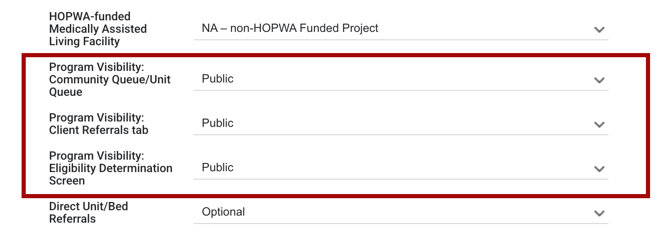
All Program Visibility fields include the following options:
- Public
- Limited
- Agency
- None
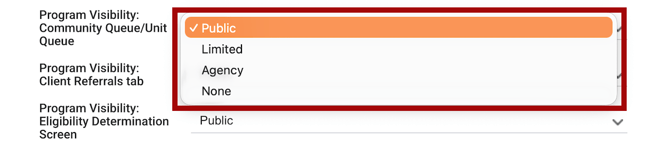
The Program Visibility picklist definitions are:
- Public: All other agencies in the referral setting can send referrals from the relevant screen.
- Limited: Choose which agencies/users and/or access roles can send referrals from the relevant screen.
- Agency: Only the program's agency can send referrals from the relevant screen.
- None: No referrals can be sent to the program from the relevant screen.
Public Option Details
When the selection for Program Visibility is Public, all other agencies in the Referral setting can send referrals from the relevant screen.
All three of the Program Visibility fields default to Public for new program creation.
Limited Option Details
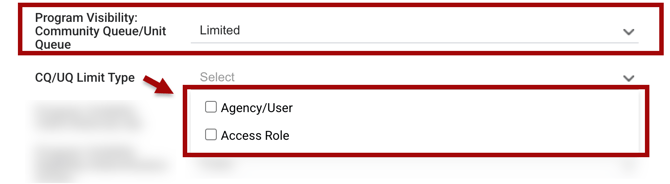
If the Limited option is selected, the system shows dependent fields.
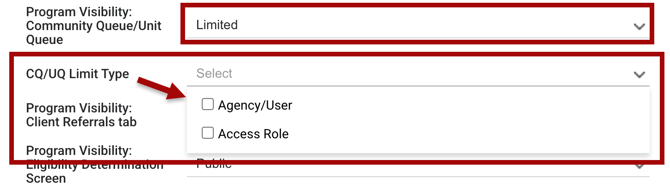
When the Limited option is selected for the Program Visibility: Community Queue/Unit Queue setting, a multi-select picklist field Community Queue/Unit Queue Limit Type appears with the following options:
- Agency/User
- Access Role
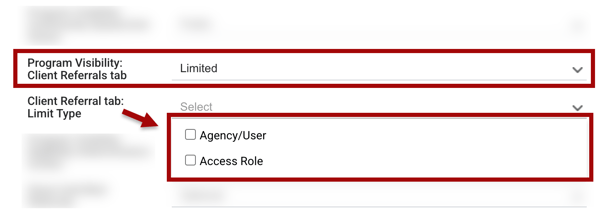
If the Limited option is selected for the Program Visibility: Client Referrals Tab setting, a multi-select picklist field Client Referral tab: Limit Type appears with the following options:
- Agency/User
- Access Role
If the Limited option is selected for the Program Visibility: Eligibility Determination Screen setting, a multi-select picklist field Eligibility Determination Screen Limit Type appears with the following options:
- Agency/User
- Access Role
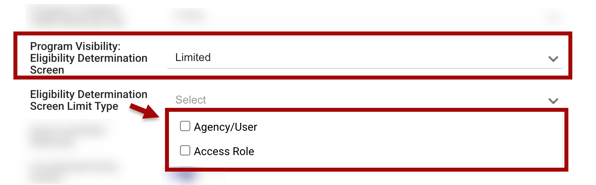
Limited: Agency/User Option Details
Agency/User is a hierarchical multi-select list of all Active non-deleted users grouped by Active, non-deleted common agencies in the relevant referral setting. Informational Agencies are not included. Users are listed under their home agency.
- When an agency’s checkbox is checked, all the users within the agency are selected.
- Users with additional agency access to the agency will also be included in the permissions, even though they do not show in the list.
- Expand an agency to view and select specific users within that agency.
- There is a search bar to help the user find the user names in the list.
- The users selected can send referrals to this program when the Reassign Community Queue Referrals access right is enabled in their access role.
- This field is only visible if the Agency/User field is enabled within the Limit Type field.
- If this field is shown, selecting the Agencies/Users is required.
The user can allow specific agencies/users to create referrals for a program. The following fields were added for this purpose:
- Community Queue/Unit Queue Limited: Select Agencies/Users
- Client Record Limited: Select Agencies/Users
- Eligibility Screen Limited: Select Agencies/Users
Here is an example of selecting agencies/users for the Community Queue/Unit Queue Limited: Select Agencies/Users field:
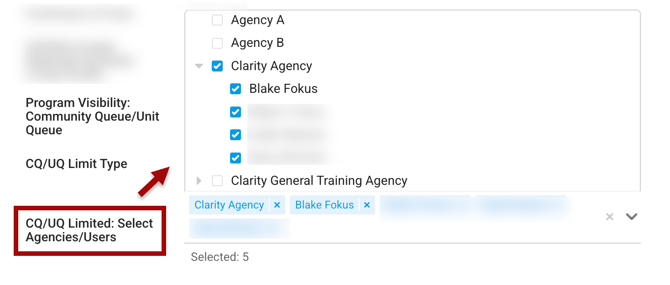
Click here for additional details for Agency/Program Visibility for Referrals in this article.
Note: If the Agency/User field is not enabled within the Community Queue/Unit Queue Limit Type field, any user is able to reassign referrals to this program if their access role/access rights allow.
Limited: Access Role Option Details
Access Role is a hierarchical multi-select list of all active access roles, grouped by Role Type.
- Users with the selected access roles are able to reassign referrals to the program.
- The access role can be assigned to the user’s home agency or through additional agency access.
- This field is only visible if the Access Role field is enabled within the Limit Type field.
- If the Access Role field is enabled, selecting the Access Role(s) is required.
- If the Access Role field is enabled, selecting the Access Role(s) is required.
The user can allow specific access roles to create referrals for a program. The following fields were added for this purpose:
- Community Queue/Unit Queue Limited: Select Access Roles
- Client Record Limited: Select Access Roles
- Eligibility Screen Limited: Select Access Roles
Here is an example of selecting access roles for the Community Queue/Unit Queue Limited: Select Access Roles field:
Notes:
- If the Access Role field is not enabled, users with any access roles are able to reassign referrals to this program.
-
When multiple options are selected, all selected dependent fields display. Users who meet at least one criteria are able to see the program and make referrals when their access rights allow.
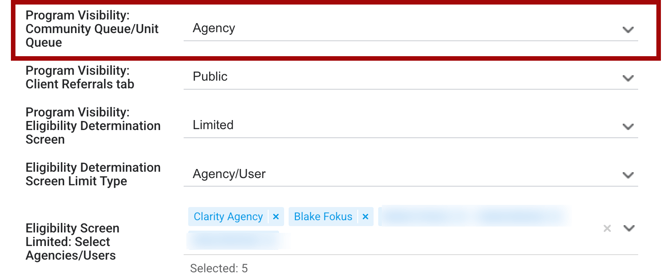
Agency Option Details
When Agency is selected for a Program Visibility setting, only the users at the program's agency and users with the Referral Match Maker access right can send referrals from the relevant screen.
None Option Details
When None is selected for Program Visibility, no referrals can be sent to the program from the relevant screen.
-
When the Client Referral Tab option AND Eligibility Determination Screen option are set to None, the Direct Unit/Bed Referrals field is hidden.
-
If all three Program Visibility fields are set to None, the Direct Unit/Bed Referrals field is hidden.
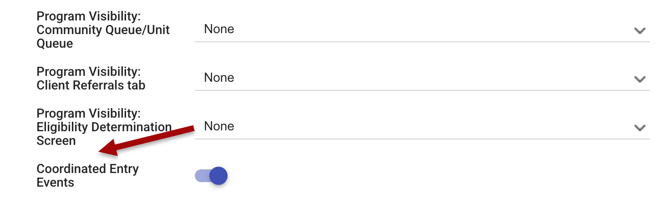
- More information about settings that impact Unit/Bed Referrals can be found in the Settings that Impact Program and Unit/Bed Referrals from the Client Referrals Tab section in this article.
-
-
Users that have the Referral Match Maker access right enabled cannot make referrals when the program visibility is None.
Field and Logic Changes
The following fields and associated logic have been removed from program setup. The Limited option for the Program Visibility fields replace these options:
- Allow Restricted Referrals from Other Agencies program setup core field
- Agencies Sending Referrals program setup core field
The Program's referral logic related to the Referrals - Send Restricted Referrals access right was removed. More details can be found in the Access Rights section of this article.
The following fields were added to all core Program Setup screens and all custom Program Setup screens with Public Listing included:
- Program Visibility: Community Queue/Unit Queue (relabeled)
- Community Queue/Unit Queue Limit Type
- Community Queue/Unit Queue Limited: Select Agencies/Users
- Community Queue/Unit Queue Limited: Select Access Roles
- Program Visibility: Client Referrals tab
- Client Referral tab: Limit Type
- Client Record Limited: Select Agencies/Users
- Client Record Limited: Select Access Roles
- Program Visibility: Eligibility Determination Screen
- Eligibility Determination Screen Limit Type
- Eligibility Screen Limited: Select Agencies/Users
- Eligibility Screen Limited: Select Access Roles
The new fields are explained in more detail in the Program Visibility Settings section of this article.
Agency/Program Visibility for Referrals
If a program is limited to an agency based on the Coordinated Entry Type set in SETUP > SETTINGS, the user can only see and select agencies that are relevant to the current Referral Settings in the list of agencies within the following Program Visibility fields on program setup:
- Community Queue/Unit Queue Limited: Select Agencies/Users
- Client Referral tab Limited: Select Agencies/Users
- Eligibility Screen Limited: Select Agencies/Users
The agencies are limited by the Coordinated Entry Type selected - Continuum of Care (CoC) Based or Sharing Group Based. The system will only show those agencies that are available based on the current Referral Settings. This update prevents users from selecting agencies that are already restricted by the Active Agency’s Continuum of Care (CoC) filters.
For more information about configuring Coordinated Entry Type, refer to the Configuring Coordinated Entry Type article.
INVENTORY - Unit/Bed Referrals
The system administrator can control which configured units and beds are available for specific users to send a referral. The following settings have been updated or added to assist with this functionality.
Screen Settings
The Allow Restricted Referrals from Other Agencies setting has been re-labelled to Limit Unit/Bed Visibility on each of the following INVENTORY screens:
-
Building screen
-
Unit screen
-
Bed screen
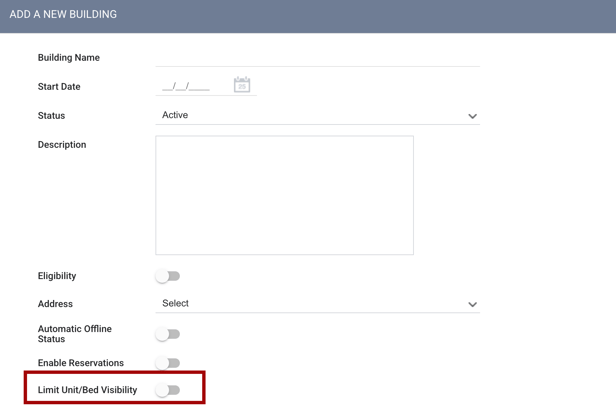
The Limit Unit/Bed Visibility field can be found when the user:
Housing Inventory Core Fields
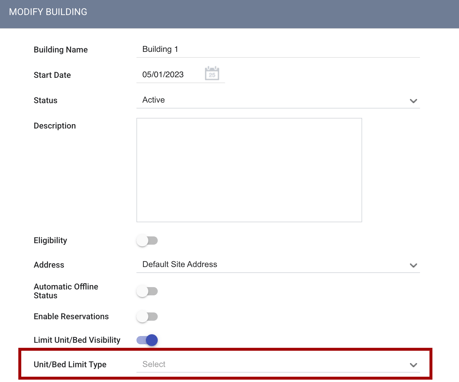
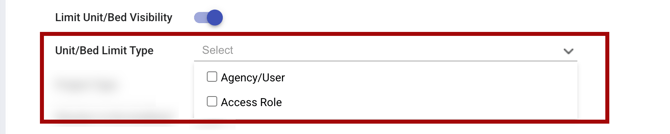
A new Housing Inventory core field has been added: Unit/Bed Limit Type.
-
This core field displays only when the Limit Unit/Bed Referrals field is enabled.
- A multi-select picklist includes the following options for the Unit/Bed Limit Type field:
- Agency/User
- Access Role
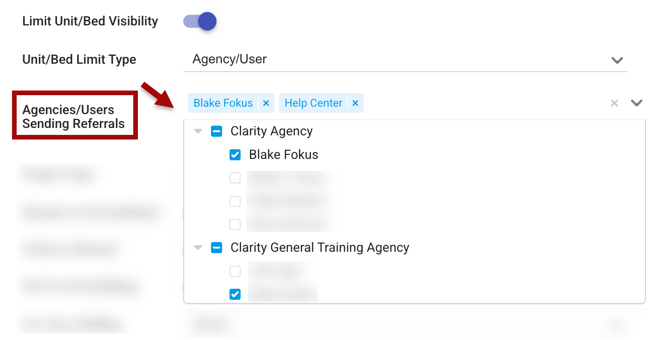
The Housing Inventory core field Agencies Sending Referrals has been updated to Agencies/Users Sending Referrals.
-
This core field displays only when Unit/Bed Limit Type has Agency/User selected.
-
Agency/User is required if Unit/Bed Limit Type is selected.
-
-
This multi-select picklist field is updated to a hierarchical multi-select list of Active non-deleted users with the Create Referrals for Limited Units access right enabled in their access role.
-
Inactive/locked users do not display.
-
-
The list is grouped by Active non-deleted common agencies in the instance.
-
When an agency’s checkbox is selected, all the users within the agency are selected.
-
When an agency is expanded, individual users can be selected.
-
There is a checkbox next to each user and agency name.
-
There is also a search bar to help the user find the correct names in the list.
A new Housing Inventory core field has been added: Access Roles Sending Referrals.
-
This field displays only when Unit/Bed Limit Type has Access Role selected.
-
This field is required if Unit/Bed Limit Type has Access Role selected.
-
-
This multi-select picklist field includes a list of access roles with Create Referrals for Limited Units enabled.
-
The list is grouped by access Role Type, and then alphabetically.
-
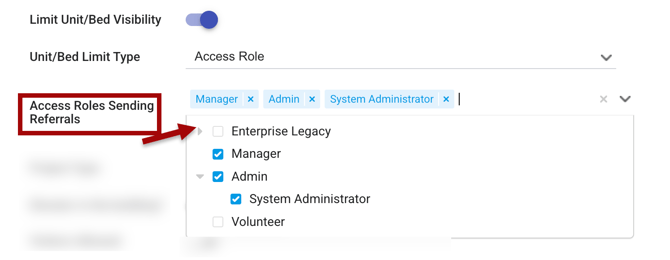
The access role can be enabled in the user’s home agency access role, or in their additional agency access role.
Settings that Impact Program and Unit/Bed Referrals from the Client Referrals Tab
The Direct Unit/Bed Referrals program setting is visible when either of the following conditions is met:
-
The program-level Program Visibility: Client Referrals Tab setting is set to any value other than None.
OR
-
The program-level Program Visibility: Eligibility Determination Screen setting is set to any value other than None.
When Direct Unit/Bed Referrals = Disabled, referral visibility follows the Program Visibility: Client Referrals Tab setting logic.
When Direct Unit/Bed Referrals = Optional or Required, the new program visibility access rights and the Inventory-level Limit Unit/Bed Visibility settings provide an added layer of granular control over where referrals can be directed.
The Create Referrals for Limited Units access right provides further control over referral permissions. When this access right is enabled for a user, they can send referrals to specific units and beds with limited visibility, provided both of the following conditions are met:
-
The Create Referrals for Limited Units access right is enabled for the user
AND
-
The user's current agency is selected for the Agencies/Users Sending Referrals setting; OR the user’s current access role is selected for the Access Roles Sending Referrals setting.
Access Rights that Impact Unit/Bed Settings
The new Create Referrals for Limited Units access right is available to choose during this process. Jump to the Access Rights section in this article for more information about the access right.
-
Only those users with this access right enabled can send referrals to units/beds where:
-
The inventory-level Limit Unit/Bed Visibility setting is enabled;
AND
-
The user and their current agency are selected in the inventory-level Agencies/Users Sending Referrals option; OR the user’s current access role is selected for the inventory-level Access Roles Sending Referrals settings.
Settings that Impact Program Referrals from the Eligibility Determination Screen
When Direct Unit/Bed Referrals = Disabled, referral visibility follows the Program Visibility: Eligibility Determination Screen setting logic.
When Direct Unit/Bed Referrals = Optional or Required, the program visibility access rights and the inventory-level Limit Unit/Bed Visibility settings provide an added layer of granular control over where referrals can be directed.
The Create Referrals for Limited Units access right provides further control over referral permissions. When this access right is enabled for a user, they can send referrals to specific units and beds with limited visibility, provided both of the following conditions are met:
- The Create Referrals for Limited Units access right is enabled
AND - The user's current agency is selected for the Agencies/Users Sending Referrals setting; OR the user’s current access role is selected for the Access Roles Sending Referrals setting.
Settings that Impact Reassigning Referrals from the Community Queue/Unit Queue
When Bed & Unit Management = Disabled, referral visibility follows the Program Visibility: Community Queue setting logic.
When Bed & Unit Management = Enabled, the new program visibility access rights and the inventory-level Limit Unit/Bed Visibility settings provide an added layer of granular control over where referrals can be directed.
The Create Referrals for Limited Units access right provides further control over referral permissions. When this access right is enabled for a user, they can send referrals to specific units and beds with limited visibility, provided both of the following conditions are met:
-
The Create Referrals for Limited Units access right is enabled for the unit/bed
AND -
The user and their current agency are selected for the Agencies/Users Sending Referrals setting; OR the user’s current access role is selected for the Access Roles Sending Referrals setting.
Eligibility Determination
When the Eligibility Determination screen opens, all programs visible to the user are shown without waiting for eligibility to be calculated.
- A Check Eligibility button triggers the eligibility calculation on demand.
- While calculating, a progress indicator displays the following message:
"Please wait, program eligibility check in-progress."
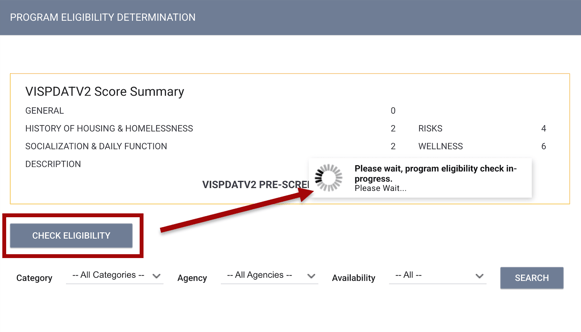
After calculation completes, the program list is split into two sections: Eligible programs (listed first, grouped by Agency or Category) and an Ineligible Programs section below.
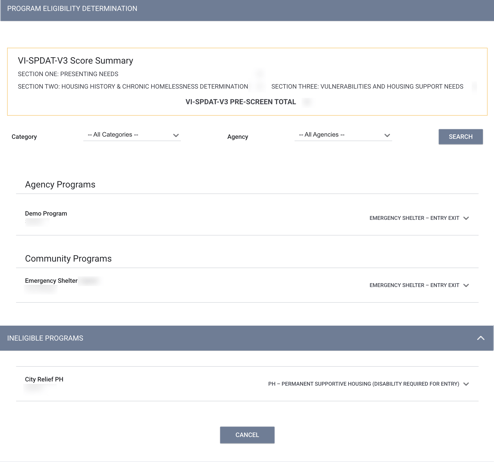
When a program is expanded before running the full calculation, the system calculates eligibility for that program individually.
Tracked Characteristics
The logic for Tracked characteristics has been updated. Tracked Characteristics are now recalculated using the Referral Settings of the agency that originally created the assessment, regardless of which agency the current user is active under (for example, if using the Switching Agencies functionality).
Updated: 06/17/2026