
Table of Contents
Purpose
Clarity Human Services offers a simple method for producing ID cards that can be used with any barcode scanner for providing services within Clarity.
Running the Report
Users with the Client Reports access right can run this report. The information returned may be limited by the user's broader access rights and visibility settings.
Report Location
The Photo ID Card - Sample report is a client-based report and is run from Reports in the client's record.
/Client%20record%20navigation%20menu%20showing%20the%20Reports%20item%20and%20report%2c%20highlighted.png?width=670&height=358&name=Client%20record%20navigation%20menu%20showing%20the%20Reports%20item%20and%20report%2c%20highlighted.png)
To create a printable file:
- Click Reports in the client's record.
- Locate [CLNT-103] Photo ID Card - Sample in the Available Reports table (use search or sort if needed).
- Click Run on the report's row or select Run from the Action Menu options. The card generates automatically; no parameters are required.
- When the report is ready, open it from the My report queue card or the global Status icon in the header. A PDF file is generated automatically.
/Available%20Repors%20section%20of%20the%20workspace%2c%20showing%20the%20Photo%20ID%20Card%20report%20highlighted.png?width=670&height=281&name=Available%20Repors%20section%20of%20the%20workspace%2c%20showing%20the%20Photo%20ID%20Card%20report%20highlighted.png)
Note: Print the card on a printer available to you.
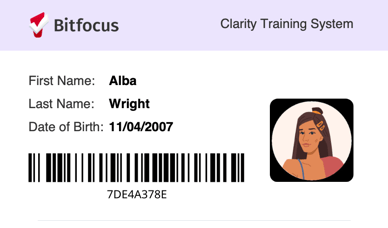
Here is an example of the output:
Specifications
Included Fields
- Last Name
- First Name
- Client Photo (if uploaded for the client)
- Pronouns
- Date of Birth
- Barcode: Clarity Human Services Unique Identifier
Additional Resources
- [GNRL-118] Batch Scan Card Report
- The Attendance Module (New Clarity Interface)
- Client Reports (New Clarity Interface)
Published: 10/01/2026