
Table of Contents
Purpose
The Referrals - Open Units tab in Clarity is configured with a default Look that captures Open Units posted to the Referrals - Availability tab. The Open Units LookML dashboard goes a step further by identifying reserved and unreserved program openings. If communities find this additional information desirable, the LookML dashboard can be copied and activated as the default content that loads on the Open Units tab. The process for publishing a custom open units Look or dashboard is outlined in this article.
Dashboard Access
Dashboards are available to all instances with Data Analysis enabled. This dashboard is a LookML Dashboard. How you access this dashboard depends on whether you use standalone or embedded Looker and the access rights assigned to your access role. At a minimum, your access role must have the Data Analysis access right enabled. For details on all access rights, see Rights Glossary for Access Roles.
Standalone Looker
This dashboard is accessible in Looker via the following path: All Folders > LookML Dashboards > Open Units.
Once selected, your dashboard will start running. The utilized models are dashboard-dependent.
Embedded Looker
This dashboard is accessible in Clarity by navigating to Reports > Data Analysis > Built In Reports > Open Units. Click Run to open and start running the dashboard.
LookML Dashboards accessed through embedded Looker must first be enabled in the Data Analysis settings before they're available. For steps to enable and access these reports, see the Embedded Looker: Looker - Clarity Human Services Integration article.
Dashboard Filters
This dashboard has four dashboard filters that apply to all of the Looks on the dashboard.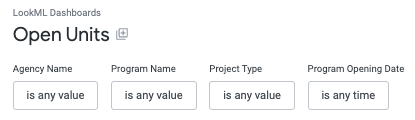
|
Agency Name Default: is any value |
This filter applies to all Looks. Selection impacts filter options for Program Name. |
|
Program Name Default: is any value |
This filter applies to all Looks. |
|
Project Type Default: is any value |
This filter applies to all Looks. Selection impacts filter options for Program Name. |
|
Program Opening Date Default: is any value |
This filter applies to all Looks. |
Content
This dashboard consists of four Looks capturing unreserved and reserved program openings.
Currently Unreserved Program Openings
The count of program openings posted through the Referrals - Availability tab that have not been deleted and have no active referrals pending completion.
Currently Reserved Program Openings
The count of program openings posted through the Referrals - Availability tab that have not been deleted and currently have an active referral pending completion.
Unreserved Program Openings
A list of the individual program openings counted in the "Currently Unreserved Program Openings" Look. The list includes key information about the program openings such as Agency Name, Program Name, Project Type, Program Opening Date, and Program Opening Note among other opening details.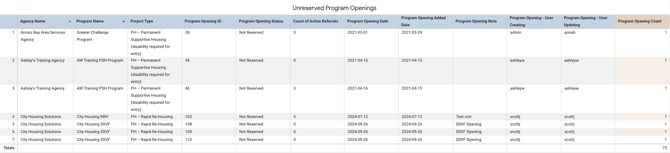
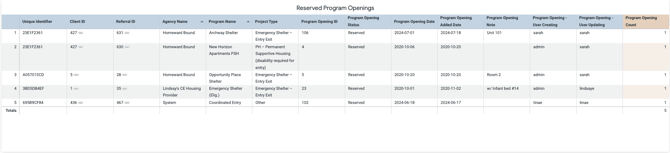
Reserved Program Openings
A list of the individual program openings counted in the "Currently Reserved Program Openings" Look. The list includes key information about the program openings, such as the Client Unique Identifier currently reserving the unit, Referred to Agency Name, Referred to Program Name, Referred to Project Type, Program Opening Date, and Program Opening Note, among other opening details.
Updated: 10/19/2026