
Report Purpose & Summary
The Shelter Count Point-in-Time (PIT) report is designed to count clients experiencing homelessness during a chosen point-in-time per HUD's HIC and PIT Data Collection Notice guidance. This report is required annually for the HIC/PIT reporting process, which is typically conducted on the last Wednesday of January, with submissions to HDX 2.0 taking place in the spring.
Although the PIT report is utilized for Federal Reporting submissions, this report is also a tool for communities to assess a snapshot of data to drive system improvements and advocacy initatives.
Running the Report
Report Location
Available versions:
- Agency level - [HUDX-230] Shelter Count PIT - HUD Reports folder
- Admin level - [HUDX-230-AD] Shelter Count PIT - Administrator Reports folder
Who Can Run the Report
Agency Level - Anyone can run this report, but the returned information will be limited based on the user's access rights.
Admin Level - System administrators and users with additional access can run the report across multiple agencies.
Parameters
The following parameters are required to run this report.
| Switch Access Agency(ies) |
Choose which agencies to include: All, Single Select, or Multi-Select (Hold Control/Command or Hold Shift to select multiple options sequentially.) |
| CoC Filter Category |
There are four levels of CoC filtering available. Only one option may be selected:
|
| CoC | Choose which CoC to report on. |
| Project Type(s) |
Choose which project types to include: All, Single Select, or Multi-Select (Hold Control/Command or Hold Shift to select multiple options sequentially.) |
| Program Status |
Recommend using "All Programs" so projects that may have closed during the reporting year are included. |
| Continuum Project |
This parameter was added to filter out non-continuum projects from the report. ***Selecting Yes is recommended for the report to align with the HIC report.*** |
| Program(s) |
Choose which programs to include: All, Single Select, or Multi-Select (Hold Control/Command or Hold Shift to select multiple options sequentially.) |
| Apply Enrollment CoC Filter |
Selecting this option will only include households where the HoH has the selected CoC as the Enrollment CoC |
| Include Gender? |
Toggle on to include the Gender table in the PIT Report. |
| Client ID Selection |
Select "Clarity Unique Identifier" (default) or "HUD Unduplicated Personal ID". To learn more about the impacts of this parameter, review Parameter Spotlight: Client ID Selection. |
| PIT Date |
For official HUD PIT/HIC reporting, this should be the CoC-determined point-in-time date, typically during the last ten days of January of the reporting year. |
| Report Output Format |
Web Page, PDF, Excel, CSV Details |
Admin Report Additional Parameters
The administrator version does not include the Switch Agency(ies) parameter and instead includes:
| Agency Filter Category |
There are four levels of CoC filtering available. Only one option may be selected:
|
| Agency Status |
|
| Agency(ies) |
Choose which agencies to include: All, Single Select, or Multi-Select (Hold Control/Command or Hold Shift to select multiple options sequentially.) |
| Unsheltered PIT Counts |
Selecting 'Yes' will enable the inclusion of Unsheltered Point-in-Time (PIT) data, generating an 'Unsheltered PIT Data Quality Review' table, 'Unsheltered Total' and 'PIT Total' columns, and the 'IMPORTED UNSHELTERED PIT DATA' table. Data imported must align with the selected PIT Year and CoC for the report, and the status of the data must be imported. This is not a requirement to run the report, the Unsheltered PIT Counts prompt defaults to 'No' to return the standard Shelter PIT Count report. Note: Gender fields will return "N/A" for Unsheltered Data. |
Report Details
Programming Specifications
HUD has not provided official programming specifications. Communities and vendors work off the HIC (Housing Inventory Count) and PIT (Point-In-Time) Data Collection for CoC and ESG Programs notice. Refer to the latest version for the latest information.
CoCs are also required to report an unsheltered count of clients in addition to a sheltered count. Refer to the notice linked above for guidance on conducting the unsheltered count.
If a community utilizes Unsheltered Point-in-Time (PIT) Integration, Unsheltered Counts can be included in the Shelter Count PIT report to create a comprehensive PIT report for the CoC. Unsheltered PIT counts will return in the report from imported, unsheltered Point-in-Time (PIT) data collected using Esri’s ArcGIS/Survey 123 Point-in-Time Count Solution. Unsheltered PIT reporting is only available on the Administrator version of the report by selecting 'Yes' for the Unsheltered PIT Counts parameter.
Sheltered Counts
The Shelter Counts report on the following project types:
- Emergency Shelter (Entry-Exit and Night-by-Night)
- Safe Haven
- Transitional Housing
Project Stay Universe
- Project Type = Emergency Shelter (Entry-Exit and Night-by-Night), Safe Haven, OR Transitional Housing
- AND Project Start Date <= PIT Date
- AND (Project Exit Date is null OR Project Exit Date > PIT Date)
- AND IF Project Type = Emergency Shelter Night-by-Night, the client must have a bed night service on PIT Date
- Bed Night Services are defined as a service within an enrollment for Project Type = Emergency Shelter Night-by-Night with the following configuration settings:
-
Service Category = Housing
-
Delivery Type = Single Event or Daily Attendance
-
Site Type = Residential
-
- Bed Night Services are defined as a service within an enrollment for Project Type = Emergency Shelter Night-by-Night with the following configuration settings:
If the Enrollment CoC Filter is on:
- Head of Household's Enrollment CoC must be active on PIT Date
- AND Head of Household's Enrollment CoC must equal the selected CoC
Unsheltered Counts
Unsheltered PIT Survey Data is selected for the report when:
- Survey CoC = Report CoC
- Survey PIT Count Year = Report PIT Date Year
- PIT Survey Import Status = Imported
Standard PIT report calculations apply to the Unsheltered PIT data (i.e., age, household type, and chronic homeless status inheritance to other household members).
Individual survey data is used for calculations and to return Unsheltered PIT data. The Individual Survey Global ID is utilized as the Individual ID. Individuals are linked to households using a Parent Global ID, which is referenced as the Household ID in the Unsheltered PIT data drill downs. Household surveys must have at least one linked Individual survey to qualify for the report universe.
Unsheltered PIT Data Quality Review
When Unsheltered PIT data is included in the report, the Unsheltered PIT Data Quality Review table will appear above the main PIT report table if any of the following data quality issues are present:
|
Households without Individuals |
Household survey records were imported without any associated individual survey records. Since individual surveys are required for PIT metrics, this error means updates should be made in Survey123, and data should be re-imported, as unsheltered households without individuals are excluded from reporting. |
|
Non-HUD Values |
Identifies any unexpected, imported values for Age and Race/Ethnicity. |
|
More than One Head of Household |
Identifies households containing more than one designated Head of Household. |
|
No Head of Household |
Identifies households missing a designated Head of Household. |
|
Household Size Discrepancy |
Checks for the following discrepancies:
|
|
Household Type Discrepancy |
Checks for the following discrepancies:
|
|
Chronic Homeless Household Status Discrepancy |
Identifies any conflicting information about Chronic Homeless Status between the household survey and the calculated age from linked individual surveys. |
This table will dynamically hide rows when there are no data quality issues present.
Population Data
Population Data is divided into three household types: Persons in households with at least one adult and one child, persons in households without children, and persons in households with only children. For definitions of household types and other key terms, please review the latest HIC/PIT Notice.
Population Data Report Logic
- Household Types are programmed utilizing logic from the HMIS Reporting Glossary for households without children, households with children and adults, and households with only children for persons in households with at least one adult and one child, persons in households without children, and persons in households with only children.
Note: Clients with unknown ages are not counted in a defined household type. Please review the Persons by Programs Table - Number of Clients with Unknown Age column for data quality flags.
- Veteran Households must include at least one client that is 18 years or older and has Veteran Status = Yes.
- Unaccompanied Youth Households uses the following logic:
- # of Children > 0 AND # of Youth Adults = 0
- OR # of Children = 0 AND # of Youth Adults > 0
- AND # of Clients with Age>24 = 0
- AND # of Unknown Age Clients = 0
- # of Children > 0 AND # of Youth Adults = 0
- Parenting Youth Households uses the following logic:
- # of Youth Children > 0
- AND # of Youth Adults > 0
- AND # of Clients with Age>24 = 0
- AND # of Unknown Age Clients = 0
Chronic Homelessness Logic
- Clients residing in Transitional Housing are not included in Chronic Homeless counts for the purposes of the PIT count.
- Chronic at Point-in-Time Logic is utilized for all clients that are residing in Emergency Shelter and Safe Haven based on HMIS Reporting Glossary Logic.
- HIC/PIT Data Collection Notice Guidance has additional stipulations for Chronic Homeless definitions. For the purposes of PIT Reporting, Chronic Homeless status is carried to other household members for counting Chronically Homeless Persons and Households.
Additional Homeless Populations Logic
- Adults with a Serious Mental Illness uses the following logic:
- Age >= 18
- AND Mental Health Disorder = Yes
- AND Expected to be of long–continued and indefinite duration and substantially impairs ability to live independently = Yes
- Adults with a Substance Use Disorder uses the following logic:
- Age >= 18
- AND Alcohol use disorder = Yes OR Drug use disorder = Yes OR Both alcohol and drug use disorders = Yes
- AND Expected to be of long–continued and indefinite duration and substantially impairs ability to live independently = Yes
- Adults with HIV/AIDS uses the following logic:
- Age >= 18
- AND HIV/AIDS = Yes
- Adult Survivors of Domestic Violence uses the following logic:
- Age >= 18
- AND Domestic Violence Survivor = Yes
- AND Are you Currently Fleeing? = Yes
Gender Data
While Gender PIT data is not required for HDX 2.0 PIT Module submissions this year, it is used to support local funding and community initiatives. Dynamic Gender tables in the report are inspired by the most recent HIC and PIT Data Collection Notice Guidance documentation that included Gender table shells. Gender table shells will populate the main report when Yes is selected for the Include Gender? parameter.
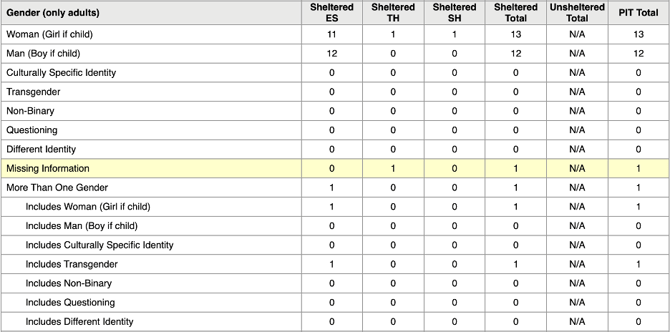
The Gender data will render in all Report Output Formats when enabled. In the Web Page, PDF, and Excel Report Output Formats. Gender tables will be present for all populations within the All Households, Veteran Households, and Youth Households sections. In the CSV-Details report output, the Gender column will appear and lists all selected response options.
When No is selected, Gender tables and data will not populate the report.
Report Format
The PIT is broken down by populations:
- All Households
- Households with at Least One Adult and One Child
- Households without Children
- Household with Only Children
- Veteran Households
- Households with at Least One Adult and One Child
- Households without Children
- Youth Households
- Unaccompanied Youth
- Parenting Youth
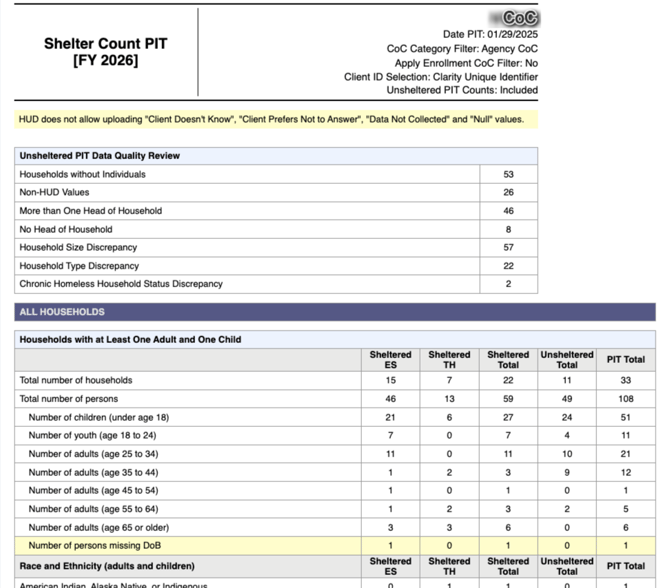
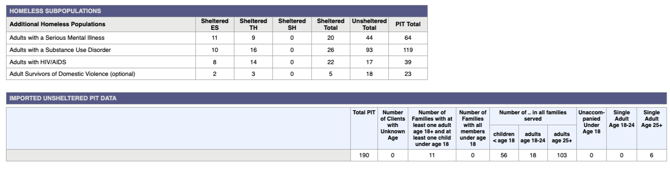
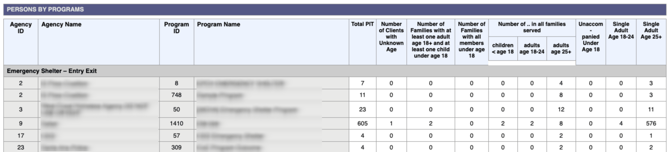
There is an additional section for homeless subpopulations as well as a table breaking down counts of sheltered persons by program and project type by age, and household type (unaccompanied minors, single adults, and families).
Drilldown Functionality
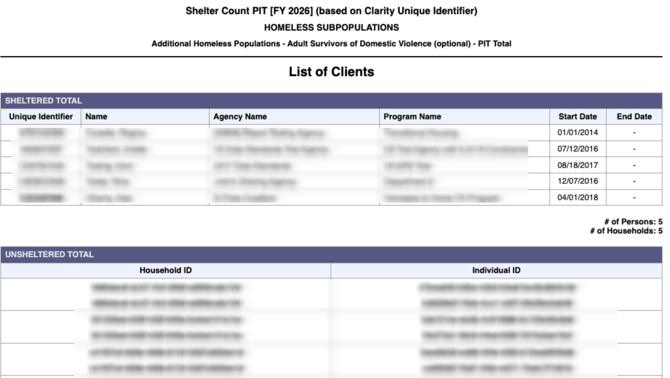
Drilldowns are available for all counts within the report tables. Drilldowns return a list of clients to review and assess the data in the report.
For Sheltered Counts, the drill down table will include Unique Identifier, Name, Enrollment Information (Agency Name, Program Name, Program Start Date, and Program End Date), and a count of persons and households. Drilldown tables for reports where the "Client ID Selection" parameter is “HUD Unduplicated Personal ID”, returns the Personal ID instead of the Unique Identifier. Linking functionality is available for sheltered counts - Unique Identifier/Personal ID will direct a user to the applicable Client Profile, and Program Name will direct to the applicable Program Enrollment.
For Unsheltered Counts, the drill down table will include Household ID (Individual Survey - Parent Global ID) and Individual ID (Individual Survey - Global ID), and a count of persons and households. Linking functionality is not available for this data.

Report Output Format: CSV Details
When CSV Details is selected for the Report Output Format, a csv file will prepare during the report run time. If Unsheltered PIT Count Data is included in the report, please note column headers with an asterisk will be null.
The following columns will return in the CSV file:
- Agency ID*
- Agency Name*
- Program ID*
- Program Name*
- Project Type*
- Personal ID [Returns Individual ID for Unsheltered Count Data]
- Unique ID [Returns Individual ID for Unsheltered Count Data]
- Name*
- Household ID [Returns Household ID for Unsheltered Count Data]
- Start Date*
- End Date*
- Relationship to HoH
- Age
- Age Group
- Gender [If Include Gender = Yes]
- Race & Ethnicity
- Chronically Homeless Status
- Is Household Chronically Homeless?
- Veteran Status
- Is Veteran Household?
- Household Type
- Youth Household Type
- Is Adult with a Serious Mental Illness?
- Is Adult with a Substance Use Disorder?
- Is Adult with HIV/AIDS?
- Is Adult Survivors of Domestic Violence?
Updated: 02/10/2026