
Table of Contents
Support Reminders
The Bitfocus Technical Support team is prepared and excited to help you during the LSA Season! If you have any questions after looking over the resources below, we encourage you to submit a support request.
To expedite our assistance, please be as thorough as possible when submitting your ticket.
Your ticket will need to contain the following:
- Report parameters (CoC, Date Range)
- The date the report was generated
- The date the report was uploaded
- The date the flag file was received
- The attached Excel flag file
- The file submitted to HDX that generated the flag file
- If you choose to list the individual Flag IDs in the description, please break them out into the two sections designated by HUD - "CoC" and "Vendor."
Note: For more information about requesting support, check out our "What to Include in a Ticket” video at https://learn.bitfocus.com > Course Catalog > Free Content > Clarity Human Services: Frequently Asked Questions.
Clarity Data Analysis: LSA Cleanup Dashboards
We maintain a series of LSA Data Cleanup dashboards. The dashboards are:
- Updated to reflect current HMIS Data Standards.
- Adjusted to the current default date range for all dashboards.
- Updated to more closely align with LSA flags.
Notes: Data Analysis must be enabled at both the instance and user levels. If you do not have access to Data Analysis, contact your system administrator or agency lead for more information.
-
To access embedded Data Analysis, the Data Analysis access right must be enabled for your access role. See Rights Glossary for Access Roles.
- To access standalone Data Analysis, you must have a standalone Looker account.
The six dashboards include:
|
LSA Data Cleanup Dashboard Name |
Description |
|
Contains Looks for common LSA errors around funding sources, bed inventory, and potential CoC Configuration issues. |
|
|
Contains Looks related to common issues surrounding the head of household (HoH) data, including program enrollments without an HoH. |
|
|
Contains Looks to identify length of stay and bed utilization errors. Includes Night-by-night shelter attendance issues. |
|
|
Contains two Looks to help drill down on overlapping enrollments. Please note: due to the complexity of these looks, this dashboard might take a little longer to load. |
|
|
Contains Looks to help locate errors around geocode and project descriptors. |
|
|
Contains Looks to compare data associated with the current federal reporting analysis period to the year prior to identify intended or unintended shifts in commonly analyzed data points for federal reporting as it relates to the LSA. |
We hope you find these dashboards useful as you prepare for and address the errors/warnings associated with HUD’s LSA Report. If you have any questions about copying or editing these dashboards, please reach out to the Support Team.
LSA Data Cleanup Dashboard Access
The LSA Data Cleanup dashboards can be accessed in two different ways:
Embedded Data Analysis
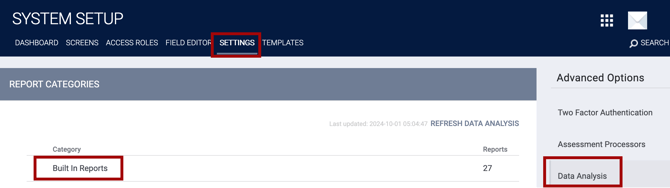
The first option is to access them through the Built-In Reports section of the embedded Data Analysis tab. To activate the dashboards in this location, a system administrator would need to navigate to SETUP > SETTINGS > Data Analysis > Built-In Reports.
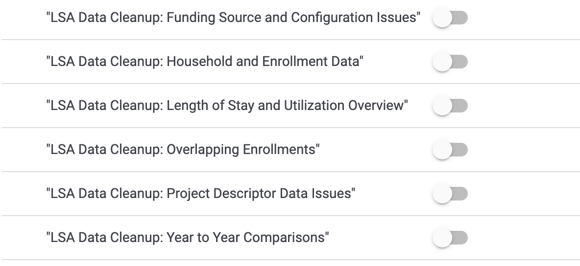
Within that folder, the six dashboards can be independently activated using the toggles, then saved.
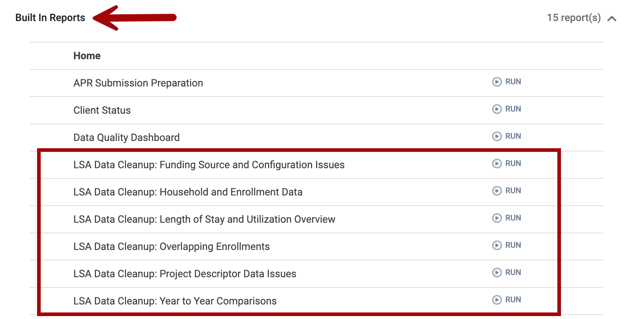
Once the dashboards are activated on the Data Analysis tab, all users with Data Analysis access rights can run them via the Built-in Reports section.
The dashboards will automatically adhere to the agency's existing privacy controls.
Standalone Data Analysis
The second option for accessing the LSA Data Cleanup dashboards is through standalone Looker for users with a standalone Looker account.
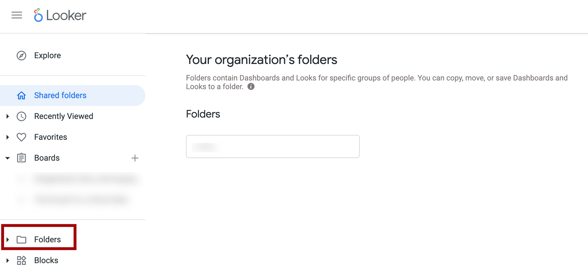
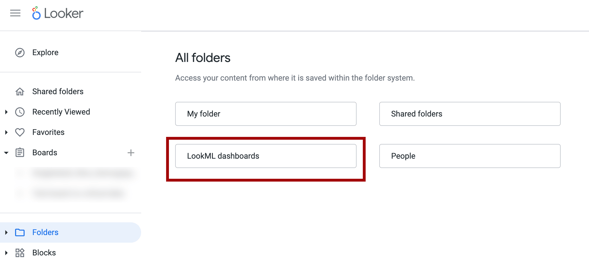
First, log in to Looker and navigate to Folders on the left side of the screen.
Within the folder, there will be a LookML dashboards folder containing the six LSA Cleanup dashboards and all other pre-programmed LookML dashboards.
Additional Bitfocus Resources
-
LSA FAQs and Troubleshooting: Regularly updated with HUD and Bitfocus guidance, updates, and resource links.
-
[HUDX-231-AD] LSA Quick Guide: Overview of Clarity’s LSA Export.
-
Data Quality: LSA Data Quality Errors: A simple guide to creating a Look with the Data Quality model.
-
LSA Preparations: General steps to prepare for the LSA year-round.
HUD LSA Resources
Updated: 09/01/2026