
Table of Contents
Overview
The Clarity Human Services Calendar is a secure calendar that keeps track of client appointments. You can also add it to another calendar application, such as the Mac Calendar app, Google Calendar, or Outlook.
The subscription hides personally identifying information and uses Clarity Unique Identifiers in the external calendar to protect client information.
Getting Started
To open the Calendar, click the Calendar icon in the primary navigation menu.
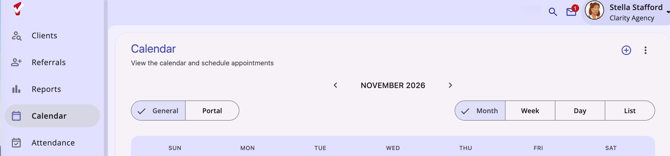
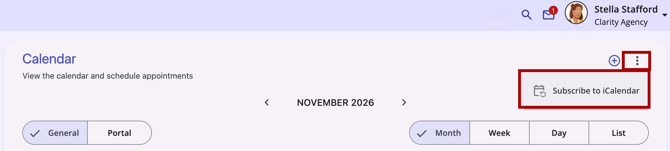
To start a subscription:
- In the Calendar, click the Action Menu (three dots) icon in the top right.
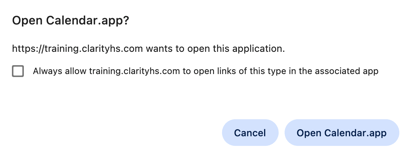
- Select Subscribe to iCalendar. A dialog appears at the top of the page and asks whether to open your calendar application.
What you do next depends on the calendar you use.
Subscribing with the Mac Calendar App
To subscribe on a Mac:
- Start a subscription as described in Getting Started.
- In the dialog, click Open Calendar.app.
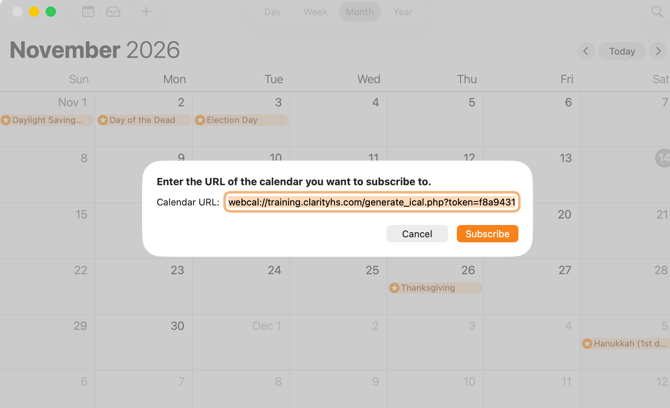
- In the Calendar app, the subscription URL is already filled in. Click Subscribe.
Subscribing with Google Calendar or Outlook
To subscribe to Google Calendar or Outlook, you need the Clarity calendar URL.
Getting the Calendar URL
Use the same process on a Mac and on a PC:
- Start a subscription as described in Getting Started.
- In the dialog, click Open Calendar.app.
- In the Calendar app pop-up, copy the URL. Do not click Subscribe.
Adding the URL to Google Calendar
- Open Google Calendar in your browser.
- Select Add Other Calendar, then select From URL.
- Paste the calendar URL.
- Click Add Calendar.
Adding the URL to Outlook
- Open your Outlook calendar.
- Right-click Other Calendars and click Add Calendar.
- Click From Internet and paste the calendar URL.
- Click Advanced and select Yes.
Note: It can take up to 12 hours for appointment changes to appear in your outside calendar.
Additional Resources
Published: 11/16/2026