
Purpose
This report identifies clients who were enrolled in programs during a specific date range without a documented connection to a Coordinated Entry referral. The analysis helps communities pinpoint where the standard assessment and referral workflow was not recorded in the system, allowing for targeted data cleanup and better alignment with local Coordinated Entry policies
Running the Report
Who Can Run the Report
Anyone can run the report, but the returned information will be limited based on the access rights of the user.
Report Location
This report can be found in the following locations in the Report Library:
- Community and Referrals → [RFRL-121] CE Compliance Report
Parameters
The following parameters are required to run this report.
|
Project Type(s) |
Select which Project Type(s) to include: All, Single Select, or Multi-Select (Hold Control/Command or Hold Shift to select multiple options sequentially.) |
|
Program Status |
|
|
Program(s) |
This list contains programs (restricted by the Project Type(s) and Program Status parameters) Select which program(s) to include: All, Single Select, or Multi-Select (Hold Control/Command or Hold Shift to select multiple options sequentially.) |
|
Report Output Format |
|
Report Logic
To be counted in the report, a client should meet the following criteria
- Client program enrollment (to the programs(s) selected in the parameters)
- AND has a start date within the date range
- AND Client program stay does not have a connected referral associated with it.
- NOT restricted by CE Assessment type. ( (screens.coordinated_entry = 1))
Note: The referral must be created in the agency that runs the report, in order to show in the 'In Com. Queue' Column.
Report Details
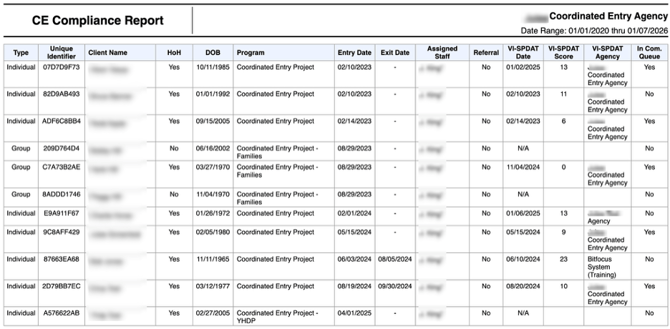
The report provides the following details, sorted by Client Program Start Date and the Client Name (ascending).
The Referral column shows if the referral was made from the assessment and 'In Com. Queue' column will display if the client is currently on the Community Queue.
- Type - The type of enrollment: group or individual.
- Unique Identifier
- Client Name
- HoH - Is the client a HoH?
- DOB - The client date of birth
- Program - Assessing Program
- Entry Date - Program Entry Date
- Exit Date - Program Exit Date
- Assigned Staff - Program Assigned Staff
- Referral - Displays no if a referral was made from the assessment.
- VI-SPDAT Date - The assessment date.
- VI-SPDAT Score - The score of the Coordinated Entry Assessment.
- VI-SPDAT Agency - The Agency that conducted the Coordinated Entry Assessment.
- In Com. Queue - Displays a yes or no if the client is currently pending in the Community Queue. The referral should be created under the agency that runs the report to show a “yes” in this column.
At the bottom of the page, the List of Programs section displays the programs that were selected for this report.

Drilldown Functionality
There is no drilldown functionality in this report.
Published: 04/17/2026