
Table of Contents
Purpose
Dashboard Access
Dashboards are available to all instances with Data Analysis enabled. This dashboard is a LookML Dashboard. How you access it depends on whether you use standalone or embedded Looker and your access rights. In either case, you must have Data Analysis enabled in your access role at a minimum. See Rights Glossary for Access Roles for information about Data Analysis access rights.
For accurate systemwide results, the user running the report must have an access role that includes the Systemwide Data Analysis access right.
Standalone Looker
This dashboard is accessible in Looker via the following path: All Folders > LookML Dashboards > LSA Data Cleanup: Project Descriptor Data Issues.
Once selected, the dashboard will begin to run. The utilized models are dashboard-dependent.
Embedded Looker
This dashboard is accessible in Clarity by navigating to Reports > Data Analysis > Built In Reports > LSA Data Cleanup: Project Descriptor Data Issues. Click Run to open and start running the dashboard.
LookML Dashboards accessed through embedded Looker must first be enabled in the Data Analysis settings before they're available. For steps to enable and access these reports, see the Embedded Looker: Looker - Clarity Human Services Integration article.
Dashboard Filters
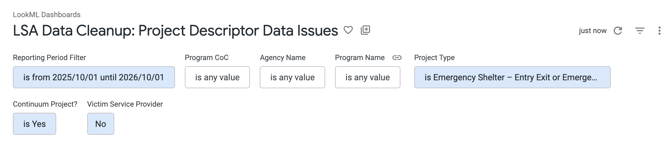
There are seven filters on this dashboard to filter data for reporting needs and targeted analysis. The table below outlines which Looks the filters apply to and the default values.
|
Analysis Period Default: 10/01/2025 – 10/01/2026 |
This filter applies to all Looks. |
|
Program CoC Default: is any value |
This filter applies to all Looks. Selection impacts filter options for Agency Name and Program Name. |
|
Agency Name Default: is any value |
This filter applies to all Looks. Selection impacts filter options for Program Name. |
|
Program Name Default: is any value |
This filter applies to all Looks.
|
|
Project Type Default: · Emergency Shelter – Entry Exit · Emergency Shelter - Night-by-Night · PH – Permanent Supportive Housing (disability required for entry) · Safe Haven · PH – Housing Only* · PH – Permanent Supportive Housing (disability required for entry) · PH – Housing with Services (no disability required for entry)* · PH – Rapid Re-Housing · Safe Haven · Transitional Housing |
This filter applies to all Looks.
Selection impacts filter options for Program Name. |
|
Continuum Project Default: is Yes |
This filter applies all Looks except for Agencies with Invalid Zip Codes Look and Non-Continuum Programs with Enrollments Look. Selection impacts filter options for Program Name. |
|
Victim Service Provider Default: is No |
This filter applies to all Looks. |
*Project Types with an asterisk are excluded for LSA enrollment analysis but are included for HIC analysis when running the LSA for HIC submission.
Content
The following Looks make up the LSA Data Cleanup: Project Descriptor Data Issues dashboard. The overview below is broken down into sections within the dashboard and includes a summary of the Looks’ content. For more information on how a Look is configured and what fields/custom fields are used, please review the Look by selecting the ‘Explore from Here’ icon or within the ‘Tile Actions’ menu (three-dot icon) in the upper right corner.
A. Potential Geocode and Geography Issues

i) Program Geocode Issues
This Look identifies programs with missing, incorrect, or invalid geocodes and only includes lodging/residential programs with an active enrollment during the reporting period.

ii) Program Site Geocode Issues
This Look identifies program sites with missing, incorrect, or invalid geocodes and only includes lodging/residential programs with an active enrollment during the reporting period.

iii) Agencies with Invalid Zip Codes
This Look highlights agencies with invalid or improperly formatted zip codes and only includes agencies with an active enrollment during the reporting period. The “Continuum Project” dashboard filter does not apply to this Look.

iv) Programs and Primary Program Sites with Invalid Zip Codes
This Look identifies programs and their associated primary program sites that have invalid or improperly formatted zip codes and only includes lodging/residential programs with an active enrollment during the reporting period.

v) Program Sites with Invalid Zip Codes
This Look focuses on program sites with invalid or improperly formatted zip codes and only includes sites linked to lodging/residential programs operating during the reporting period.

B. Project Descriptor Data Element Errors

i) Project Descriptor Data Element Errors
This Look identifies project descriptor data element errors and only includes programs with an active enrollment during the reporting period.

ii) Non-HMIS Participating Programs with Enrollments
This Look flags programs marked as non-HMIS participating but still containing client enrollments during the reporting period. It only includes programs with an active enrollment during the reporting period.

iii) Active Programs in Inactive Agencies
This Look identifies active programs associated with agencies marked as inactive and only includes lodging/residential programs with an active enrollment during the reporting period.

iv) Inactive Programs Without an Operating End Date
This Look highlights inactive programs that are missing an operating end date and only includes lodging/residential programs with an active enrollment during the reporting period.

v) Non-Continuum Programs with Enrollments
This Look identifies programs designated as non-continuum that have recorded enrollments during the reporting period. It only includes lodging/residential programs with an active enrollment during the reporting period. The “Continuum Project” dashboard filter does not apply to this Look.

vi) Clients Enrolled Outside of Program's Operating Period
This Look flags instances where clients are enrolled in programs outside the program’s defined operating period. It includes clients enrolled in lodging/residential programs during the reporting period who began their enrollment before the program's operating start date or whose enrollment remained open after the program's operating end date.

Additional Resources
For additional support with federal reporting data cleanup, refer to the following LookML dashboard article:
Updated: 10/19/2026