
Table of Contents
Purpose
The Batch Scan Card Report generates printable ID/scan cards for multiple clients at once, based on a selected service and date range. This is the batch counterpart to [CLNT-103] Photo ID Card - Sample, which produces a single card from an individual client's profile.
Running the Report
Users with access to the Agency Management category can run this report. The information returned may be limited by the user's broader access rights and visibility settings.
Report Location
This report is found in the Agency Management section of the Report Library (Launchpad > Report Library > Agency Management > [GNRL-118] Batch Scan Card Report).
Parameters
The following parameters are required to run this report:
| Parameter | Description |
|---|---|
| Service: Service Item(s) | Choose All, or select one or more specific service items to include. |
| Report Date Range | Choose the date range for the report. |
| Report Output Format | PDF only. |
Report Output
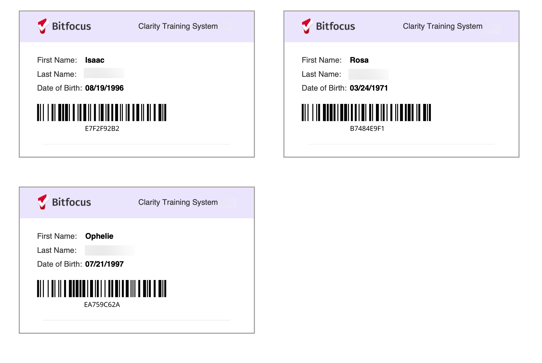
The output produces a PDF with scannable cards for all clients who received the selected service(s) for the selected date range. If the client's record does not include a client photo, that space will be blank.
Specifications
The included fields on the card are:
- Last Name
- First Name
- Client Photo (if uploaded for the client)
- Date of Birth
- Barcode: Clarity Human Services Unique Identifier
Additional Resources
- [CLNT-103] Photo ID Card - Sample — generates a single card from an individual client's profile.
Published: 10/01/2026