
Table of Contents
Overview
Pursuant to the Behavioral Health Services Act (BHSA) Policy Manual C.9.5.5 and Assembly Bill 977 (AB 977), the State of California requires recipients of state-funded homelessness programs to enter specific data elements related to individuals and families into their local Homeless Management Information System (HMIS).
To support our California customers, Bitfocus has produced this resource for use in HMIS configuration in alignment with the most recent DHCS-BHSA HMIS Project Set-up Instructions (V1.1 - updated June 3, 2026). As instructions may change, please use this guidance in conjunction with the most recent setup instructions provided by your funder.
HMIS Leads needing technical assistance may reach Abt Global at BHSA@abtglobal.com.
Key Resources:
- DHCS-BHSA HMIS Project Set-up Instructions
- CalMHSA - Housing Interventions landing page (includes previous webinar recordings)
- Behavioral Health Services Act (BHSA) Policy Manual C.9.5.5
- Housing and Behavioral Health: A Guidebook for California Counties
Timeline
All currently operating projects that will be transferred to BHSA-Housing Intervention funding must be set up in HMIS with data entered for all current clients on or before June 30, 2026 — whether or not they have previously participated in HMIS.
For projects that commence on or after July 1, 2026, HMIS data entry is required beginning on the first day the first individual or household is served by the project.
Project Set-up Instructions
- Organization Name: Enter the name of the organization providing state-funded assistance or housing.
- Project Type: Select the Project Type based on the type of shelter, housing, or services the County Behavioral Health Departments/local BHSA recipients or subcontractor provides. Consult the DHCS-BHSA HMIS Project Set-up Instructions, Tables 2 and 3 for HUD-defined HMIS Project Types and the BHSA-relevant activities.
- Continuum Project: Consult the DHCS-BHSA HMIS Project Set-up Instructions, pg. 8-9 for additional guidance.
- Project Continuum of Care:
- For projects funded for a single CoC that place clients in other CoCs' geographies, the project remains in the HMIS implementation where the funding, administration, and primary HMIS Lead oversight reside (typically the CoC associated with the funding county). Project CoC (2.03) is a multiselect field and must include all CoC codes where the project operates.
- Enrollment CoC (3.16) must be captured per client to reflect where each client is being served. BHSA requirements include Enrollment CoC as a required data element on both the Enrollment and Project Status screens. If a program has only one Project CoC assigned, the Enrollment CoC does not appear on the Enrollment screen, but it will appear on the Status screen (pre-filled with the single CoC value). If a program has multiple CoCs assigned, the Enrollment CoC will appear on both the Enrollment and Status screens, and the proper CoC must be selected to reflect where each client is being served.
- In order to be selected on the project setup screen, new CoC values must be configured within an instance’s CoC List within System Variables. If your instance has reached its CoC Limit (visible in your Subscription Details) and additional new CoC values are required to set up your BHSA projects appropriately, please reach out to your Bitfocus Account Manager.
- Funding Sources:
- Funding Source (2.06.1) should be configured as “Local or Other Funding Source (Please Specify).”
- In the dependent Funding Source Non Federal (2.06.1A) field, the Other Funder
Code provided by the funder should be CA-DHCS-BHSA. This picklist value must be configured by a system administrator in the funding_source_non_federal field picklist in the Field Editor prior to Funding Source configuration: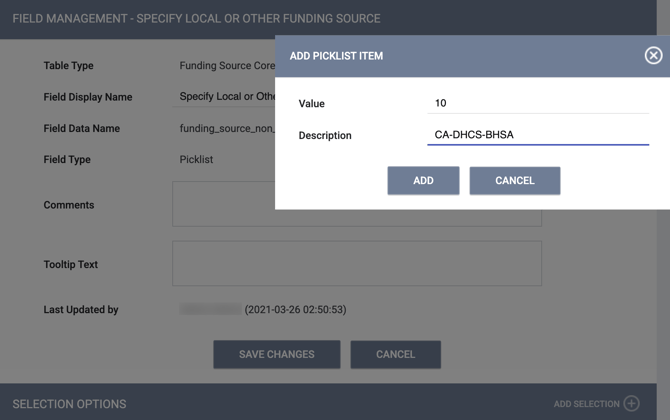
- Grant Identifier (2.06.2): Enter the program abbreviation (BHSA) appended by the county code found in Appendix D of the DHCS-BHSA HMIS Project Set-up Instructions in the Grant Identifier field.
The screenshot below maps the data elements mentioned in the checklist to the appropriate funding source elements on the Clarity Human Services screen.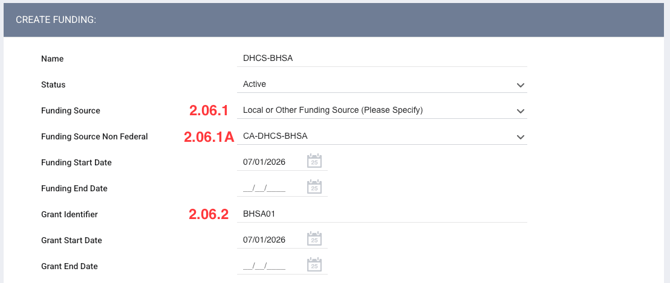
- Bed and Unit Inventory: All residential projects must record bed and unit inventory in HMIS.
Required Data Elements
County Behavioral Health Departments/local BHSA recipients are required to enter Universal Data Elements and Common Program Specific Data Elements for all clients and members of their household being served by the specified state funding programs, as shown in Appendix C of the DHCS-BHSA HMIS Project Set-up Instructions.
Based on the most recent DHCS-BHSA HMIS Project Set-up Instructions (V1.1 - updated June 3, 2026), Bitfocus recommends utilizing the [2026] HMIS General Intake, [2026] HMIS Minimum Intake, or an equivalent local Client Profile Screen to collect the required Universal Data Elements (UDEs).
Bitfocus has created a new [2026] California BHSA template to assist communities in collecting required Common Program Specific Data Elements. The new template is now available within all instances. The template includes two new System screens, modified from the 2026 HUD: CoC Standard screens, to meet these requirements.
- 2026 California BHSA Project Enrollment: Date of Engagement field constraints have been updated to include Services Only as an additional project type
- If you are using an existing custom enrollment screen for BHSA programs, you may need to update the field constraints for this field. You can also make a copy of the new 2026 California BHSA Project Enrollment screen and add any necessary custom fields.
- 2026 California BHSA Project Status: Enrollment CoC field has been added
- If you are using a custom status screen for BHSA programs, you will need to make a copy of the new 2026 California BHSA Project Status screen and add any necessary custom fields. Because this Collection Point does not match the HMIS Data Standards for this data element, you will not be able to add this field to an existing custom status screen.
- Special note on reporting: Because this Collection Point does not match the HMIS Data Standards for this data element, reporting is not available in HUD reports and Looker. However, this data can be pulled through the [GNRL-220] Program Details Report.
Different program types require the collection of different data elements. A Current Living Situation screen will need to be added to the template for applicable project types. If you are using the [2026] California BHSA system template, you will need to create a copy in order to add the Current Living Situation (CLS) screen. For Night-By-Night Emergency Shelter Programs, Bed-Night services will also need to be created.
Please consult the most up-to-date HMIS Data Standards and the Program Setup Instructions provided by the funding agency for additional information.
Privacy
The DHCS-BHSA HMIS Project Set-up Instructions include recommendations and requirements around data sharing and privacy. Communities may consider utilizing Sharing Groups, Sharing Departments, and/or Sensitive Data screen field settings to meet these needs.
Updated: 07/10/2026